

Fallen PvP Paket sumber daya untuk Minecraft 1.20.1, 1.21.1
Texturepack PvP Bertema Ungu
Tentang paket sumber daya Fallen PvP
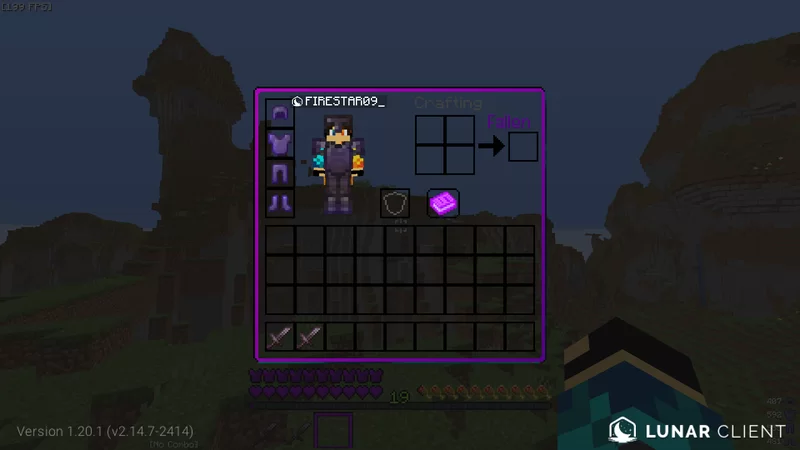
Fallen is a 16x texturepack that features:
- Short Swords
- Purple Bow, Crossbow, Enderpearls, Exp Bottles and Gapples
- More Vivid Purple Glint
- Purple GUI and HUD
- Purple Potion Effects
- 2 CIT Swords (Fallen Reaper and Purple Vengeance)
- Purple Breaking Animation
- Yeah Everything But Purple
Cara memasang Fallen PvP
With Millida Launcher
Install Millida Launcher
The launcher is free: download it at millida.net/launcher and sign in with any nickname.
Click “Install” on this page
The launcher opens and installs the resource pack for Minecraft 1.16.5–1.21.7 automatically.
Launch the game
A profile with it appears in the launcher: click “Play”.
Manually
Download the archive
Pick the file §5§lFallen.zip (3.5 MB) for your game version. No need to unpack it.
Put it in the resourcepacks folder
The easiest way: “Options”, then “Resource Packs”, then “Open Pack Folder”, and drag the archive there.
Enable the pack
In the same window, move the pack to the right-hand “Selected” column and click “Done”.
Versi
Dengan dependensi
| Minecraft | Loader | File | Tanggal | Tindakan |
|---|---|---|---|---|
| 1.17.1 | — | Fallen v53.5 MB 26 |
FAQ
Which Minecraft versions does Fallen PvP work on?
There are files for 1.16.5–1.21.7, 26 versions in total. The newest is 1.21.7.
Where can I download Fallen PvP safely?
On this page: the file §5§lFallen.zip (3.5 MB) is stored on Millida’s server, with no link shorteners. SHA-1 checksum: e52a527ff93dceecef163a899f9347aeb44e21b3.
Ulasan
Jadilah yang pertama menilai Fallen PvP



