
Timer Plugin untuk Minecraft
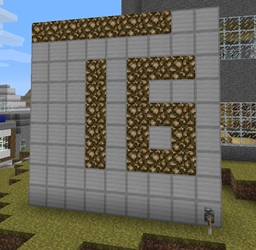
Timer memungkinkan Anda menentukan jam yang memberikan waktu dunia lokal.
mulai dari _ForgeUser8609831 · CurseForge
Timer
Timer allows you to define a clock giving the local world time. (Multiple worlds supported since v0.3)
Version:
- 0.3
How to use:
- To define a clock, just place a vertical square of 9x9 blocks of the predefined material and place a lever on the extreem right lower block.
- Once the square is recognized by the plugin as a clock, the server warns you with the message "Timer created".
- To start or stop the clock, just use the lever, the following messages will be warned : "Timer started" or "Timer stopped".
- To remove a clock, just break the lever and the server will warn you with the message "Timer deleted".
Commands:
- None, just create a 9x9 blocks square and place the lever
Permissions:
- If you're not using the Permissions plugin, Timer use the built-in op.non-op system for permissions. Only ops will be able to create a clock.
- Otherwise, the Permissions node is: timer.create
Configuration file:
- This config.yml file contains only 3 lines which define the material ID and Data of the clock's blocks (Default is 42 but blocks like 35:5 are now available too), the material ID and Data of the blocks used for showing time and the 12/24 format.
Installation:
- Just put timer.jar in your server's plugin directory, then restart or reload the server.
- You can then modify the configuration file if needed.
- Add the Permission node if you use Permissions.
Video:
- Watch here
Cara memasang Timer
A server on Paper or Spigot
The plugin runs on the server core; players do not need to install anything.
File goes into the plugins folder
Download the file Timer.jar (14 KB) and put it into the server’s plugins folder.
Restart the server
On startup the plugin creates its own settings folder in plugins.
Use the “To server” button
On Millida Hosting, the button at the top of the page uploads the file to your server and restarts it for you.
Versi
Dengan dependensi
| Minecraft | Loader | File | Tanggal | Tindakan |
|---|---|---|---|---|
| — | — | Timer V0.314.4 KB |
Ulasan
Jadilah yang pertama menilai Timer
Komentar 0
Masuk untuk berkomentarMasuk


