

ScoreboardStatsX Plugin untuk Minecraft 1.12
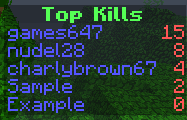
tampilkan kill dan death dengan Scoreboard
Note
This plugin is compatible with HealthBar, ColoredTags, Ghost Player and all other scoreboard plugins.
Just enable compatibilityMode in the configuration and install ProtocolLib. For normal use ProtocolLib is NOT required.

Features:
You don't need a database for all these features
- Much better performance (since 0.7)
- All versions of ScoreboardStats supports all Minecraft versions above 1.5
- Optimized for all kinds of servers.
- Fast support on every question
- Support UTF-8 characters like the hearts Click here:
- Many variables Click here:
- fully configurationable
- PvP can also be displayed on Signs Click here:
- Support SQL-Databases
- No database required unless you don't want this plugin to track pvpstats
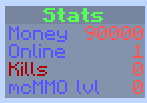
- The Player can see his own stats (Kills/Deaths) with the Scoreboard on the right side
- You can disable the scoreboard for custom worlds
Variables for all the following plugin:
- mcMMO
- Economy
- Heroes
- Factions
- SimpleClans
- uSkyBlock
- and many more coming soon
Please use the Tickets for any issues, errors or suggestions.

Github Issue Tracker
Installation
- Download it
- drop it in your /plugins/ folder
- start your server
- join the server and..
- That's it
- All variables can be found here: https://dev.bukkit.org/projects/scoreboardstats/pages/variables

Commands
Command Description Aliases
/sidebar Toggle (show or hide) the scoreboard on the right side side, scoreboardstats, sb toggle
/sidebar reload Reload the configuration side reload, scoreboardstats reload, sb reload
For plugin developers/API
See the wiki on Github: https:github.com/TuxCoding/ScoreboardStats/wiki
Permissions
Permission Description
scoreboardstats.use General permission. Without that the scoreboard will not be displayed for the player
scoreboardstats.command.toggle Toggle the sidebar
scoreboardstats.reload With this permission a player can reload the configuration
scoreboardstats.sign Only player with this permission can create signs that displays the kills, deaths, etc.
Source
You don't have to decompile the plugin. You can find there the source code with comments and building utilities. ScoreboardStats is open source and hosted on GitHub; feel free to fork, star, or contribute by making pull requests and opening issues.
https://github.com/TuxCoding/ScoreboardStats
Auto-Updater
- This plugin uses an Auto-updater. if you don't want an automatically update. Disable it in the configuration.
- The updater only utilize the api of curse/dev.bukkit, so you don't get an unapproved version. Every file providing there is accepted by the devBukkit staff
- I can upload a new version with bug fixes where you don't have to download it, the plugin can do it for you automatically.
- The updater only runs on plugin startup, and then as a seperate thread, so it doesn't really affect your startup time.
- Every file there equals the files on this page.
Compatibility with older minecraft versions
As you can see on file list there are selected three versions. These version numbers are for the Minecraft versions. Lowest test version, mid version and the highest tested version. That means that you should always use the latest version of ScoreboardStats although you use an old Minecraft version. It's very hard to use all versions at once, so please use the newest version of ScoreboardStats.
Donations
Donations are always appreciated, it's the best way to say thanks to a developer.
Cara memasang ScoreboardStatsX
A server on Paper or Spigot
The plugin runs on the server core for Minecraft 1.8–1.12; players do not need to install anything.
File goes into the plugins folder
Download the file ScoreboardStats.jar (287 KB) and put it into the server’s plugins folder.
Restart the server
On startup the plugin creates its own settings folder in plugins.
Use the “To server” button
On Millida Hosting, the button at the top of the page uploads the file to your server and restarts it for you.
Minecraft 1.12 runs on Java 8: with a different Java version the game may close right after launch.
Versi
Dengan dependensi
| Minecraft | Loader | File | Tanggal | Tindakan |
|---|---|---|---|---|
| 1.9 | — | ScoreboardStats v0.10.6287 KB |
FAQ
Which Minecraft versions does ScoreboardStatsX work on?
There are files for 1.12, 1.11, 1.10, 1.9, 1.8.1, 1.8. The newest is 1.12.
Which Java does ScoreboardStatsX need?
Minecraft 1.12 runs on Java 8. If the game closes right after launch, the usual cause is the wrong Java version in the profile settings.
Where can I download ScoreboardStatsX safely?
On this page: the file ScoreboardStats.jar (287 KB) is stored on Millida’s server, with no link shorteners. SHA-1 checksum: e277950471f2db524401692b6e29f2c7d5c86407.
Ulasan
Jadilah yang pertama menilai ScoreboardStatsX


