
Tentang plugin QuickTrade
QuickTrade
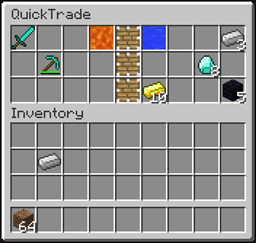
Description QuickTrade is a lightweight alternative to all the inventory-based player trade plugins, a lot of which are inactive at the moment. This plugin uses an inventory to allow players to trade their items or money with others across the map, no matter how far away they are. They are able to swap any items they want, as they see fit, giving your users the element of control over trades and the economy which other shop plugins don't have.
Features
- Inventory-based trade
- Shift-Right-Click trading - no commands required
- Optional Exp Trading - Allow players to trade their Exp Levels!
- Very lightweight
- Very little configuration required
- Customisable and simple trade GUI
- Very customisable features (i.e. trade request timeout, trade distance limit, shift-right-clicking, economy, buttons etc)
- Economy support - allow users to add money to trades!
Commands In order to put as little stress on the server as possible, there are very few commands, making this plugin both lightweight and easy-to-use for players.
- /trade <player>
Request to trade with <player>
- /trade accept
Accept a trade request
- /trade decline
Refuse a trade request
- /trade toggle
Disable the sending of shift-right-click trading requests for you
- /trade reload
Reload the plugin configuration
Alises to command: /qt, /qtrade.
Permissions
- quicktrade.trade.command
Allow players to use the /trade command
- quicktrade.trade.rightclick
Allow players to request trades by shift-right-clicking
- quicktrade.toggle
Allow access to the /trade toggle command
- quicktrade.creative.bypass
Allow access to bypass the creative trade block
- quicktrade.admin
Allow access to the /trade reload command
Configuration Please see the configuration file here: Configuration Page
Video Tutorials Portuguese Credits: (AbsintoJ) English tutorial coming soon
Issues/Bugs Fortunately no known bugs at the moment.
To-do List
- Language localization system
- Multi-world support/restrictions
- Add wool support to change accept/decline/separator items
- Configurable accept/decline/separator items
- Add a trade accept check system (make both players accept again if trade is changed)
- Add economy support
- Add short aliases to the plugin
- Add right click trading
- Add permissions support if needed
- Add a reload command
- Add an item blacklist
- Allow more currency buttons Unfortunately I cannot do this, it would be too resource intensive and inconvenient for the server to handle.
- Add an optional trading distance limit
Donate!
Cara memasang QuickTrade
A server on Paper or Spigot
The plugin runs on the server core; players do not need to install anything.
File goes into the plugins folder
Download the file QuickTrade.jar (56 KB) and put it into the server’s plugins folder.
Restart the server
On startup the plugin creates its own settings folder in plugins.
Use the “To server” button
On Millida Hosting, the button at the top of the page uploads the file to your server and restarts it for you.
Versi
Dengan dependensi
| Minecraft | Loader | File | Tanggal | Tindakan |
|---|---|---|---|---|
| — | — | QuickTrade-v1.1.955.8 KB | ||
| — | — | QuickTrade-v1.0.326.1 KB |
FAQ
Do players need to install QuickTrade?
No, the plugin goes only on the server, into the plugins folder: players do not need to download anything.
Where can I download QuickTrade safely?
On this page: the file QuickTrade.jar (56 KB) is stored on Millida’s server, with no link shorteners. SHA-1 checksum: 6ff2acbdc701afc17d2566fe0f653f827e5f75a0.
Ulasan
Jadilah yang pertama menilai QuickTrade


