

PailPlus Plugin untuk Minecraft
Menambahkan lebih banyak fungsionalitas ke Pail!
Tentang plugin PailPlus
Adding more functionality to Pail
Source
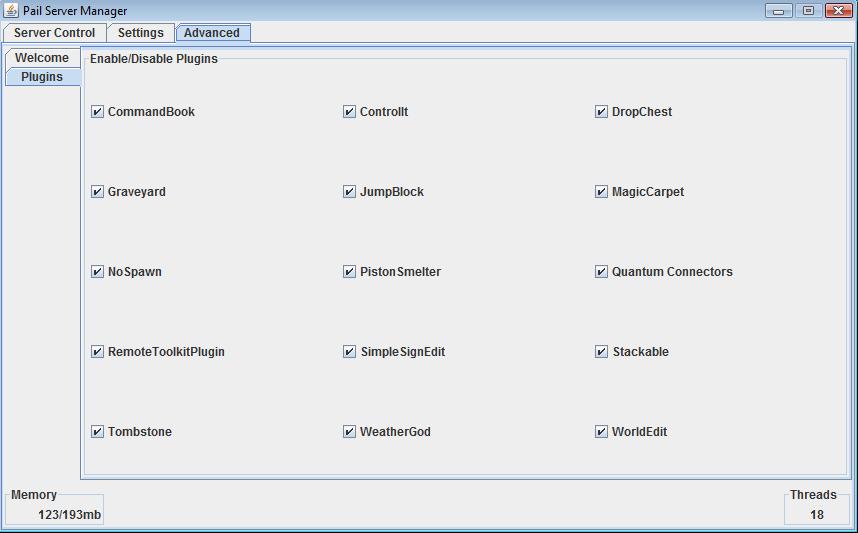
Features:
- Server Monitor Bar
- System Tray!
- Plugin Manager Might be added back at a later date
- Permission Gui Might be added back at a later date
Planned Features:
- CPU Monitor
- MultiWorld Manager
- Permission Gui Edits
- Default Permissions
- "Custom Nodes" - Like groups
- New layout
- "Add Player"
- "Node Editor"
- "easier" permission setting

Cara memasang PailPlus
A server on Paper or Spigot
The plugin runs on the server core; players do not need to install anything.
File goes into the plugins folder
Download the file PailPlus.jar (28 KB) and put it into the server’s plugins folder.
Restart the server
On startup the plugin creates its own settings folder in plugins.
Use the “To server” button
On Millida Hosting, the button at the top of the page uploads the file to your server and restarts it for you.
Versi
Dengan dependensi
| Minecraft | Loader | File | Tanggal | Tindakan |
|---|---|---|---|---|
| — | — | v0.328 KB | ||
| — | — | v0.1 Alpha50.1 KB |
FAQ
Do players need to install PailPlus?
No, the plugin goes only on the server, into the plugins folder: players do not need to download anything.
Where can I download PailPlus safely?
On this page: the file PailPlus.jar (28 KB) is stored on Millida’s server, with no link shorteners. SHA-1 checksum: ec65e37dc2adbd76d25f1bb2bd4b760f17e4f754.
Ulasan
Jadilah yang pertama menilai PailPlus


