
mcMMO Combat Level Plugin untuk Minecraft 1.19
Level Combat mcMMO
mcMMO Combat Level
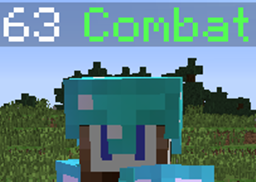
Displays a combat level above users heads and in chat based on their mcMMO stats that affect combat:
- Unarmed
- Swords
- Axes
- Archery
- Acrobatics
- Taming
Default combat formula
(Unarmed + Swords + Axes + Archery + (.25 * Acrobatics) + (.25 * Taming)) / 45
Each stat's weight on the combat formula is capped at level 1000, so the maximum combat level possible is 100, and minimum is 0.
Installation
- You need the mcMMO plugin first.
- Download McCombatLevel.jar
- Place in your server's plugins folder
- Run your server to generate the config
- Edit the config to your liking
- Reload the plugin or restart the server
Config
- enable_prefix : True by default, this is the prefix to the left of the name in chat. You can also choose [combatlevel] in your chat plugin
- enable_tag_level : True by default, this is the level that appears above the player's head
- tag_name : "Combat" by default, this is the text that appears after the level above the player's head
- tag_color : GREEN by default, this is the color of the tag_name
- prefix_bracket_color : GOLD by default, change the color of the brackets in the level prefix
- prefix_level_color : DARK_GREEN by default, change the color of the level in the prefix
Permissions
This plugin requires no permissions to operate. If you wish to edit someone's combat level, you must change their mcMMO stats using /mmoedit to gain the required combat level.
Commands
/level or /combatlevel displays current player combat level.
Please use the Tickets for any issues, errors or suggestions.
https://github.com/TuxCoding/McCombatLevel/issues
Source
You don't have to decompile the plugin. You can find there the source code with comments and building utilities. McCombatLevel is open source and hosted on GitHub; feel free to fork, star, or contribute by making pull requests and opening issues.
https://github.com/TuxCoding/McCombatLevel
Cara memasang mcMMO Combat Level
A server on Paper or Spigot
The plugin runs on the server core for Minecraft 1.15–1.19; players do not need to install anything.
File goes into the plugins folder
Download the file McCombatLevel.jar (33 KB) and put it into the server’s plugins folder.
Restart the server
On startup the plugin creates its own settings folder in plugins.
Use the “To server” button
On Millida Hosting, the button at the top of the page uploads the file to your server and restarts it for you.
Minecraft 1.19 runs on Java 17: with a different Java version the game may close right after launch.
Versi
Dengan dependensi
| Minecraft | Loader | File | Tanggal | Tindakan |
|---|---|---|---|---|
| 1.16 | — | mcCombatLevel v2.332.7 KB | ||
| — | — | McCombatLevel 1.25.2 KB |
Ulasan
Jadilah yang pertama menilai mcMMO Combat Level



