

ColoredSigns 2.0 Plugin untuk Minecraft 1.3.2
ColoredSigns 2.0
ColoredSigns
ColoredSigns is back!
- Java version of ColoredSigns 1.7.
- Bukkit-Version 1.7.2 R0.3
- ColoredSigns version: 2.0
ColoredSigns is a Plugin to Use Colors and modify your Signs.
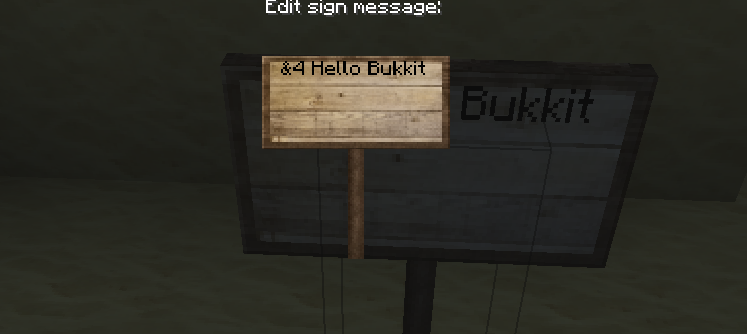
How to:
- Download the Plugin.
- Put the jar into your plugin folder.
- Restart/reload your Server
- Configure ColoredSigns with the config.yml, you can change any plugin ingame message in the messages.yml
Color Nodes:
&0 &1 &2 &3 &4 &5 &6 &7 &8 &9 &f &n &m &l &k &c &h &b .....
Use color codes on a sign
- Colors need to be enabled in the config.yml
- You need the permission node "ColoredSigns.color
- WARNING: If you are using the PermissionsEx support, you need to add the node in PermissionsEx to. For more information see "PermissionsEx" below.
Example:
Permissions:
- ColoredSigns.color (Allows to use color on signs)
- ColoredSigns.signremover (Allows to enter and leave the signremover mode)
- ColoredSigns.givesigns (Gives permissions for the sign give command)
- ColoredSigns.changeline (Allows to change a line on a sign with a command)
- ColoredSigns.* (Gives all permissions for Coloredsigns)
- ColoredSigns.blocksignplace.ignore (Ignore sign block place canceling ,config.yml)
PermissionsEx
- If you are using "PermissionsEx", enable "PermissionsEx_support" in the config.yml
- If you are not using PermissionsEx, disable the "PermissionsEx_support" in the config.yml. The default permissions will work. (OP etc.)
Commands:
- /ColoredSigns | (Show you infos/Status about the Plugin.)
- /Signs | Give you an amount of signs.
- /Changeline | Change a sign line, without breaking.
- /Signremover | Enter/leave the sign remover mode, you can only break signs in this mode.
Messages
- If you would like to change any ingame message of the plugin, edit the messages.yml
- ANOTHER MESSAGES.yml LANGUAGE-FILES http://janomine.de/bukkit/coloredsigns/
Note:
- For a fast update, the Changeline feature will availible in few minutes. In this version its not enabled.
Serverliste - http://serverliste.org/ -
Please write ideas in the comments :)//
Cara memasang ColoredSigns 2.0
A server on Paper or Spigot
The plugin runs on the server core for Minecraft 1.3.2; players do not need to install anything.
File goes into the plugins folder
Download the file ColoredSigns.jar (6 KB) and put it into the server’s plugins folder.
Restart the server
On startup the plugin creates its own settings folder in plugins.
Use the “To server” button
On Millida Hosting, the button at the top of the page uploads the file to your server and restarts it for you.
Minecraft 1.3.2 runs on Java 8: with a different Java version the game may close right after launch.
Versi
Dengan dependensi
| Minecraft | Loader | File | Tanggal | Tindakan |
|---|---|---|---|---|
| — | — | ColoredSigns V2.013.8 KB | ||
| 1.3.2 | — | ColoredSigns v.1.26.4 KB |
Ulasan
Jadilah yang pertama menilai ColoredSigns 2.0



