

Zenith Mod untuk Minecraft 1.20.1
Port fabric tidak resmi dari Apotheosis.
- unduhan
- 3 unduhan
- dilihat
- 37 dilihat
- Diperbarui
- Diperbarui 22.10.2026
- 1.20.1
 Fabric
Tentang mod Zenith
Proyek ini digantikan oleh Zenith Renewed, sebuah fork dari Zenith yang saat ini sedang dikerjakan dan diperbarui. Silakan klik di sini untuk menuju halaman Curseforge-nya.
Informasi
Zenith adalah port fabric tidak resmi dari mod Apotheosis karya Shadows - yang dapat kamu temukan di sini.
Versi 1.20 memerlukan Zenith Attributes dan FakerLib!
Zenith 1.20 memiliki paritas dengan versi forge dari Apotheosis - modul berikut tersedia:
Kredit untuk ShadowsofFire atas kode forge aslinya dan untuk Faellynna atas seninya!
- Modul Enchantment
Modul Enchantment berfokus pada perombakan sistem enchantment dan menambahkan enchantment baru. Modul ini akan memungkinkanmu menjadi jauh lebih kuat daripada yang pernah diizinkan oleh batasan sebelumnya, serta memperkenalkan enchantment baru yang menarik yang membantumu berpetualang dan menaklukkan dunia.
- Modul Spawner
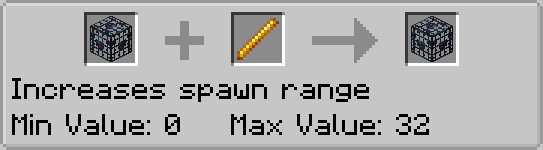
Modul Spawner adalah sumber semua perubahan pada Mob Spawner. Ini memungkinkanmu membuat mob farm yang kompleks hanya dengan menggunakan blok dan item vanilla yang sudah ada.
- Modul Garden
Modul garden memiliki beberapa ekstensi untuk blok yang tumbuh secara vertikal. Secara khusus, modul ini memungkinkan sugar cane, cactus, dan bamboo tumbuh hingga ketinggian yang lebih tinggi dari sebelumnya. Modul ini juga menyertakan item untuk mengambil dan mengangkut mob.
- Modul Potion
Modul potion mencakup potion baru, menambahkan resep baru untuk potion yang sebelumnya tidak dapat diperoleh, dan menambahkan beberapa konten baru lainnya untuk mendukung penggunaan potion.
- Modul Village
Modul Village berfokus pada pengenalan konten baru untuk village, villager, dan blok terkaitnya.
- Modul Adventure
Modul Adventure menambahkan boss, gem, dan sistem affix baru pada gear.
todo gambar
Zenith adalah port tidak resmi dari Apotheosis - mohon jangan meminta bantuan tentang port fabric ini di server discord atau repositori github mereka.
Cara memasang Zenith
With Millida Launcher
Install Millida Launcher
The launcher is free: download it at millida.net/launcher and sign in with any nickname.
Click “Install” on this page
The launcher opens and installs the mod for Minecraft 1.20.1 on Fabric automatically.
Launch the game
A profile with it appears in the launcher: click “Play”.
Manually
Install Fabric
The loader must match the game version of the mod file, for example Minecraft 1.20.1. After installing it, a separate profile appears in your launcher.
Download the file for your version
In the version list above, pick the file zenith-1.2.5-1.20.1.jar (5.8 MB) for your game version.
Put it in the mods folder
The folder is inside .minecraft (Windows: %appdata%\.minecraft\mods). If it does not exist, create it.
Launch the loader profile
Open “Mods” in the main menu: Zenith should be in the list.
Minecraft 1.20.1 runs on Java 17: with a different Java version the game may close right after launch.
Versi
Dengan dependensi
| Minecraft | Loader | File | Tanggal | Tindakan |
|---|---|---|---|---|
| 1.20.1 | Fabric | zenith-1.2.5-1.20.15.8 MB 3 | ||
| 1.20.1 | Fabric | zenith-0.2.4-1.20.12.4 MB |
FAQ
Which Minecraft versions does Zenith work on?
Only Minecraft 1.20.1: there are no files for other versions.
Is Zenith for Forge or Fabric?
Only for Fabric: 1.20.1. There are no files for Forge or NeoForge: a mod for another loader will not start.
Does Zenith need other mods?
The author lists no required dependencies: the Fabric loader is enough.
Which Java does Zenith need?
Minecraft 1.20.1 runs on Java 17. If the game closes right after launch, the usual cause is the wrong Java version in the profile settings.
Where can I download Zenith safely?
On this page: the file zenith-1.2.5-1.20.1.jar (5.8 MB) is stored on Millida’s server, with no link shorteners. SHA-1 checksum: 529bc6770f2c2d6a88d6db35b335bc8d61bdb11f.
Ulasan
Jadilah yang pertama menilai Zenith


