
- unduhan
- 1 unduhan
- dilihat
- 16 dilihat
- Diperbarui
- Diperbarui 17.10.2026
- 1.12.2 — 1.16.5
 Forge
Forge
Tentang mod Woot
CATATAN:
1.15/1.16 mendukung Patchouli untuk buku panduan dalam game
1.12 mendukung Guide-API untuk buku panduan dalam game
Changelog
Changelog 1.16 https://github.com/Ipsis/Woot/blob/1.16.x/CHANGELOG.md
Changelog 1.15 https://github.com/Ipsis/Woot/blob/1.15.x/CHANGELOG.md
Changelog 1.12 https://github.com/Ipsis/Woot/wiki/Woot-Changelog-1.12
Mod spotlight oleh RGSha
Kita semua pernah mengalaminya di Minecraft - membangun mob farm.
Semuanya bermuara pada hal yang sama.
- Munculkan mob
- Bunuh mob
- Kumpulkan XP dan loot
- Tangani banyaknya entitas yang muncul
Woot melakukan hal yang sedikit berbeda ..... mod ini tidak memunculkan mob apa pun di dunia .... APA?!
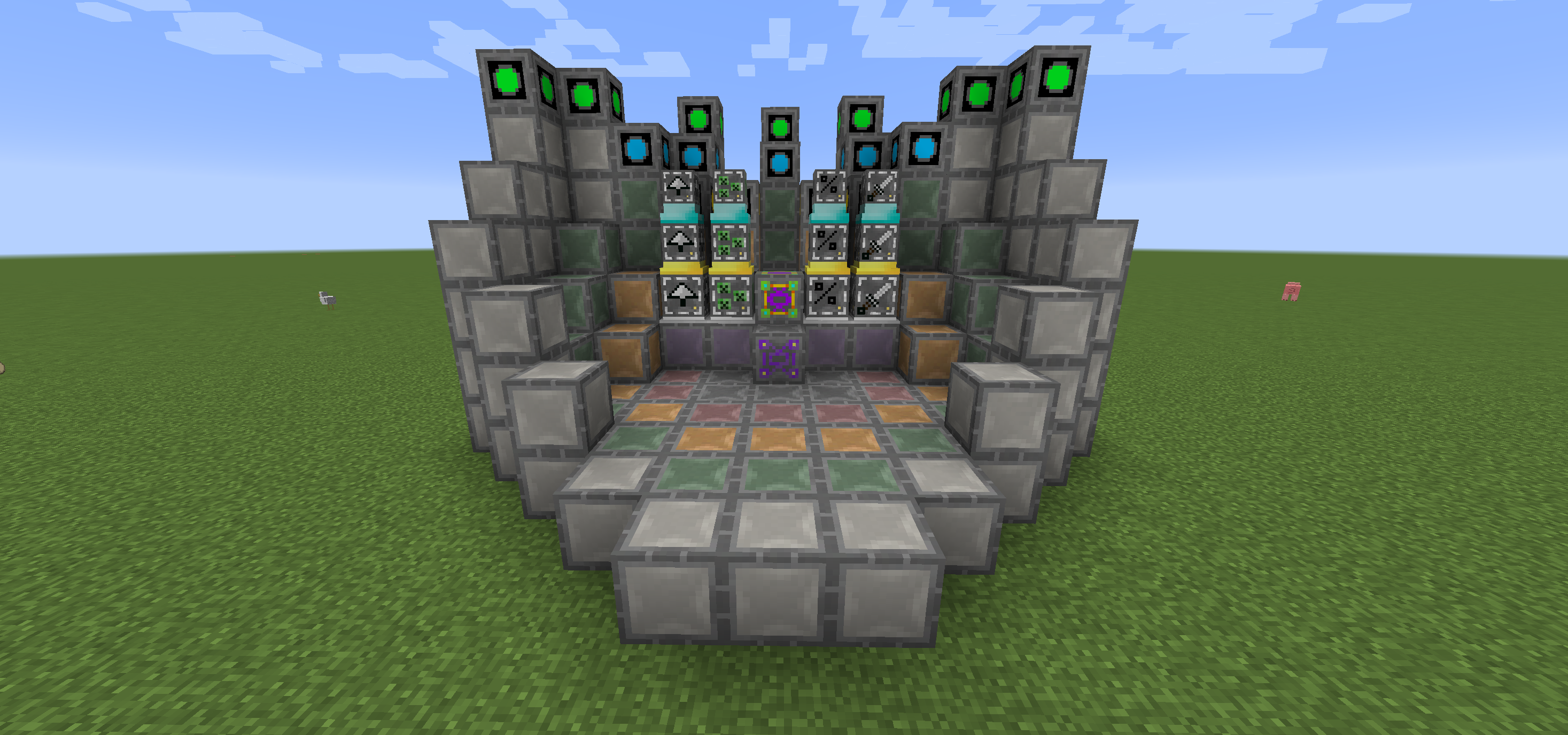
Di Woot kamu membangun pabrikmu lalu memprogramnya dengan mob pilihanmu. Lalu kamu memberinya daya dan inventaris untuk menampung semua loot yang seharusnya dihasilkan mob tersebut.
Ada beberapa tingkatan pabrik untuk menangani mob tingkat tinggi. Jadi ya, kamu membutuhkan pabrik besar untuk memunculkan Wither!
Untuk mempermudah hidup, ada blok layout untuk menunjukkan di mana kamu perlu meletakkan semua blok di multiblock setiap tingkatan.
Kamu juga dapat meningkatkan pabrikmu untuk mendapatkan keuntungan tambahan, yang semuanya membutuhkan daya ekstra.
- Looting I/II/III - menerapkan looting pada pembunuhan mob
- Rate I/II/III - memunculkan mob lebih cepat
- Mass I/II/III - memunculkan lebih banyak mob
- Decapitate I/II/III - meningkatkan tingkat drop kepala
- XP I/II/III - menghasilkan pecahan XP
- Efficiency I/II/III - membuat pabrikmu sedikit lebih hemat daya
- BloodMagic I/II/III - pembuatan Life Essence melalui Ritual
https://github.com/Ipsis/Woot/wiki
http://www.minecraftforum.net/forums/mapping-and-modding/minecraft-mods/2659457-woot-the-alternative-mob-factory

Cara memasang Woot
With Millida Launcher
Install Millida Launcher
The launcher is free: download it at millida.net/launcher and sign in with any nickname.
Click “Install” on this page
The launcher opens and installs the mod for Minecraft 1.12.2–1.16.5 on Forge automatically.
Launch the game
A profile with it appears in the launcher: click “Play”.
Manually
Install Forge
The loader must match the game version of the mod file, for example Minecraft 1.16.5. After installing it, a separate profile appears in your launcher.
Download the file for your version
In the version list above, pick the file woot-1.16.5-1.0.8.4.jar (1.1 MB) for your game version.
Put it in the mods folder
The folder is inside .minecraft (Windows: %appdata%\.minecraft\mods). If it does not exist, create it.
Launch the loader profile
Open “Mods” in the main menu: Woot should be in the list.
Minecraft 1.16.5 runs on Java 8: with a different Java version the game may close right after launch.
Versi
Dengan dependensi
| Minecraft | Loader | File | Tanggal | Tindakan |
|---|---|---|---|---|
| 1.16.5 | Forge | woot-1.16.5-1.0.8.4.jar1.1 MB 1 | ||
| 1.16.2 | Forge | woot-1.16.2-1.0.0.0.jar903 KB | ||
| 1.15.2 | — | woot-1.15.2-1.1.1.0.jar888 KB | ||
| 1.12.2 | — | woot-1.12.2-1.4.11.jar859 KB | ||
| 1.12.2 | — | woot-1.12.2-0.0.10.jar741 KB |
FAQ
Which Minecraft versions does Woot work on?
There are files for 1.16.5, 1.16.4, 1.16.2, 1.15.2, 1.12.2. The newest is 1.16.5.
Is Woot for Forge or Fabric?
Only for Forge: 1.16.2–1.16.5. There are no files for Fabric or NeoForge: a mod for another loader will not start.
Does Woot need other mods?
The author lists no required dependencies: the Forge loader is enough.
Which Java does Woot need?
Minecraft 1.16.5 runs on Java 8. If the game closes right after launch, the usual cause is the wrong Java version in the profile settings.
Where can I download Woot safely?
On this page: the file woot-1.16.5-1.0.8.4.jar (1.1 MB) is stored on Millida’s server, with no link shorteners. SHA-1 checksum: 271c86303514ca621fecfe41d1e6688e156738b8.
Ulasan
Jadilah yang pertama menilai Woot


