

Waystones Mod untuk Minecraft 1.20.1, 1.21.1
Teleportasi dari waystone ke waystone atau buat gulungan sihir untuk berpindah.
 NeoForge
 Fabric
 Forge
ForgeTentang mod Waystones
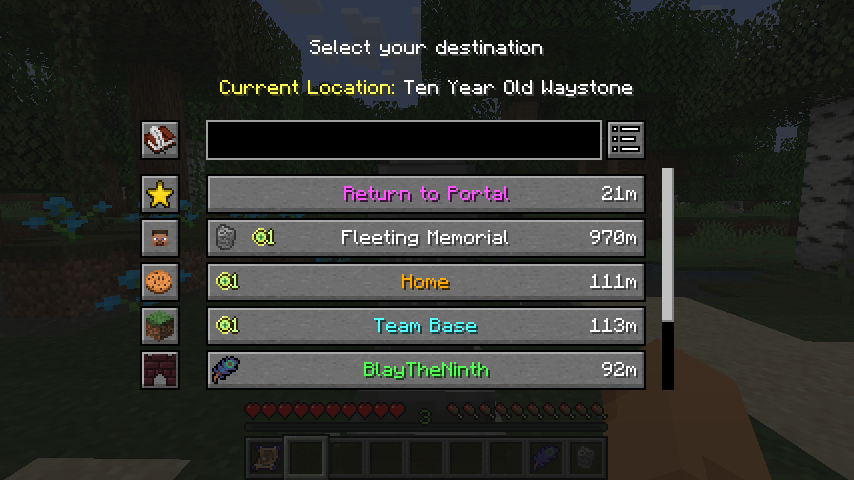
Mod ini menambahkan blok waystone yang dapat dikembalangi oleh pemain setelah diaktifkan, baik melalui Warp Scroll, Warp Stone yang dapat diisi ulang, atau dengan menggunakan waystone yang sudah ada untuk berpindah dari satu ke yang lain.
Mod ini dapat digunakan dalam Mode Survival, untuk Adventure Map, atau di Server Multiplayer sebagai alternatif dari perintah /warp dan /home. Waystone dapat dibuat tersedia secara global untuk semua pemain dan tombol inventaris yang dapat dikonfigurasi dapat diatur untuk memungkinkan warping tanpa item tambahan.

Mod ini memerlukan Balm, yang harus dipasang bersama mod ini.
Pada Minecraft 26.1 dan versi di atasnya, mod ini juga memerlukan Shogi, yang mendukung persyaratan warp yang sangat dapat dikonfigurasi dan banyak konfigurasi berbasis aturan lainnya di seluruh mod saya.
- Waystone, Warp Plate, dan Warp Scroll yang Dapat Dibuat
- Berteleportasi dari satu tempat ke tempat lain menggunakan Waystone
- Waystone Global untuk Pusat Komunitas atau Berbagi dengan Teman
- Tombol Teleportasi Opsional di Inventaris Anda
- Struktur Waystone di Desa
Mod Showcase oleh Krzair
Ikon item Return Scroll dan Warp Stone yang disertakan dibuat oleh @JoeCreates dan dirilis secara publik di bawah lisensi CC-BY-SA 3.0 di sini.

Cara memasang Waystones
With Millida Launcher
Install Millida Launcher
The launcher is free: download it at millida.net/launcher and sign in with any nickname.
Click “Install” on this page
The launcher opens and installs the mod for Minecraft 1.16.5–26.3 on Fabric, Forge or NeoForge automatically, together with its dependencies: Balm, Fabric API, Dependency.
Launch the game
A profile with it appears in the launcher: click “Play”.
Manually
Install Fabric, Forge or NeoForge
The loader must match the game version of the mod file, for example Minecraft 26.3. After installing it, a separate profile appears in your launcher.
Download the file for your version
In the version list above, pick the file waystones-neoforge-26.3-26.3.0.1.jar (1.1 MB) for your game version and loader.
Put it in the mods folder
The folder is inside .minecraft (Windows: %appdata%\.minecraft\mods). If it does not exist, create it. Required dependencies go there too: Balm, Fabric API, Dependency.
Launch the loader profile
Open “Mods” in the main menu: Waystones should be in the list.
On a server
A server on Fabric, Forge or NeoForge
The mod only works on a server with the same loader and game version, for example 26.3.
File goes into the server’s mods folder
Stop the server, put the mod file into the mods folder and start the server again.
Use the “To server” button
On Millida Hosting, the button at the top of the page uploads the file to your server and restarts it for you.
Versi
Dengan dependensi
| Minecraft | Loader | File | Tanggal | Tindakan |
|---|---|---|---|---|
| 1.21.1 | NeoForge | 1.21.11.2 MB 99 | ||
| 1.21.1 | Fabric | 1.21.11.2 MB 45 | ||
| 1.21.1 | Forge | 1.21.11.2 MB 19 | ||
| 26.3 | NeoForge | 26.31.1 MB 8 | ||
| 26.3 | Fabric | 26.31.2 MB 122 | ||
| 1.21.1 | NeoForge | 1.21.11.2 MB 1 | ||
| 1.21.1 | Forge | 1.21.11.2 MB | ||
| 1.21.1 | Fabric | 1.21.11.2 MB |
Yang dibutuhkan untuk menjalankan
- Balmwajib
- Fabric APIwajib
- Dependencywajib
Konten yang membutuhkannya
FAQ
Which Minecraft versions does Waystones work on?
There are files for 1.16.5–26.3, 14 versions in total. The newest is 26.3.
Is Waystones for Forge or Fabric?
There are files for Fabric: 1.18–26.3, for Forge: 1.16.5–1.21.1 and for NeoForge: 1.21–26.3.
What does Waystones need to work?
Required: Balm, Fabric API, Dependency. Without them the mod will not start: dependencies go into the same mods folder.
Does Waystones work on a server?
Yes. Waystones works both in singleplayer and on a server.
Where can I download Waystones safely?
On this page: the file waystones-neoforge-26.3-26.3.0.1.jar (1.1 MB) is stored on Millida’s server, with no link shorteners. SHA-1 checksum: c30ff7476f23e87dcd20e1577c003e084c01ba76.
Ulasan
Jadilah yang pertama menilai Waystones


