
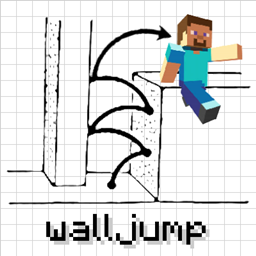
Wall-Jump! [FORGE] Mod untuk Minecraft 1.16.5, 1.18.2
Lompat dari dinding ke dinding! Wall jump, double jump, speed jump, fence jump, dll.
- unduhan
- 4 unduhan
- dilihat
- 34 dilihat
- Diperbarui
- Diperbarui 17.10.2026
- 1.16.4 — 1.18.2
 Forge
Forge
Tentang mod Wall-Jump! [FORGE]
Wall-Jump TXF untuk Minecraft 1.19-1.21.4
Platforming dari dinding ke dinding di Minecraft! Mod ini menambahkan wall jumping dan double jumping ke dalam game.
Wall Cling: Lompat ke arah dinding dan tahan tombol wall jump (LSHIFT). Lalu...
Wall Jump: Saat wall clinging, terus tahan W dan lepaskan LSHIFT untuk wall jump.
Double Jump: Lompatan di udara opsional yang bisa kamu manfaatkan.
Jika kamu membuat map atau video untuk mod Wall-Jump dan ingin ditampilkan di sini, silakan kirim pesan kepadaku!
Beberapa opsi konfigurasi:
- Tombol Wall-Jump (LSHIFT secara default, tapi SPACE juga berfungsi dengan baik
- Ketinggian dan jarak yang diluncurkan saat Wall-Jump
- Double jumping (nonaktif secara default, tapi ini fitur yang sangat menyenangkan)
- Single-wall jumping (memanjat ke atas hanya menggunakan satu dinding)
- Jarak minimum untuk fall damage (jatuh dari ketinggian kecil tidak akan memperlambatmu)
- Peningkatan kecepatan saat berlari di tanah dan saat meluncur
- Enchantment untuk wall-jumping, double-jumping, dan speed-boosting
(Server yang memiliki mod ini terpasang akan memaksa klien menggunakan konfigurasi server) Gunakan mod Configured untuk mengonfigurasi mod ini di dalam game!
Cek juga mod-mod berbasis pergerakan yang keren ini...
Elenai Dodge: Menambahkan mekanik dodging multi-arah ke dalam game! Elenai Dodge 2: Menambahkan mekanik dodging yang lebih baik lagi ke dalam game! GoProne: Menambahkan keybind untuk masuk ke mode merangkak sesuai keinginan! Move Plus: Menambahkan ledge grabbing, dodging dan crawling!
Cara memasang Wall-Jump! [FORGE]
With Millida Launcher
Install Millida Launcher
The launcher is free: download it at millida.net/launcher and sign in with any nickname.
Click “Install” on this page
The launcher opens and installs the mod for Minecraft 1.16.4–1.18.2 on Forge automatically.
Launch the game
A profile with it appears in the launcher: click “Play”.
Manually
Install Forge
The loader must match the game version of the mod file, for example Minecraft 1.18.2. After installing it, a separate profile appears in your launcher.
Download the file for your version
In the version list above, pick the file walljump-forge-1.18.1-1.3.7.jar (81 KB) for your game version.
Put it in the mods folder
The folder is inside .minecraft (Windows: %appdata%\.minecraft\mods). If it does not exist, create it.
Launch the loader profile
Open “Mods” in the main menu: Wall-Jump! [FORGE] should be in the list.
Minecraft 1.18.2 runs on Java 17: with a different Java version the game may close right after launch.
Versi
Dengan dependensi
| Minecraft | Loader | File | Tanggal | Tindakan |
|---|---|---|---|---|
| 1.18.1 | Forge | walljump-forge-1.18.1-1.3.7.jar81.2 KB 2 | ||
| 1.16.5 | — | walljump-forge-1.16.4-1.3.7.jar82.5 KB 2 |
FAQ
Which Minecraft versions does Wall-Jump! [FORGE] work on?
There are files for 1.18.2, 1.18.1, 1.18, 1.16.5, 1.16.4. The newest is 1.18.2.
Is Wall-Jump! [FORGE] for Forge or Fabric?
Only for Forge: 1.18–1.18.2. There are no files for Fabric or NeoForge: a mod for another loader will not start.
Does Wall-Jump! [FORGE] need other mods?
The author lists no required dependencies: the Forge loader is enough.
Which Java does Wall-Jump! [FORGE] need?
Minecraft 1.18.2 runs on Java 17. If the game closes right after launch, the usual cause is the wrong Java version in the profile settings.
Where can I download Wall-Jump! [FORGE] safely?
On this page: the file walljump-forge-1.18.1-1.3.7.jar (81 KB) is stored on Millida’s server, with no link shorteners. SHA-1 checksum: 8d2baf2c28043815b2b1cdb66d6d9b1ef721e2c4.
Ulasan
Jadilah yang pertama menilai Wall-Jump! [FORGE]


