
Transfer Labels Mod untuk Minecraft 1.21.1
Tempatkan label di antara blok untuk mentransfer item & fluida
- dilihat
- 15 dilihat
- Diperbarui
- Diperbarui 18.10.2026
- 1.21.1
 NeoForge
Tentang mod Transfer Labels
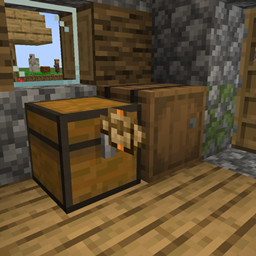
Transfer Labels adalah mod yang memungkinkan Anda memindahkan item/cairan antar blok yang letaknya bersebelahan.
Cara kerjanya:
- Anda dapat menempatkan label pada blok dengan sneak klik kanan ke dalam blok
- Anda dapat berinteraksi dengan label dengan memegang label dan klik kanan pada label yang telah ditempatkan
- Anda dapat menghapus label yang telah ditempatkan dengan klik kiri pada label sambil memegang label
Anda dapat mengakses label melalui blok menggunakan label accessor
Penyaringan:
Saat membuka GUI label Anda dapat menyaring dengan berbagai jenis filter seperti regulating, exact count, mod dan tag.
Untuk filter yang memiliki jumlah, Anda dapat mengubah berapa banyaknya dengan menggulir sambil menahan Shift/Alt/Ctrl dan kombinasi apa pun dari tombol-tombol tersebut
Akselerasi:
Anda dapat mempercepat label dengan menambahkan label item yang sama pada slot amount atau speed.
Cara memasang Transfer Labels
With Millida Launcher
Install Millida Launcher
The launcher is free: download it at millida.net/launcher and sign in with any nickname.
Click “Install” on this page
The launcher opens and installs the mod for Minecraft 1.21.1 on NeoForge automatically.
Launch the game
A profile with it appears in the launcher: click “Play”.
Manually
Install NeoForge
The loader must match the game version of the mod file, for example Minecraft 1.21.1. After installing it, a separate profile appears in your launcher.
Download the file for your version
In the version list above, pick the file transfer_labels-0.1.9.jar (151 KB) for your game version.
Put it in the mods folder
The folder is inside .minecraft (Windows: %appdata%\.minecraft\mods). If it does not exist, create it.
Launch the loader profile
Open “Mods” in the main menu: Transfer Labels should be in the list.
Minecraft 1.21.1 runs on Java 21: with a different Java version the game may close right after launch.
Versi
Dengan dependensi
| Minecraft | Loader | File | Tanggal | Tindakan |
|---|---|---|---|---|
| 1.21.1 | NeoForge | transfer_labels-0.1.9.jar151 KB | ||
| 1.21.1 | NeoForge | transfer_labels-0.1.8.jar151 KB |
FAQ
Which Minecraft versions does Transfer Labels work on?
Only Minecraft 1.21.1: there are no files for other versions.
Is Transfer Labels for Forge or Fabric?
Only for NeoForge: 1.21.1. There are no files for Forge or Fabric: a mod for another loader will not start.
Does Transfer Labels need other mods?
The author lists no required dependencies: the NeoForge loader is enough.
Which Java does Transfer Labels need?
Minecraft 1.21.1 runs on Java 21. If the game closes right after launch, the usual cause is the wrong Java version in the profile settings.
Where can I download Transfer Labels safely?
On this page: the file transfer_labels-0.1.9.jar (151 KB) is stored on Millida’s server, with no link shorteners. SHA-1 checksum: b25faa4331f7f3e9f1fa133aa96f1e0a9a14ba52.
Ulasan
Jadilah yang pertama menilai Transfer Labels


