

Tips Mod untuk Minecraft 1.20.1, 1.12.2
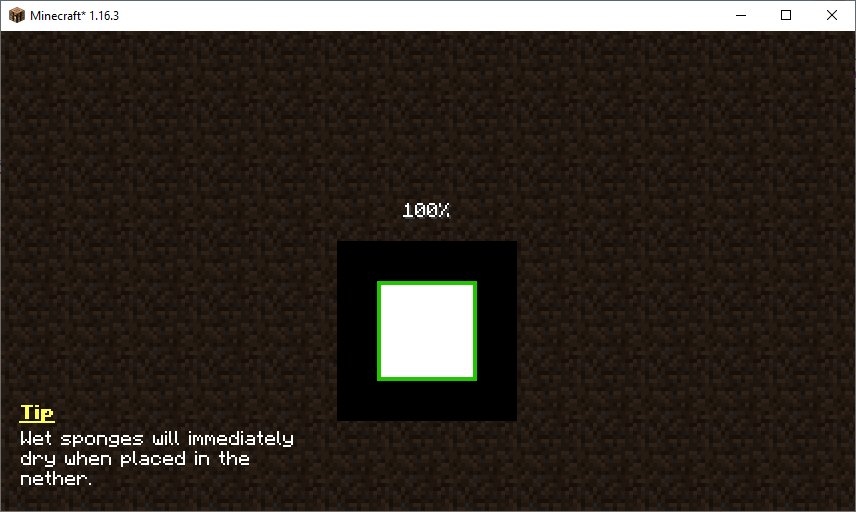
Mod ini menambahkan tips ke menu pemuatan. Mod ini juga memungkinkan modpack dan mod menambahkan tips mereka sendiri!
 Fabric
 Forge
ForgeTentang mod Tips
Mod ini akan menampilkan tips berguna pada layar permainan tertentu seperti layar pemuatan dunia. Tips yang ditampilkan akan berganti setiap lima detik. Kumpulan tips dapat diperluas oleh resource pack, mod lain, dan bahkan modpack. Anda dapat mempelajari lebih lanjut tentang konfigurasi tips di sini.
Suka mod ini dan ingin mendukung saya?
- Ikuti saya di Twitter
- Gabung Discord saya
- Dukung di Patreon
- Kunjungi situs web saya
Proyek ini disponsori oleh Nodecraft. Gunakan kode DARKHAX untuk diskon 30% pada bulan pertama layanan Anda!
Logo proyek oleh Delapouite di Game Icons dan dilisensikan di bawah CC By 3.0.

Cara memasang Tips
With Millida Launcher
Install Millida Launcher
The launcher is free: download it at millida.net/launcher and sign in with any nickname.
Click “Install” on this page
The launcher opens and installs the mod for Minecraft 1.12–1.20.1 on Fabric or Forge automatically, together with its dependencies: Fabric API, Bookshelf.
Launch the game
A profile with it appears in the launcher: click “Play”.
Manually
Install Fabric or Forge
The loader must match the game version of the mod file, for example Minecraft 1.20.1. After installing it, a separate profile appears in your launcher.
Download the file for your version
In the version list above, pick the file Tips-Fabric-1.20.1-12.1.9.jar (111 KB) for your game version and loader.
Put it in the mods folder
The folder is inside .minecraft (Windows: %appdata%\.minecraft\mods). If it does not exist, create it. Required dependencies go there too: Fabric API, Bookshelf.
Launch the loader profile
Open “Mods” in the main menu: Tips should be in the list.
On a server
A server on Fabric or Forge
The mod only works on a server with the same loader and game version, for example 1.20.1.
File goes into the server’s mods folder
Stop the server, put the mod file into the mods folder and start the server again.
Use the “To server” button
On Millida Hosting, the button at the top of the page uploads the file to your server and restarts it for you.
Minecraft 1.20.1 runs on Java 17: with a different Java version the game may close right after launch.
Versi
Dengan dependensi
| Minecraft | Loader | File | Tindakan |
|---|---|---|---|
| 1.20.1 | Fabric | 1.20.1111 KB | |
| 1.19.2 | Forge | 1.19.2125 KB | |
| 1.18.2 | Forge | 1.18.288.2 KB 1 | |
| 1.16.5 | Forge | 1.16.570.1 KB | |
| 1.12.2 | Forge | 1.12.220.1 KB |
Yang dibutuhkan untuk menjalankan
- Fabric APIwajib
- Bookshelfwajib
FAQ
Which Minecraft versions does Tips work on?
There are files for 1.20.1, 1.19.2, 1.18.2, 1.16.5, 1.12.2, 1.12. The newest is 1.20.1.
Is Tips for Forge or Fabric?
There are files for Fabric: 1.20.1 and for Forge: 1.12–1.19.2. There are no files for NeoForge: a mod for another loader will not start.
What does Tips need to work?
Required: Fabric API, Bookshelf. Without them the mod will not start: dependencies go into the same mods folder.
Does Tips work on a server?
Yes. Tips works both in singleplayer and on a server.
Which Java does Tips need?
Minecraft 1.20.1 runs on Java 17. If the game closes right after launch, the usual cause is the wrong Java version in the profile settings.
Where can I download Tips safely?
On this page: the file Tips-Fabric-1.20.1-12.1.9.jar (111 KB) is stored on Millida’s server, with no link shorteners. SHA-1 checksum: 7863604f7655ce1a65c08b5abc332e6ee065065a.
Ulasan
Jadilah yang pertama menilai Tips


