

SwingThrough Mod untuk Minecraft 1.20.1, 1.16.5
Memungkinkan membidik (serta berinteraksi dan menyerang) entitas hidup melalui blok transparan seperti rumput, tanaman, dan bunga.
 Fabric
 Quilt
QuiltTentang mod SwingThrough
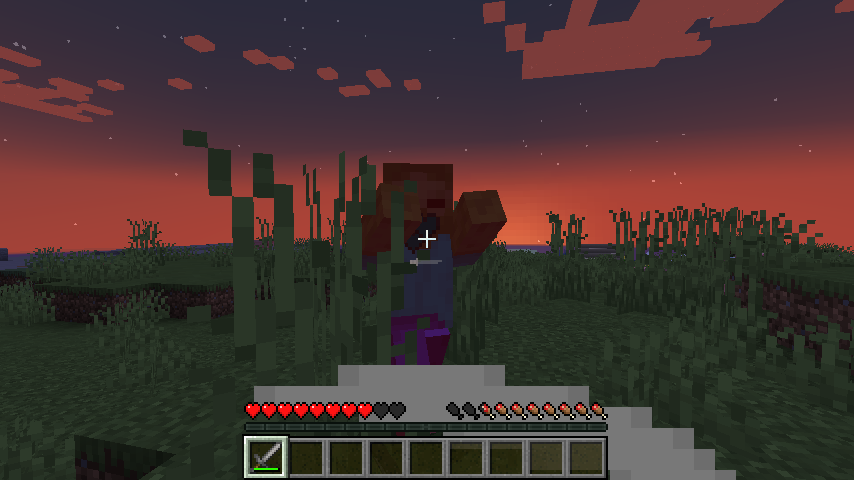
Memungkinkan penargetan entitas hidup melalui blok transparan.
Memerlukan Connector pada neoforge.
Mod ini membuang target crosshair blok untuk memungkinkan entitas ditargetkan sebagai gantinya, ketika:
- Blok tersebut memiliki tabrakan kosong
- Entitas tersebut hidup dan dapat diserang
- Anda tidak sedang menunggangi entitas tersebut secara langsung
- Entitas tersebut berada dalam jangkauan (jangkauan interaksi persis di 1.21)
Berkat implementasi ini, garis luar blok juga akan menghilang saat Anda menargetkan entitas tersebut.
Catatan Teknis
Mod ini terdiri dari satu mixin dengan sekitar 4 baris kode yang bermakna:
- 2 baris untuk menggunakan jangkauan penargetan entitas penuh jika blok memenuhi kondisi
- 2 baris untuk membuang target blok jika jangkauan penuh telah digunakan dan entitas memenuhi kondisi
Mod ini tidak melakukan raycast atau pencarian radius tambahan.
Penutup
Semua mod dibangun di atas karya banyak orang lain.
Kami membuat mod ini untuk Tinkerer's Quilt - modpack kami tentang kemudahan bermain dan konten vanilla.
Cara memasang SwingThrough
With Millida Launcher
Install Millida Launcher
The launcher is free: download it at millida.net/launcher and sign in with any nickname.
Click “Install” on this page
The launcher opens and installs the mod for Minecraft 1.16–1.20.2 on Fabric or Quilt automatically.
Launch the game
A profile with it appears in the launcher: click “Play”.
Manually
Install Fabric or Quilt
The loader must match the game version of the mod file, for example Minecraft 1.20.2. After installing it, a separate profile appears in your launcher.
Download the file for your version
In the version list above, pick the file swingthrough-1.0.6+1.20.jar (22 KB) for your game version and loader.
Put it in the mods folder
The folder is inside .minecraft (Windows: %appdata%\.minecraft\mods). If it does not exist, create it.
Launch the loader profile
Open “Mods” in the main menu: SwingThrough should be in the list.
SwingThrough works on the player’s side only: there is no need to install it on a server.
Minecraft 1.20.2 runs on Java 17: with a different Java version the game may close right after launch.
Versi
Dengan dependensi
| Minecraft | Loader | File | Tindakan |
|---|---|---|---|
| 1.16.5 | Fabric, Quilt | 1.16.521.8 KB 1 |
FAQ
Which Minecraft versions does SwingThrough work on?
There are files for 1.16–1.20.2, 19 versions in total. The newest is 1.20.2.
Is SwingThrough for Forge or Fabric?
There are files for Fabric: 1.16–1.20.2 and for Quilt: 1.16–1.20.2. There are no files for Forge or NeoForge: a mod for another loader will not start.
Does SwingThrough need other mods?
The author lists no required dependencies: the Fabric or Quilt loader is enough.
Do I need to install SwingThrough on a server?
No. SwingThrough works on the player’s side only: there is no need to install it on a server.
Which Java does SwingThrough need?
Minecraft 1.20.2 runs on Java 17. If the game closes right after launch, the usual cause is the wrong Java version in the profile settings.
Where can I download SwingThrough safely?
On this page: the file swingthrough-1.0.6+1.20.jar (22 KB) is stored on Millida’s server, with no link shorteners. SHA-1 checksum: fe9c7077b69767b3a175e1d310f95b0ebab66747.
Ulasan
Jadilah yang pertama menilai SwingThrough


