

Sodium Options API Mod untuk Minecraft 1.20.1
API konfigurasi untuk menambahkan opsi Sodium dengan menu kategori yang lebih baik
- unduhan
- 165 unduhan
- dilihat
- 452 dilihat
- Diperbarui
- Diperbarui 03.09.2026
- 1.20 — 1.20.1
 Forge
Forge- Klien
Tentang mod Sodium Options API

Mod ini menambahkan event lintas platform untuk menambahkan integrasi menu opsi Sodium/Embeddium. Sebagai contoh, Anda dapat menambahkan halaman opsi ke Embeddium di Forge, Fabric Sodium 0.5 di 1.20.1, dan Fabric/NeoForge Sodium 0.6 di 1.21.1 dengan satu event:
OptionGUIConstruction.EVENT.register((pages) -> pages.add(new TestOptionPage()));
Jika Anda pengguna akhir dan belum memasang mod ini sebagai library untuk addon Sodium lain, Anda dapat memasangnya bersama Reese's Options untuk mendapatkan menu kategori yang lebih baik, dengan dukungan drop-down agar lebih mudah dinavigasi. Ini akan berlaku bahkan untuk mod yang tidak menggunakan API ini dan menyuntikkan langsung ke opsi Sodium.
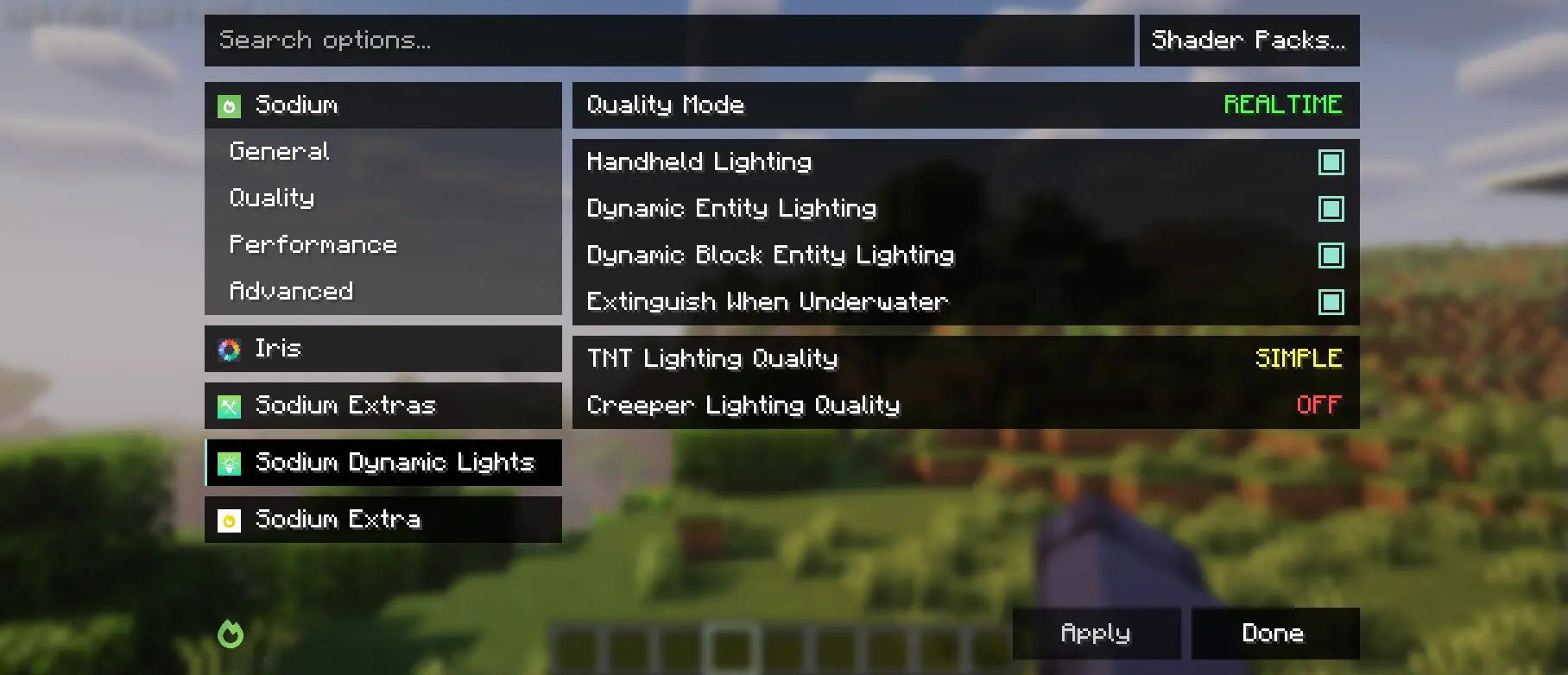
Mod ini sebagian merupakan fork dari API kategori dan event opsi Embeddium, dengan perubahan besar untuk mendukung Sodium upstream. Meskipun mod ini mengubah menu Reese's Sodium Options, perubahan tersebut dilakukan melalui mixin demi alasan kompatibilitas, jadi Anda perlu memasang keduanya.
Menggunakan API
Pertama, Anda perlu menambahkan mod ini ke lingkungan pengembangan Anda, menggunakan rilis Maven untuk Curseforge atau Modrinth.
modImplementation("maven.modrinth:sodium-options-api:version")
Kemudian, mod ini menyediakan tiga event di toni.sodiumoptionsapi.api:
- OptionGUIConstruction.EVENT, dipanggil sekali di konstruktor GUI, memungkinkan penambahan seluruh halaman. Ini mungkin yang Anda butuhkan.
- OptionPageConstruction.EVENT, dipanggil untuk setiap OptionPage. Gunakan ini jika Anda ingin menambahkan sekelompok toggle ke tab performance atau semacamnya.
- OptionGroupConstruction.EVENT, dipanggil untuk setiap grup opsi. Gunakan ini jika Anda ingin menyisipkan satu opsi ke grup yang sudah ada, atau mengubah opsi vanilla.
Cara memasang Sodium Options API
With Millida Launcher
Install Millida Launcher
The launcher is free: download it at millida.net/launcher and sign in with any nickname.
Click “Install” on this page
The launcher opens and installs the mod for Minecraft 1.20–1.20.1 on Forge automatically, together with its dependencies: Embeddium.
Launch the game
A profile with it appears in the launcher: click “Play”.
Manually
Install Forge
The loader must match the game version of the mod file, for example Minecraft 1.20.1. After installing it, a separate profile appears in your launcher.
Download the file for your version
In the version list above, pick the file sodiumoptionsapi-forge-1.0.10-1.20.1.jar (434 KB) for your game version.
Put it in the mods folder
The folder is inside .minecraft (Windows: %appdata%\.minecraft\mods). If it does not exist, create it. Required dependencies go there too: Embeddium.
Launch the loader profile
Open “Mods” in the main menu: Sodium Options API should be in the list.
Sodium Options API works on the player’s side only: there is no need to install it on a server.
Minecraft 1.20.1 runs on Java 17: with a different Java version the game may close right after launch.
Versi
Dengan dependensi
| Minecraft | Loader | File | Tindakan |
|---|---|---|---|
| 1.20.1 | Forge | 1.20.1434 KB 164 |
Yang dibutuhkan untuk menjalankan
- Embeddiumwajib
Konten yang membutuhkannya
FAQ
Which Minecraft versions does Sodium Options API work on?
There are files for 1.20.1, 1.20. The newest is 1.20.1.
Is Sodium Options API for Forge or Fabric?
Only for Forge: 1.20–1.20.1. There are no files for Fabric or NeoForge: a mod for another loader will not start.
What does Sodium Options API need to work?
Required: Embeddium. Without it the mod will not start: dependencies go into the same mods folder.
Do I need to install Sodium Options API on a server?
No. Sodium Options API works on the player’s side only: there is no need to install it on a server.
Which Java does Sodium Options API need?
Minecraft 1.20.1 runs on Java 17. If the game closes right after launch, the usual cause is the wrong Java version in the profile settings.
Where can I download Sodium Options API safely?
On this page: the file sodiumoptionsapi-forge-1.0.10-1.20.1.jar (434 KB) is stored on Millida’s server, with no link shorteners. SHA-1 checksum: 7529fbf938787ed13a251cbf40936f8c29ec4b6c.
Ulasan
Jadilah yang pertama menilai Sodium Options API


