

 Fabric
Tentang mod Sodium Fullbright
This mod simply allows you to change the brightness option in Sodium from 100% to 1000%.
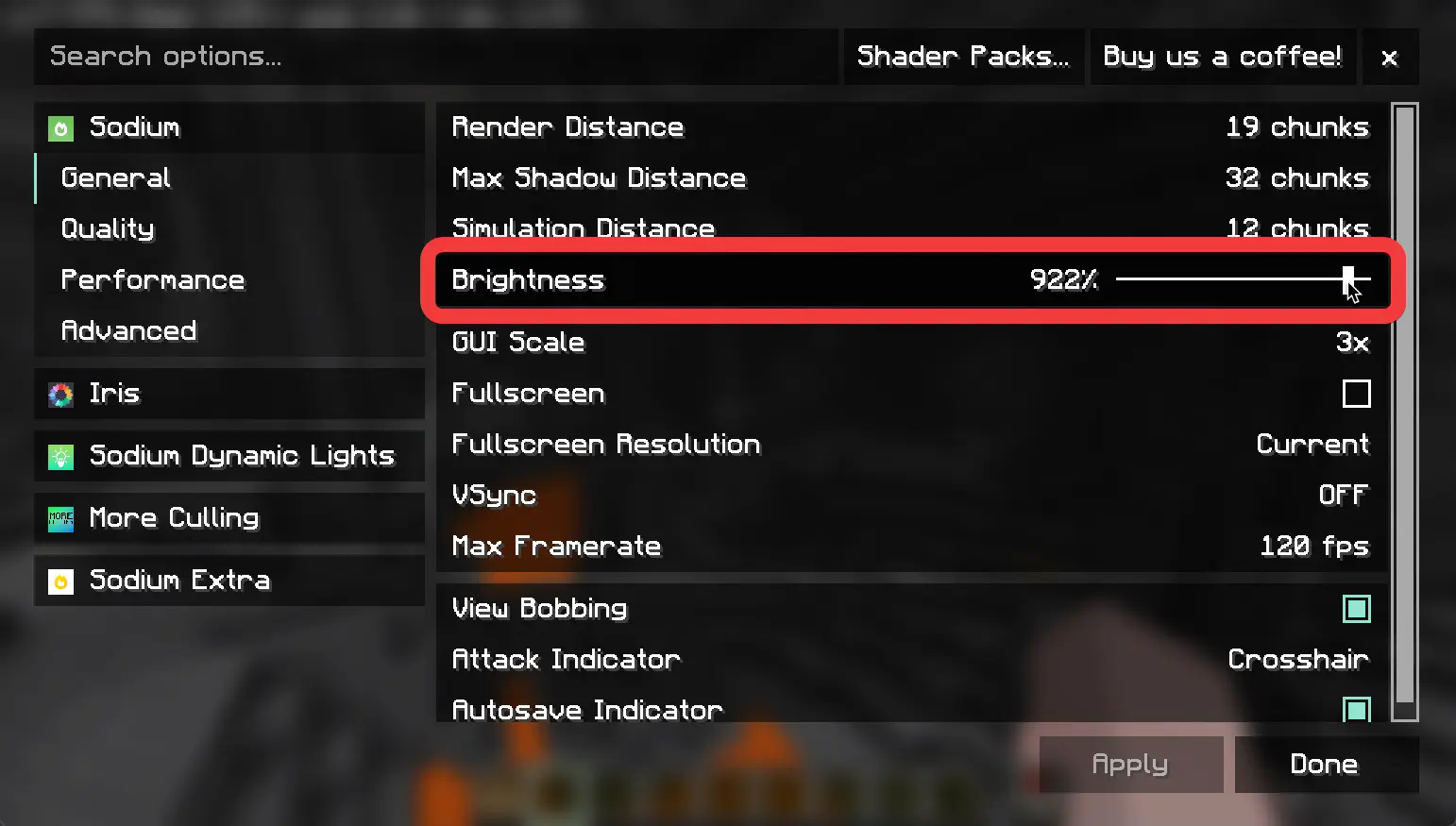
I made this mod because I was looking for an option to change my brightness without having to bind a key. It makes the most sense for me to simply change it in the video settings.
If you are looking for a mod that has more options regarding full brightness and this one isn't cutting it, I absolutely recommend GammaUtils, it's a great mod.
Notes
- No, I don't intend to support vanilla video settings.
- Yes, I might make the max value configurable.
- Yes, I might add a Sodium option menu item for toggling the max brightness value
Cara memasang Sodium Fullbright
With Millida Launcher
Install Millida Launcher
The launcher is free: download it at millida.net/launcher and sign in with any nickname.
Click “Install” on this page
The launcher opens and installs the mod for Minecraft 1.21.1–26.2 on Fabric automatically, together with its dependencies: Sodium, Fabric API.
Launch the game
A profile with it appears in the launcher: click “Play”.
Manually
Install Fabric
The loader must match the game version of the mod file, for example Minecraft 26.2. After installing it, a separate profile appears in your launcher.
Download the file for your version
In the version list above, pick the file sodium-fullbright-1.2.0.jar (7 KB) for your game version.
Put it in the mods folder
The folder is inside .minecraft (Windows: %appdata%\.minecraft\mods). If it does not exist, create it. Required dependencies go there too: Sodium, Fabric API.
Launch the loader profile
Open “Mods” in the main menu: Sodium Fullbright should be in the list.
Sodium Fullbright works on the player’s side only: there is no need to install it on a server.
Versi
Dengan dependensi
| Minecraft | Loader | File | Tanggal | Tindakan |
|---|---|---|---|---|
| 26.2 | Fabric | 26.26.5 KB 6 | ||
| 1.21.11 | Fabric | 1.21.116.5 KB 21 | ||
| 1.21.10 | Fabric | 1.21.1011.9 KB 10 | ||
| 1.21.4 | Fabric | 1.21.412.3 KB | ||
| 1.21.4 | Fabric | 1.21.412.3 KB |
Yang dibutuhkan untuk menjalankan
- Sodiumwajib
- Fabric APIwajib
FAQ
Which Minecraft versions does Sodium Fullbright work on?
There are files for 1.21.1–26.2, 15 versions in total. The newest is 26.2.
Is Sodium Fullbright for Forge or Fabric?
Only for Fabric: 1.21.1–26.2. There are no files for Forge or NeoForge: a mod for another loader will not start.
What does Sodium Fullbright need to work?
Required: Sodium, Fabric API. Without them the mod will not start: dependencies go into the same mods folder.
Do I need to install Sodium Fullbright on a server?
No. Sodium Fullbright works on the player’s side only: there is no need to install it on a server.
Where can I download Sodium Fullbright safely?
On this page: the file sodium-fullbright-1.2.0.jar (7 KB) is stored on Millida’s server, with no link shorteners. SHA-1 checksum: b336bbdccaf1ba841d0224eab4792734e177e927.
Ulasan
Jadilah yang pertama menilai Sodium Fullbright


