

Server Tab Info Mod untuk Minecraft 1.20.1, 1.12.2
Mod client dan/atau server yang memberikan cara bagus untuk melihat rata-rata tick time dan tick per detik (TPS) permainan
 NeoForge
 Forge
ForgeTentang mod Server Tab Info
Seharusnya benar-benar disebut Tab Info, karena sekarang juga berfungsi saat di singleplayer!
Pendahuluan
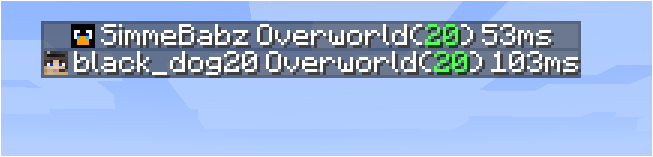
Ini adalah mod yang dapat dipasang di klien maupun server tanpa menyebabkan error mod yang hilang untuk klien tanpa mod atau server tanpa mod. Saat terhubung ke server, mod ini hanya berfungsi jika server juga memiliki mod ini. Versi di server tidak perlu sama dengan versi di klien, tetapi jika klien terhubung ke server dengan versi yang terlalu lama, beberapa fitur akan hilang.
Pertunjukan fitur
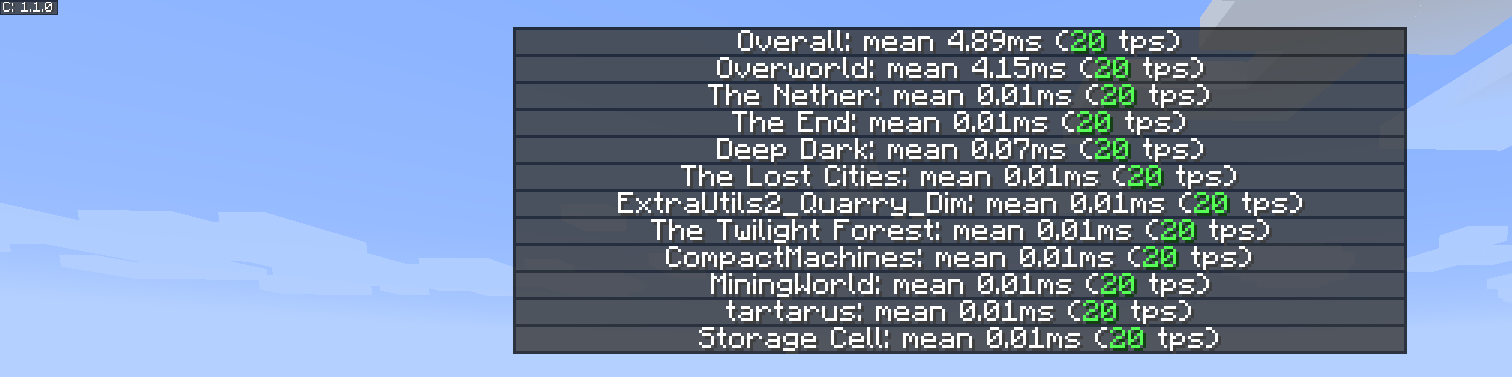
Daftar tps dimensi yang baru dan lebih baik
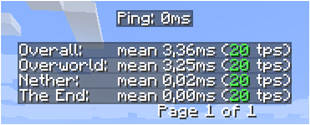
Daftar pemain yang baru

Inspirasi
Inspirasi untuk mod dan presentasinya didasarkan pada fitur kecil dari MineTogether, di mana jika mod opsional dipasang di server dan fitur query aktif, kamu dapat melihat informasi seperti tps dan entitas di dunia. Informasi ini disajikan seperti daftar tab pemain, saat menekan Tab + Ctrl.
Pemicunya adalah karena fitur itu berhenti berfungsi, oleh karena itu saya membuat mod kecil ini untuk melihat tps untuk semua dimensi.
Untuk mengaktifkan gui, tekan Tab + Ctrl (standar tetapi dapat dikonfigurasi di keybindings), lalu kamu akan disajikan tps keseluruhan untuk server dan untuk setiap dimensi.
Masalah yang diketahui
- Jika MineTogether dipasang dan integrasi siv diaktifkan serta ServerInfoProvider tidak dipasang, kamu bisa mengalami masalah lag saat menggunakan keybind untuk halaman tps, karena keduanya menggunakan keybind yang sama.
Untuk memperbaiki masalah ini, nonaktifkan integrasi siv di bawah MineTogether atau ubah keybind untuk halaman tps.
Cara memasang Server Tab Info
With Millida Launcher
Install Millida Launcher
The launcher is free: download it at millida.net/launcher and sign in with any nickname.
Click “Install” on this page
The launcher opens and installs the mod for Minecraft 1.12–1.20.4 on Forge or NeoForge automatically.
Launch the game
A profile with it appears in the launcher: click “Play”.
Manually
Install Forge or NeoForge
The loader must match the game version of the mod file, for example Minecraft 1.20.4. After installing it, a separate profile appears in your launcher.
Download the file for your version
In the version list above, pick the file ServerTabInfo-1.20.4-1.3.8.jar (109 KB) for your game version and loader.
Put it in the mods folder
The folder is inside .minecraft (Windows: %appdata%\.minecraft\mods). If it does not exist, create it.
Launch the loader profile
Open “Mods” in the main menu: Server Tab Info should be in the list.
Minecraft 1.20.4 runs on Java 17: with a different Java version the game may close right after launch.
Versi
Dengan dependensi
| Minecraft | Loader | File | Tanggal | Tindakan |
|---|---|---|---|---|
| 1.20.4 | NeoForge | ServerTabInfo-1.20.4-1.3.8.jar109 KB | ||
| 1.20.1 | Forge | ServerTabInfo-1.20-1.3.8.jar101 KB | ||
| 1.17.1 | Forge | ServerTabInfo-1.17.1-1.3.4-b2.jar102 KB | ||
| 1.16.1 | Forge | ServerTabInfo-1.16.1-1.2.7-alpha.jar71.3 KB | ||
| 1.12.1 | — | ServerTabInfo-1.12.2-1.2.6.jar53.5 KB | ||
| 1.13.2 | — | ServerTabInfo-1.13.2-1.2.4-beta.jar51.5 KB |
FAQ
Which Minecraft versions does Server Tab Info work on?
There are files for 1.12–1.20.4, 9 versions in total. The newest is 1.20.4.
Is Server Tab Info for Forge or Fabric?
There are files for Forge: 1.16.1–1.20.1 and for NeoForge: 1.20.4. There are no files for Fabric: a mod for another loader will not start.
Does Server Tab Info need other mods?
The author lists no required dependencies: the Forge or NeoForge loader is enough.
Which Java does Server Tab Info need?
Minecraft 1.20.4 runs on Java 17. If the game closes right after launch, the usual cause is the wrong Java version in the profile settings.
Where can I download Server Tab Info safely?
On this page: the file ServerTabInfo-1.20.4-1.3.8.jar (109 KB) is stored on Millida’s server, with no link shorteners. SHA-1 checksum: 10b7839c442bfb1d3ba61870a11344b0db072e3e.
Ulasan
Jadilah yang pertama menilai Server Tab Info


