
Roughly Enough Resources Mod untuk Minecraft 1.20.1, 1.16.5
Dukungan worldgen untuk Roughly Enough Items
 NeoForge
 Forge
Forge Fabric
Roughly Enough Resources
Ini dimaksudkan sebagai pengganti Just Enough Resources, yang sendiri dimaksudkan sebagai pengganti Not Enough Resources.
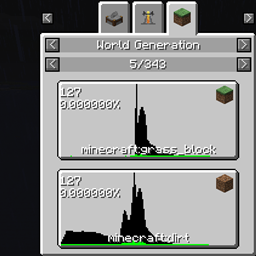
Singkatnya, ini akan menunjukkan kepada Anda blok apa yang muncul di ketinggian berapa di dunia. Perlu dicatat bahwa ada beberapa kasus di mana blok (yang merupakan bahan pembentuk dunia) dan item (yang resepnya akan ditampilkan oleh REI) tidak sepenuhnya cocok. RER mencoba mengatasinya dengan beberapa cara. Beberapa di antaranya akan muncul sebagai beberapa resep yang terlampir pada item yang sama -- misalnya, obor di dinding dan obor di lantai adalah blok yang berbeda, tetapi item yang sama. Yang lain akan muncul sebagai item yang agak terkait -- air dan lava muncul sebagai ember yang sesuai, dan blok api muncul sebagai flint & steel. Beberapa blok berbeda muncul sebagai tanda tanya, tetapi Anda bisa mendapatkan nama blok tersebut dengan mengarahkan kursor ke atasnya. REI, agak disayangkan, memiliki dukungan yang anehnya hanya sebagian untuk udara -- jika Anda mencoba menekan tombol "R" pada item udara, tidak akan terjadi apa-apa. Resep untuk udara hanya terlihat pada daftar semua resep "world generation".
Lisensi:
MIT License
Gambar:
Cara memasang Roughly Enough Resources
With Millida Launcher
Install Millida Launcher
The launcher is free: download it at millida.net/launcher and sign in with any nickname.
Click “Install” on this page
The launcher opens and installs the mod for Minecraft 1.14–1.20.1 on Fabric, Forge or NeoForge automatically.
Launch the game
A profile with it appears in the launcher: click “Play”.
Manually
Install Fabric, Forge or NeoForge
The loader must match the game version of the mod file, for example Minecraft 1.20.1. After installing it, a separate profile appears in your launcher.
Download the file for your version
In the version list above, pick the file rer-2.9.0.jar (84 KB) for your game version and loader.
Put it in the mods folder
The folder is inside .minecraft (Windows: %appdata%\.minecraft\mods). If it does not exist, create it.
Launch the loader profile
Open “Mods” in the main menu: Roughly Enough Resources should be in the list.
Minecraft 1.20.1 runs on Java 17: with a different Java version the game may close right after launch.
Versi
Dengan dependensi
| Minecraft | Loader | File | Tanggal | Tindakan |
|---|---|---|---|---|
| 1.20.1 | NeoForge, Forge | [Forge 1.20(.1)] v2.9.083.5 KB | ||
| 1.20.1 | Fabric | [Fabric 1.20(.1)] v2.9.079.6 KB 2 | ||
| 1.19.3 | Fabric | [Fabric 1.19.3] v2.7.079.3 KB | ||
| 1.19.3 | Forge | [Forge 1.19.3] v2.7.083.2 KB | ||
| 1.16.3 | — | rer-2.1.4.jar71.1 KB 1 | ||
| 1.14.1 | — | rer-1.1.0.jar57.7 KB 2 | ||
| 1.14.1 | — | rer-1.0.0.jar24.6 KB |
Ulasan
Jadilah yang pertama menilai Roughly Enough Resources


