
RFTools Control Mod untuk Minecraft 1.20.1, 1.21.1
Addon komputer otomasi dan logika untuk RFTools
 NeoForge
 Forge
ForgeTentang mod RFTools Control
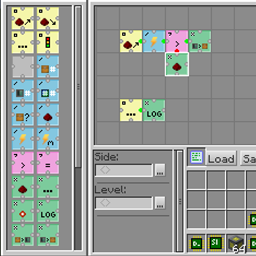
RFTools Control adalah mod addon untuk mod RFTools yang menambahkan kontrol otomatisasi menggunakan bahasa pemrograman berbasis grid visual. Dengan menggunakan opcode yang Anda susun dalam grid, Anda dapat memindahkan item, mengontrol redstone, memeriksa energi (RF), dan sebagainya. Anda dapat mengakses inventaris biasa, tetapi mod ini juga mendukung akses langsung ke sistem yang dikendalikan storage scanner. Ke depannya, mod ini juga akan menyediakan cara bagi storage scanner untuk melakukan autocrafting item. Namun, hal ini belum sepenuhnya diterapkan.
Dua blok utama dalam mod ini adalah programmer yang digunakan untuk membuat program dan processor yang menjalankan program tersebut. Networking juga disediakan.
Catatan! Komentar telah dinonaktifkan karena sulit bagi saya untuk memeriksanya di terlalu banyak tempat. Jika Anda ingin mengirimkan laporan bug, buka tab 'Issues' atau di sini: RFTools Control Issue Tracker. Jika Anda ingin membahas RFTools secara umum, Anda dapat melakukannya di sini: RFTools Control on MC Forums
Cara memasang RFTools Control
With Millida Launcher
Install Millida Launcher
The launcher is free: download it at millida.net/launcher and sign in with any nickname.
Click “Install” on this page
The launcher opens and installs the mod for Minecraft 1.12–1.21.1 on Forge or NeoForge automatically.
Launch the game
A profile with it appears in the launcher: click “Play”.
Manually
Install Forge or NeoForge
The loader must match the game version of the mod file, for example Minecraft 1.21.1. After installing it, a separate profile appears in your launcher.
Download the file for your version
In the version list above, pick the file rftoolscontrol-1.21-8.0.2.jar (662 KB) for your game version and loader.
Put it in the mods folder
The folder is inside .minecraft (Windows: %appdata%\.minecraft\mods). If it does not exist, create it.
Launch the loader profile
Open “Mods” in the main menu: RFTools Control should be in the list.
Minecraft 1.21.1 runs on Java 21: with a different Java version the game may close right after launch.
Versi
Dengan dependensi
| Minecraft | Loader | File | Tanggal | Tindakan |
|---|---|---|---|---|
| 1.21.1 | NeoForge | RFToolsControl - 1.21-8.0.2662 KB 1 | ||
| 1.20.1 | Forge | RFToolsControl - 1.20-7.0.4587 KB 1 | ||
| 1.20.1 | Forge | RFToolsControl - 1.20-7.0.0576 KB | ||
| 1.12.2 | — | RFToolsControl - 1.12-2.0.2587 KB | ||
| 1.12.2 | — | RFToolsControl - 1.12-1.9.0-alpha577 KB | ||
| 1.12 | — | rftoolsctrl-1.12-1.6.8beta1.jar568 KB |
FAQ
Which Minecraft versions does RFTools Control work on?
There are files for 1.21.1, 1.20.1, 1.12.2, 1.12. The newest is 1.21.1.
Is RFTools Control for Forge or Fabric?
There are files for Forge: 1.20.1 and for NeoForge: 1.21.1. There are no files for Fabric: a mod for another loader will not start.
Does RFTools Control need other mods?
The author lists no required dependencies: the Forge or NeoForge loader is enough.
Which Java does RFTools Control need?
Minecraft 1.21.1 runs on Java 21. If the game closes right after launch, the usual cause is the wrong Java version in the profile settings.
Where can I download RFTools Control safely?
On this page: the file rftoolscontrol-1.21-8.0.2.jar (662 KB) is stored on Millida’s server, with no link shorteners. SHA-1 checksum: ff976f8f58feaf6cc101ab2e51fbfaecac3f27ff.
Ulasan
Jadilah yang pertama menilai RFTools Control


