
Realistic Bees Mod untuk Minecraft 26.3
🐝 Lebah mungil, atau besar! Kemunculan kelompok yang lebih besar dan ruang sarang yang ditambah.
 Fabric
 Forge
Forge NeoForge
 Quilt
QuiltTentang mod Realistic Bees
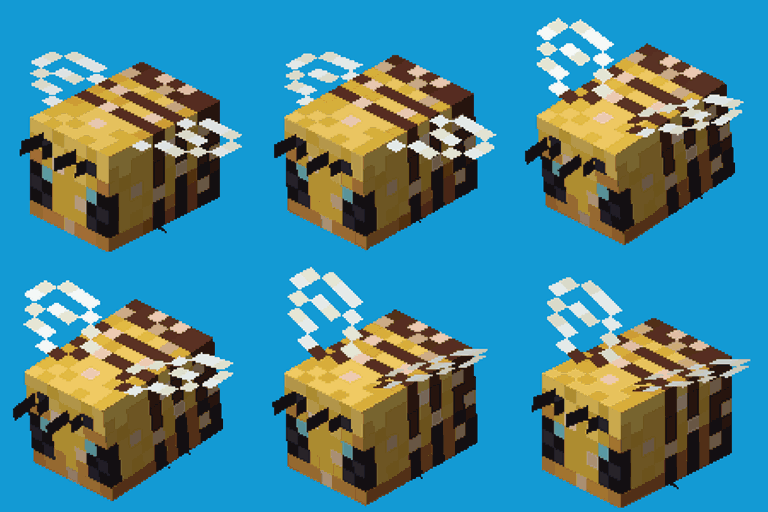
Realistic Bees adalah mod yang berupaya membuat perilaku lebah lebih realistis tanpa menambahkan item atau objek baru ke dalam game. Lebah berukuran 25% dari ukuran normalnya. Untuk membuat lebah sedikit lebih tidak jarang ditemukan, mod ini juga menambahkan nilai config (secara default 4) yang menentukan jumlah tambahan lebah yang muncul setelah setiap kemunculan lebah alami. Sarang lebah juga dapat menampung lebih banyak lebah daripada default Minecraft, diubah dari 3 menjadi 20.
Semua opsi config yang tersedia:
beeSizeModifier default 0.25, min 0.01, max 5.0 Nilai ini menentukan ukuran lebah. Secara default 0.25, yang berarti lebah berukuran 1/4 dari ukuran vanilla-nya. Setel ke 1.0 untuk menonaktifkan fitur ukuran lebah yang berbeda.
extraBeeSpawnsPerBee default 9, min 0, max 50 Untuk membuat lebah sedikit lebih umum. Setiap kali lebah muncul secara alami, mod memunculkan tambahan 'extraBeeSpawnsPerBee' lebah.
beeHiveBeeSpace default 20, min 0, max 50 Berapa banyak lebah yang seharusnya dapat masuk ke sarang secara total. Default Minecraft adalah 3, tetapi lebah jauh lebih kecil sehingga seharusnya ada lebih banyak ruang.
preventBeeSuffocationDamage default true Lebah yang lebih kecil (bayi) terkadang dapat melakukan sesuatu yang tidak terduga dengan AI mereka dan mendapatkan damage sesak napas. Mencegah damage ini memperbaiki mereka yang menghilang.
Lebah mungil! --atau lebih besar. Tergantung pada config beeSizeModifier:
Anda bebas menggunakan mod ini di modpack apa pun, selama unduhannya tetap dihosting dalam ekosistem CurseForge atau Modrinth.
Serilum.com berisi ikhtisar dan informasi lebih lanjut tentang semua mod yang tersedia.
Komentar dinonaktifkan karena saya tidak dapat melacaknya di begitu banyak halaman mod yang terpisah. Untuk masalah, ide, saran atau apa pun ada repo Github. Terima kasih!
Cara memasang Realistic Bees
With Millida Launcher
Install Millida Launcher
The launcher is free: download it at millida.net/launcher and sign in with any nickname.
Click “Install” on this page
The launcher opens and installs the mod for Minecraft 1.19.3–26.3 on Fabric, Forge, NeoForge or Quilt automatically.
Launch the game
A profile with it appears in the launcher: click “Play”.
Manually
Install Fabric, Forge, NeoForge or Quilt
The loader must match the game version of the mod file, for example Minecraft 26.3. After installing it, a separate profile appears in your launcher.
Download the file for your version
In the version list above, pick the file realisticbees-26.3.0-4.3.jar (63 KB) for your game version and loader.
Put it in the mods folder
The folder is inside .minecraft (Windows: %appdata%\.minecraft\mods). If it does not exist, create it.
Launch the loader profile
Open “Mods” in the main menu: Realistic Bees should be in the list.
Versi
Dengan dependensi
| Minecraft | Loader | File | Tanggal | Tindakan |
|---|---|---|---|---|
| 26.3 | Fabric, Forge, NeoForge, Quilt | [Fabric/Forge/Neo] 26.3.0-4.3 | Realistic Bees62.8 KB 49 | ||
| 1.19.3 | Forge | realisticbees_1.19.3-2.8.jar19.9 KB |
FAQ
Which Minecraft versions does Realistic Bees work on?
There are files for 26.3, 1.19.3. The newest is 26.3.
Is Realistic Bees for Forge or Fabric?
There are files for Fabric: 26.3, for Forge: 1.19.3–26.3, for NeoForge: 26.3 and for Quilt: 26.3.
Does Realistic Bees need other mods?
The author lists no required dependencies: the Fabric, Forge, NeoForge or Quilt loader is enough.
Where can I download Realistic Bees safely?
On this page: the file realisticbees-26.3.0-4.3.jar (63 KB) is stored on Millida’s server, with no link shorteners. SHA-1 checksum: 310f14d3ff1b78a43eaaa664018f6c8b0643297f.
Ulasan
Jadilah yang pertama menilai Realistic Bees


