
Raw's Visual keybinder Mod untuk Minecraft 1.21.1, 1.19.2
Solusi visual untuk keybinding.
 NeoForge
 Forge
ForgeTentang mod Raw's Visual keybinder
Mod ini adalah solusi untuk memiliki modpack besar dengan banyak keybind.
Mod ini menambahkan cara tambahan untuk mengelola keybind. Mod ini menyediakan layar tambahan yang dapat diakses melalui tombol di sebelah tombol edit 'keybind' bawaan di menu opsi.
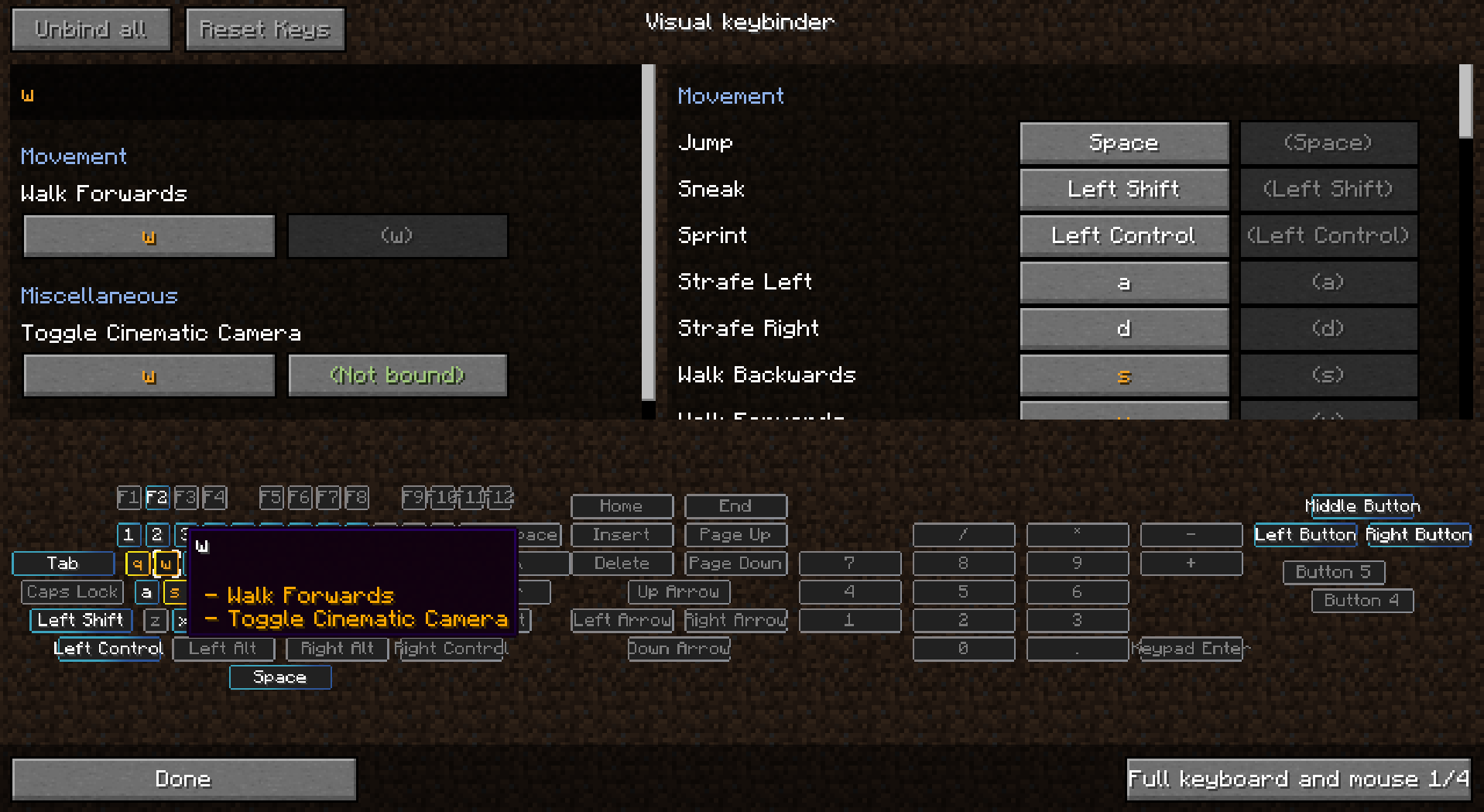
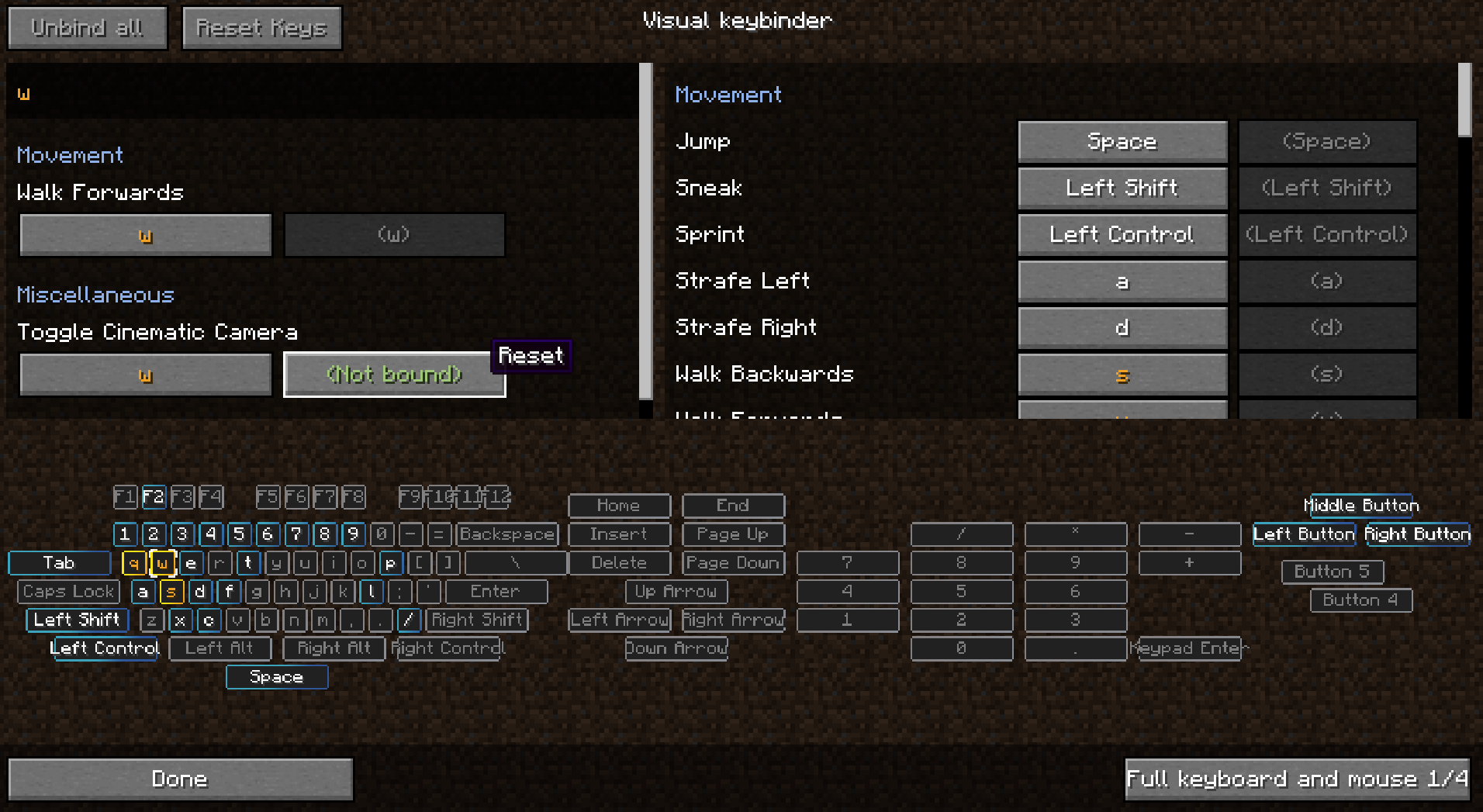
Layar tersebut memiliki tata letak seperti keyboard dengan semua tombol yang bertabrakan dan digunakan ditandai. Dengan begitu pemain memiliki gambaran yang jelas tentang tombol mana yang masih tersedia dan mana yang perlu diperhatikan.
Sebagai efek samping dari pembuatan mod ini, kamu juga dapat menggunakan modifier dengan tombol mouse seperti Shift+klik kiri. Ini mungkin berguna atau tidak untuk beberapa situasi.
Beberapa tata letak tersedia dan tata letak dapat diubah atau ditambahkan di config.
Mod klien. Tidak perlu ada di server.
Lihat gambar untuk beberapa tangkapan layar.
Preset
Preset dapat dimuat dan disimpan. Preset disimpan di folder .minecraft di bawah 'keybinding presets'.
Beralih antar preset dengan cepat dengan menyiapkan keybind untuk preset favoritmu.
Cara membuat preset dimuat saat pertama kali mulai
Gunakan 'presettoloadonfirststartup.txt' untuk menentukan keybind yang harus dimuat saat startup. Binding tersebut kemudian akan dimuat saat startup. File initialized.dat akan dibuat ketika pemain telah memulai game untuk pertama kalinya. Ketika file ini ada, preset di presettoloadonfirststartup.txt tidak akan dimuat.
Membuat preset menjadi readonly
Saat membuka preset dengan notepad kamu dapat menambahkan teks 'readonly' di baris pertama lalu simpan.
Mengirim keybind bersama modpack
- pastikan kamu mengekspor folder keybinding preset
- jangan ekspor keybinding presets/initialized.dat
- simpan preset di dalam game
- edit file yang dibuat di notepad
- di awal file sisipkan baris baru dengan teks: readonly
- tidak lebih tidak kurang
- lalu di file presettoloadonfirststartup.txt, di baris kedua isi nama presetmu, yaitu nama file tanpa preset.txt yang ada di akhir nama file.
Kamu dapat mengirim modpackmu dengan beberapa preset, tetapi hanya satu preset yang dapat dimuat saat startup. Huruf kapital dapat digunakan dalam nama file.
Penggunaan dalam modpack diizinkan tanpa perlu bertanya
Terima kasih kepada Radimous untuk backport ke 1.18.2!
Terima kasih kepada Bubin7766 untuk porting ke 1.21.1 Neoforge!
Cara memasang Raw's Visual keybinder
With Millida Launcher
Install Millida Launcher
The launcher is free: download it at millida.net/launcher and sign in with any nickname.
Click “Install” on this page
The launcher opens and installs the mod for Minecraft 1.19.2–1.21.1 on Forge or NeoForge automatically.
Launch the game
A profile with it appears in the launcher: click “Play”.
Manually
Install Forge or NeoForge
The loader must match the game version of the mod file, for example Minecraft 1.21.1. After installing it, a separate profile appears in your launcher.
Download the file for your version
In the version list above, pick the file visual_keybinder-1.21.1-0.1.13-neoforge.jar (345 KB) for your game version and loader.
Put it in the mods folder
The folder is inside .minecraft (Windows: %appdata%\.minecraft\mods). If it does not exist, create it.
Launch the loader profile
Open “Mods” in the main menu: Raw's Visual keybinder should be in the list.
Minecraft 1.21.1 runs on Java 21: with a different Java version the game may close right after launch.
Versi
Dengan dependensi
| Minecraft | Loader | File | Tanggal | Tindakan |
|---|---|---|---|---|
| 1.19.2 | Forge | visual_keybinder-1.19.2 - 0.1.12.jar252 KB | ||
| 1.21.1 | NeoForge | visual_keybinder-1.21.1-0.1.13-neoforge.jar345 KB 8 |
FAQ
Which Minecraft versions does Raw's Visual keybinder work on?
There are files for 1.21.1, 1.19.2. The newest is 1.21.1.
Is Raw's Visual keybinder for Forge or Fabric?
There are files for Forge: 1.19.2 and for NeoForge: 1.21.1. There are no files for Fabric: a mod for another loader will not start.
Does Raw's Visual keybinder need other mods?
The author lists no required dependencies: the Forge or NeoForge loader is enough.
Which Java does Raw's Visual keybinder need?
Minecraft 1.21.1 runs on Java 21. If the game closes right after launch, the usual cause is the wrong Java version in the profile settings.
Where can I download Raw's Visual keybinder safely?
On this page: the file visual_keybinder-1.21.1-0.1.13-neoforge.jar (345 KB) is stored on Millida’s server, with no link shorteners. SHA-1 checksum: 58204c60c8f8b983dcb184b6104193ebf488b79f.
Ulasan
Jadilah yang pertama menilai Raw's Visual keybinder


