
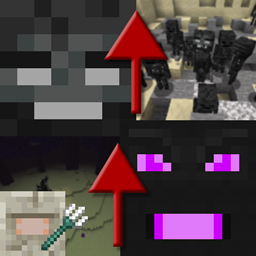
Progressive Bosses Mod untuk Minecraft 1.20.1, 1.16.5
Panggil versi yang lebih kuat dari Wither dan Ender Dragon
- unduhan
- 7 unduhan
- dilihat
- 33 dilihat
- Diperbarui
- Diperbarui 17.10.2026
- 1.16 — 1.20.1
 Forge
Forge
Tentang mod Progressive Bosses
Untuk port Fabric, lihat [Fabric] Progressive Bosses (perlu dicatat ini tidak berafiliasi dengan saya, silakan laporkan masalah kepada pengembangnya)
Mod ini memerlukan InsaneLib
Mod ini membuat Wither dan Ender Dragon lebih sulit dengan memungkinkan Anda memanggil versi mereka yang lebih kuat. Juga membuat pertarungan Elder Guardian lebih sulit.
Tingkat kesulitan akan menyesuaikan berdasarkan pemain di sekitar bos.
- Lebih banyak health: mereka itu bos ... kenapa mereka bisa tumbang hanya dengan beberapa serangan?
- Kemampuan baru: seperti Wither Charging atau kristal respawn Dragon
- Minion: baik Dragon maupun Wither memiliki Minion
- Kristal dalam kandang: lebih banyak kandang akan muncul di sekitar kristal, dan beberapa kristal akan muncul di dalam menara
- Acidball dan Skull lebih cepat: menghindar jadi lebih sulit
- Pertarungan Elder Guardian lebih sulit dan dengan hadiah yang nyata!
- Banyak sekali perbaikan bug: Mojang sudah tidak peduli lagi dengan aspek survival dari game ini
- Dan masih banyak lagi! Ini baru puncak gunung esnya.
Jadilah patreon untuk mencoba versi yang lebih baru lebih awal dan bermain di server publik.
Lihat proyek saya yang lain!
Izin Modpack
Lakukan apa pun yang Anda mau untuk modpack, publik atau privat terserah Anda!
Stop Mod Reposts
Jangan unduh mod ini dari situs web lain selain Curseforge atau Modrinth. Itu mungkin malware dan bisa membahayakan PC Anda. Cek https://stopmodreposts.org untuk info lebih lanjut.
Cara memasang Progressive Bosses
With Millida Launcher
Install Millida Launcher
The launcher is free: download it at millida.net/launcher and sign in with any nickname.
Click “Install” on this page
The launcher opens and installs the mod for Minecraft 1.16–1.20.1 on Forge automatically.
Launch the game
A profile with it appears in the launcher: click “Play”.
Manually
Install Forge
The loader must match the game version of the mod file, for example Minecraft 1.20.1. After installing it, a separate profile appears in your launcher.
Download the file for your version
In the version list above, pick the file progressivebosses-4.3.12.jar (999 KB) for your game version.
Put it in the mods folder
The folder is inside .minecraft (Windows: %appdata%\.minecraft\mods). If it does not exist, create it.
Launch the loader profile
Open “Mods” in the main menu: Progressive Bosses should be in the list.
Minecraft 1.20.1 runs on Java 17: with a different Java version the game may close right after launch.
Versi
Dengan dependensi
| Minecraft | Loader | File | Tanggal | Tindakan |
|---|---|---|---|---|
| 1.20.1 | Forge | 4.3.12999 KB 7 | ||
| 1.20.1 | Forge | 4.3.3990 KB | ||
| 1.20.1 | Forge | 4.3.1959 KB | ||
| 1.16.3 | — | [1.16.x] Progressive Bosses 2.2.068 KB |
FAQ
Which Minecraft versions does Progressive Bosses work on?
There are files for 1.16–1.20.1, 7 versions in total. The newest is 1.20.1.
Is Progressive Bosses for Forge or Fabric?
Only for Forge: 1.20.1. There are no files for Fabric or NeoForge: a mod for another loader will not start.
Does Progressive Bosses need other mods?
The author lists no required dependencies: the Forge loader is enough.
Which Java does Progressive Bosses need?
Minecraft 1.20.1 runs on Java 17. If the game closes right after launch, the usual cause is the wrong Java version in the profile settings.
Where can I download Progressive Bosses safely?
On this page: the file progressivebosses-4.3.12.jar (999 KB) is stored on Millida’s server, with no link shorteners. SHA-1 checksum: 5ec938a9e975ec49ae461d6ca1dd6e798a1d0dbc.
Ulasan
Jadilah yang pertama menilai Progressive Bosses


