
 NeoForge
 Forge
ForgeTentang mod Plonk
Tersedia di 1.7.10, 1.12.2, 1.14.4, 1.15.2, 1.16.5, 1.18.2, 1.19.2, 1.19.4, 1.20.1, 1.21.1, 26.1.x (Files (di atas) > View All > Game Version). Versi yang didukung dicetak tebal (tapi saya akan mencoba mendukung versi lain juga selama masih masuk akal).
Letakkan item dengan menekan P saat melihat ke sebuah blok. Putar semua dengan Sneak + P. Putar item dengan Sneak + Use. (Memerlukan tangan kosong)
- Catatan (untuk 1.16.4+): Tombol P yang digunakan Plonk bentrok dengan tombol Social Interactions Screen jadi kamu harus mengubah salah satunya!
Kamu bebas menggunakan mod ini di modpack apa pun (tidak perlu bertanya!).
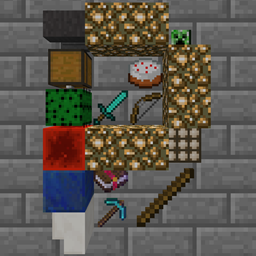
Letakkan hingga 4 tumpuk item di sisi blok mana pun menggunakan tombol Place Item (default-nya P). (Ukuran maksimum setiap tumpukan dapat dikonfigurasi dan mendukung StackUp!)
Item dapat diputar satu per satu ke 16 arah berbeda (Sneak + Klik Kanan dengan tangan kosong).
Seluruh petak item dapat diputar secara keseluruhan ke 4 arah berbeda (Sneak + tombol Place Item dengan tangan kosong).
Item dapat diambil oleh otomatisasi tetapi tidak dapat dimasukkan.
Tidak bisa lagi tersapu oleh fluida. Item yang diletakkan dapat tersapu oleh cairan. Dapat terendam air (sejak MC1.16.3+).
Konfigurasi di config/plonk.cfg (sebelum mc 1.13) atau [save folder]/serverconfig/plonk-server.toml (setelah mc 1.13)
Tampilan item yang diletakkan dan mekanismenya saat ini masih dapat berubah.
Video ini sudah sangat usang
Bug yang diketahui:
Kamera orang ketiga bertabrakan dengan blok (hanya 1.7.10 dan 1.12.2). Tidak yakin bagaimana memberi tahu minecraft agar membiarkan ray trace orang ketiga melewatinya (1.13+ memiliki RayTraceContext.Visual) Item transparan (misalnya Stained Glass) menyebabkan benda transparan lain di belakangnya tidak terender dengan benar. (sebelum mc 1.16)
Cara memasang Plonk
With Millida Launcher
Install Millida Launcher
The launcher is free: download it at millida.net/launcher and sign in with any nickname.
Click “Install” on this page
The launcher opens and installs the mod for Minecraft 1.18–26.1.2 on Forge or NeoForge automatically.
Launch the game
A profile with it appears in the launcher: click “Play”.
Manually
Install Forge or NeoForge
The loader must match the game version of the mod file, for example Minecraft 26.1.2. After installing it, a separate profile appears in your launcher.
Download the file for your version
In the version list above, pick the file plonk-26.1.2-10.0.10-neo.jar (162 KB) for your game version and loader.
Put it in the mods folder
The folder is inside .minecraft (Windows: %appdata%\.minecraft\mods). If it does not exist, create it.
Launch the loader profile
Open “Mods” in the main menu: Plonk should be in the list.
Versi
Dengan dependensi
| Minecraft | Loader | File | Tanggal | Tindakan |
|---|---|---|---|---|
| 26.1 | NeoForge | plonk-26.1.2-10.0.10-neo.jar162 KB | ||
| 26.1 | NeoForge | plonk-26.1.1-10.0.8-neo.jar162 KB | ||
| 1.20.1 | NeoForge, Forge | plonk-1.20.1-10.0.5-forge.jar148 KB | ||
| 1.18.1 | Forge | plonk-1.18.1-10.0.1.jar147 KB |
FAQ
Which Minecraft versions does Plonk work on?
There are files for 1.18–26.1.2, 7 versions in total. The newest is 26.1.2.
Is Plonk for Forge or Fabric?
There are files for Forge: 1.18–1.20.1 and for NeoForge: 1.20–26.1.2. There are no files for Fabric: a mod for another loader will not start.
Does Plonk need other mods?
The author lists no required dependencies: the Forge or NeoForge loader is enough.
Where can I download Plonk safely?
On this page: the file plonk-26.1.2-10.0.10-neo.jar (162 KB) is stored on Millida’s server, with no link shorteners. SHA-1 checksum: 4c8d57969618899ad01a7f182a680245070bcd7d.
Ulasan
Jadilah yang pertama menilai Plonk


