

 Fabric
 Forge
Tentang mod PlayerEx
11 Agustus 2023: Saya sedang beristirahat dari modding. Saya akan kembali, tapi tidak yakin kapan. Saya masih akan berusaha membalas komentar saat saya bisa. Perlu diketahui bahwa hanya versi terbaru yang akan mendapat dukungan. Selain itu, saya tidak lagi mengembangkan untuk Forge; mod ini sekarang menggunakan Fabric.
Deskripsi

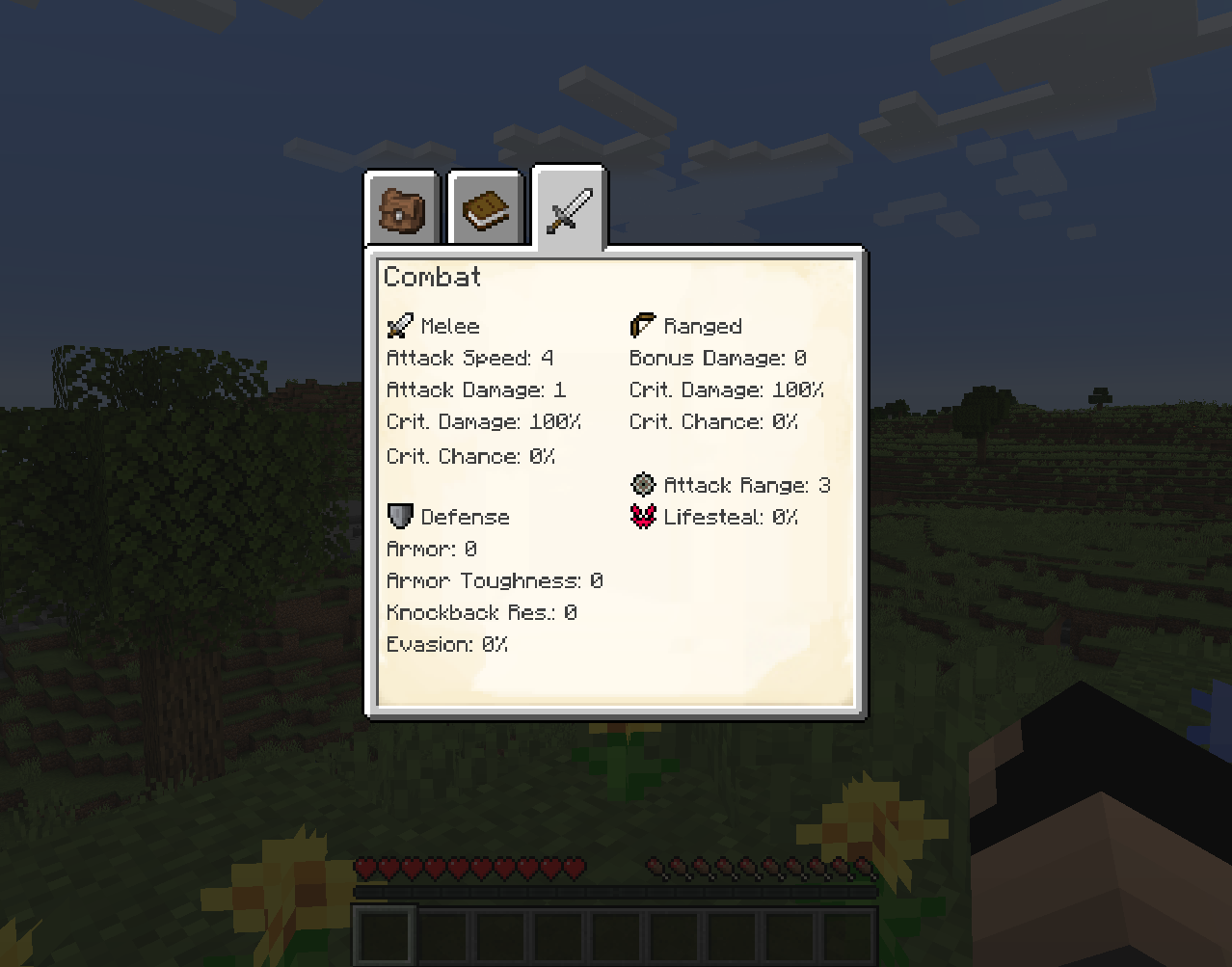
PlayerEx mendaftarkan atribut bertema RPG yang berfungsi penuh ke dalam game, dan menambahkannya ke pemain secara default (atribut ini dapat ditambahkan ke entitas hidup lainnya). Juga ditambahkan adalah level, poin skill, dan sistem level yang dapat dikonfigurasi. Iterasi terbaru didukung oleh Data Attributes, yang menjadi sumber sebagian besar kemampuan konfigurasinya - mohon pahami hal ini terlebih dahulu sebelum bertanya di sini tentang cara mengonfigurasi berbagai hal.
Untuk dokumentasi yang lebih rinci tentang konten dan mekanisme yang disediakan, antara lain, silakan baca wiki.
Mencari HUD lama? Sekarang tersedia sebagai mod mandiri di sini.
Mod addon juga tersedia: RelicEx; mod ini menawarkan beberapa item ekspansi untuk atribut PlayerEx. Beberapa video yang dengan baik hati menampilkan PlayerEx:
- Oleh Mischief of Mice (Forge)
- Oleh bstylia14 (Forge)
- Oleh AsianHalfSquat (Fabric)
Catatan dan Panduan
- Versi terakhir yang dirilis untuk Forge adalah v1.1.8.
- Selalu gunakan versi terbaru.
- Harap hapus file config sebelum memperbarui ke versi lain, karena file config cenderung berubah antar versi mayor seiring semakin banyaknya kemampuan konfigurasi yang diterapkan.
- Modpack tidak masalah.
- Mod ini sudah menyertakan (jar-in-jar) Cardinal Components (modul Base, Entity dan Chunk), TextPlaceholderAPI, OfflinePlayerCache dan exp4j (kredit diberikan).
Cara memasang PlayerEx
With Millida Launcher
Install Millida Launcher
The launcher is free: download it at millida.net/launcher and sign in with any nickname.
Click “Install” on this page
The launcher opens and installs the mod for Minecraft 1.16.4–1.19.2 on Fabric or Forge automatically.
Launch the game
A profile with it appears in the launcher: click “Play”.
Manually
Install Fabric or Forge
The loader must match the game version of the mod file, for example Minecraft 1.19.2. After installing it, a separate profile appears in your launcher.
Download the file for your version
In the version list above, pick the file playerex-3.5.4+1.19.2.jar (607 KB) for your game version and loader.
Put it in the mods folder
The folder is inside .minecraft (Windows: %appdata%\.minecraft\mods). If it does not exist, create it.
Launch the loader profile
Open “Mods” in the main menu: PlayerEx should be in the list.
Minecraft 1.19.2 runs on Java 17: with a different Java version the game may close right after launch.
Versi
Dengan dependensi
| Minecraft | Loader | File | Tanggal | Tindakan |
|---|---|---|---|---|
| 1.19.2 | Fabric | 3.5.4+1.19.2607 KB 1 | ||
| 1.16.5 | Forge | playerex-1.1.8-1.16.5.jar131 KB 3 |
FAQ
Which Minecraft versions does PlayerEx work on?
There are files for 1.19.2, 1.16.5, 1.16.4. The newest is 1.19.2.
Is PlayerEx for Forge or Fabric?
There are files for Fabric: 1.19.2 and for Forge: 1.16.4–1.16.5. There are no files for NeoForge: a mod for another loader will not start.
Does PlayerEx need other mods?
The author lists no required dependencies: the Fabric or Forge loader is enough.
Which Java does PlayerEx need?
Minecraft 1.19.2 runs on Java 17. If the game closes right after launch, the usual cause is the wrong Java version in the profile settings.
Where can I download PlayerEx safely?
On this page: the file playerex-3.5.4+1.19.2.jar (607 KB) is stored on Millida’s server, with no link shorteners. SHA-1 checksum: 48e9ef1dc6aafb45e9aa7c5d9ab2fe588f297d7c.
Ulasan
Jadilah yang pertama menilai PlayerEx


