

On Soul Fire Mod untuk Minecraft 1.21.4
Membuat soul fire benar-benar memiliki sifat unik
- unduhan
- 1 unduhan
- dilihat
- 33 dilihat
- Diperbarui
- Diperbarui 28.10.2026
- 1.21.4
 Fabric
Tentang Soul Fire
Perhatian! Mod ini sudah dihentikan, tetapi semua fiturnya telah dipindahkan ke Inferno. Pastikan untuk memeriksanya jika kamu ingin memainkan mod ini di versi yang lebih baru!
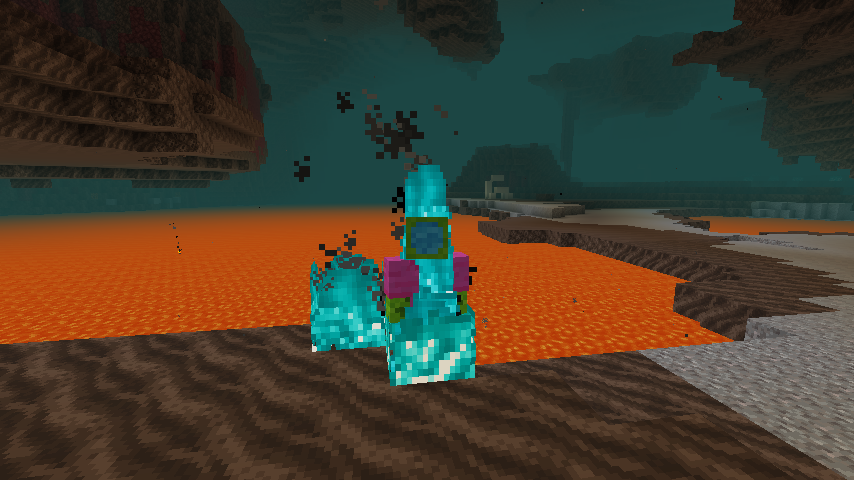
Membuat entitas yang terbakar oleh soul fire benar-benar menampilkan api biru. Mereka juga menerima 2 damage alih-alih 1, seperti yang dilakukan soul fire.
Cara memasang On Soul Fire
With Millida Launcher
Install Millida Launcher
The launcher is free: download it at millida.net/launcher and sign in with any nickname.
Click “Install” on this page
The launcher opens and installs the mod for Minecraft 1.21.4 on Fabric automatically.
Launch the game
A profile with it appears in the launcher: click “Play”.
Manually
Install Fabric
The loader must match the game version of the mod file, for example Minecraft 1.21.4. After installing it, a separate profile appears in your launcher.
Download the file for your version
In the version list above, pick the file onsoulfire-1.21.4-r1.jar (173 KB) for your game version.
Put it in the mods folder
The folder is inside .minecraft (Windows: %appdata%\.minecraft\mods). If it does not exist, create it.
Launch the loader profile
Open “Mods” in the main menu: On Soul Fire should be in the list.
Minecraft 1.21.4 runs on Java 21: with a different Java version the game may close right after launch.
Versi
Dengan dependensi
| Minecraft | Loader | File | Tanggal | Tindakan |
|---|---|---|---|---|
| 1.21.4 | Fabric | on-soul-fire-1.21.4-r1.jar173 KB 1 |
Ulasan
Jadilah yang pertama menilai On Soul Fire


