
Multi-Piston Mod untuk Minecraft 1.20.1, 1.21.1
Blok Piston Multi-arah
 NeoForge
 Forge
ForgeTentang mod Multi-Piston
Multi-piston adalah mod yang dibuat oleh Ldt-team yang juga membuat dan memelihara minecolonies, structurize, blockout, dan armory.
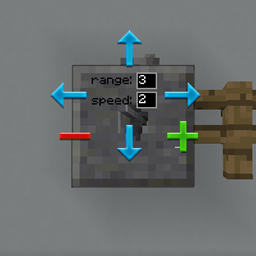
Multi-piston menambahkan blok multipiston ke dalam game yang memungkinkan Anda menyedot blok apa pun dari arah yang ditentukan dan mengeluarkannya ke arah mana pun dengan kecepatan dan jangkauan yang dapat ditentukan
Resep:
Horizontal:
Vertikal:
Bridge:
Konfigurasi:
FAQ:
Bagaimana cara kerja GUI-nya?
- Klik kanan blok untuk membuka GUI.
- Klik kanan arah input dan klik kiri arah output
- Edit jangkauan dan kecepatan, keluar dari GUI melalui tombol escape.
Bagaimana cara meningkatkan jangkauannya?
- Jangkauan maksimum adalah 10, hingga mencapai jenis blok yang berbeda
Bisakah saya meningkatkan kecepatannya?
- Hanya hingga 3, mungkin akan mendukung lebih banyak di masa depan.
Bisakah saya mengubah suaranya?
- Mungkin juga akan ditambahkan di masa depan.
Apakah ini berfungsi dengan redstone?
- Ya, ini berfungsi dengan tombol, tuas, dan input redstone apa pun seperti piston biasa.
Cara memasang Multi-Piston
With Millida Launcher
Install Millida Launcher
The launcher is free: download it at millida.net/launcher and sign in with any nickname.
Click “Install” on this page
The launcher opens and installs the mod for Minecraft 1.18.2–1.21.1 on Forge or NeoForge automatically.
Launch the game
A profile with it appears in the launcher: click “Play”.
Manually
Install Forge or NeoForge
The loader must match the game version of the mod file, for example Minecraft 1.21.1. After installing it, a separate profile appears in your launcher.
Download the file for your version
In the version list above, pick the file multipiston-1.2.58-1.21.1.jar (33 KB) for your game version and loader.
Put it in the mods folder
The folder is inside .minecraft (Windows: %appdata%\.minecraft\mods). If it does not exist, create it.
Launch the loader profile
Open “Mods” in the main menu: Multi-Piston should be in the list.
Minecraft 1.21.1 runs on Java 21: with a different Java version the game may close right after launch.
Versi
Dengan dependensi
| Minecraft | Loader | File | Tanggal | Tindakan |
|---|---|---|---|---|
| 1.20.1 | Forge | multipiston-1.20-0.0.47-snapshot.jar38.6 KB 10 | ||
| 1.21 | NeoForge | multipiston-1.2.58-1.21.1.jar33.3 KB 9 | ||
| 1.21 | NeoForge | multipiston-1.2.55-1.21.1-snapshot.jar32.6 KB | ||
| 1.20.1 | NeoForge, Forge | multipiston-1.20-1.2.43-RELEASE.jar37.8 KB | ||
| 1.20.4 | NeoForge | multipiston-1.20.4-1.2.37-ALPHA-universal.jar33 KB | ||
| 1.20.1 | Forge | multipiston-1.20-1.2.32-ALPHA.jar37.8 KB | ||
| 1.18.2 | — | multi-piston-1.18.2-1.2.13-ALPHA.jar50.1 KB |
FAQ
Which Minecraft versions does Multi-Piston work on?
There are files for 1.21.1, 1.21, 1.20.4, 1.20.1, 1.20, 1.18.2. The newest is 1.21.1.
Is Multi-Piston for Forge or Fabric?
There are files for Forge: 1.20–1.20.1 and for NeoForge: 1.20–1.21.1. There are no files for Fabric: a mod for another loader will not start.
Does Multi-Piston need other mods?
The author lists no required dependencies: the Forge or NeoForge loader is enough.
Which Java does Multi-Piston need?
Minecraft 1.21.1 runs on Java 21. If the game closes right after launch, the usual cause is the wrong Java version in the profile settings.
Where can I download Multi-Piston safely?
On this page: the file multipiston-1.2.58-1.21.1.jar (33 KB) is stored on Millida’s server, with no link shorteners. SHA-1 checksum: 2b63be739da24247328e4052ec91c928230d0390.
Ulasan
Jadilah yang pertama menilai Multi-Piston


