

Modpack Configuration Checker Mod untuk Minecraft 1.12.2, 1.21
Mod yang memungkinkan pembuat modpack menampilkan kredit modpack dan memverifikasi modpack telah disiapkan dengan benar.
 Forge
Forge Fabric
Tentang mod Modpack Configuration Checker
Silakan laporkan bug apa pun di pelacak masalah di sini
Modpack Configuration Checker
Modpack Configuration Checker adalah mod yang sangat dapat dikonfigurasi yang memungkinkan pembuat modpack menyesuaikan Minecraft agar lebih mendukung modpack. Mod ini menyediakan fitur seperti menampilkan halaman web saat peluncuran hingga fitur seperti memeriksa apakah pengguna modpack telah menetapkan RAM yang cukup untuk modpack. Mod ini secara signifikan memperluas jumlah opsi yang dimiliki penulis modpack.
Mod ini dapat dengan mudah dikonfigurasi dari dalam game (instruksi di bawah). Namun tanpa konfigurasi, Modpack Configuration Checker memverifikasi bahwa setidaknya 2gb RAM telah ditetapkan untuk modpack, yang sangat meningkatkan performa dan meminimalkan crash.
Beberapa fitur yang ditawarkan mod ini:
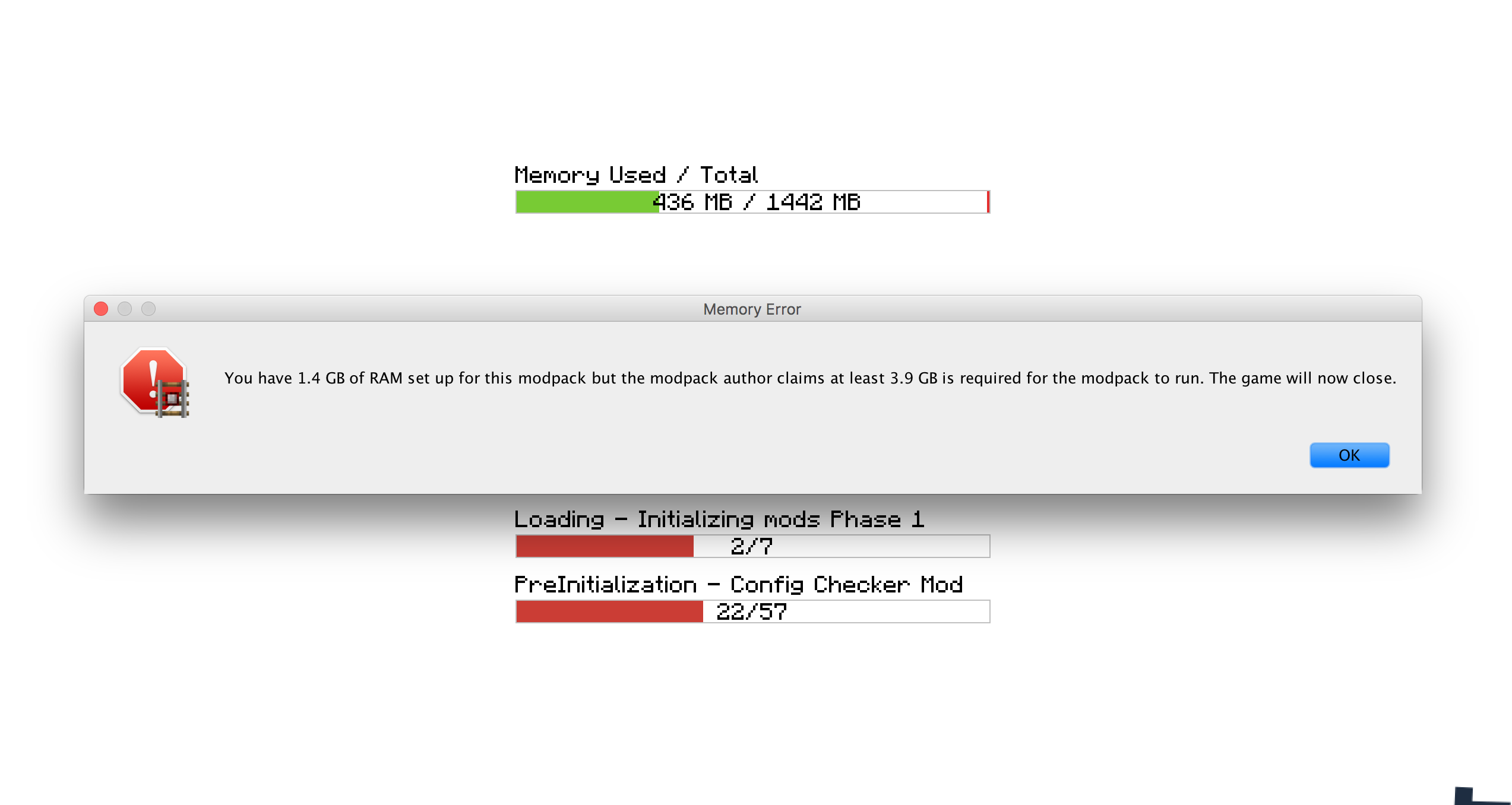
- Menetapkan jumlah RAM yang diperlukan agar modpack dapat berjalan. Jika persyaratan ini tidak terpenuhi, pengguna akan diberi peringatan dan game akan ditutup.
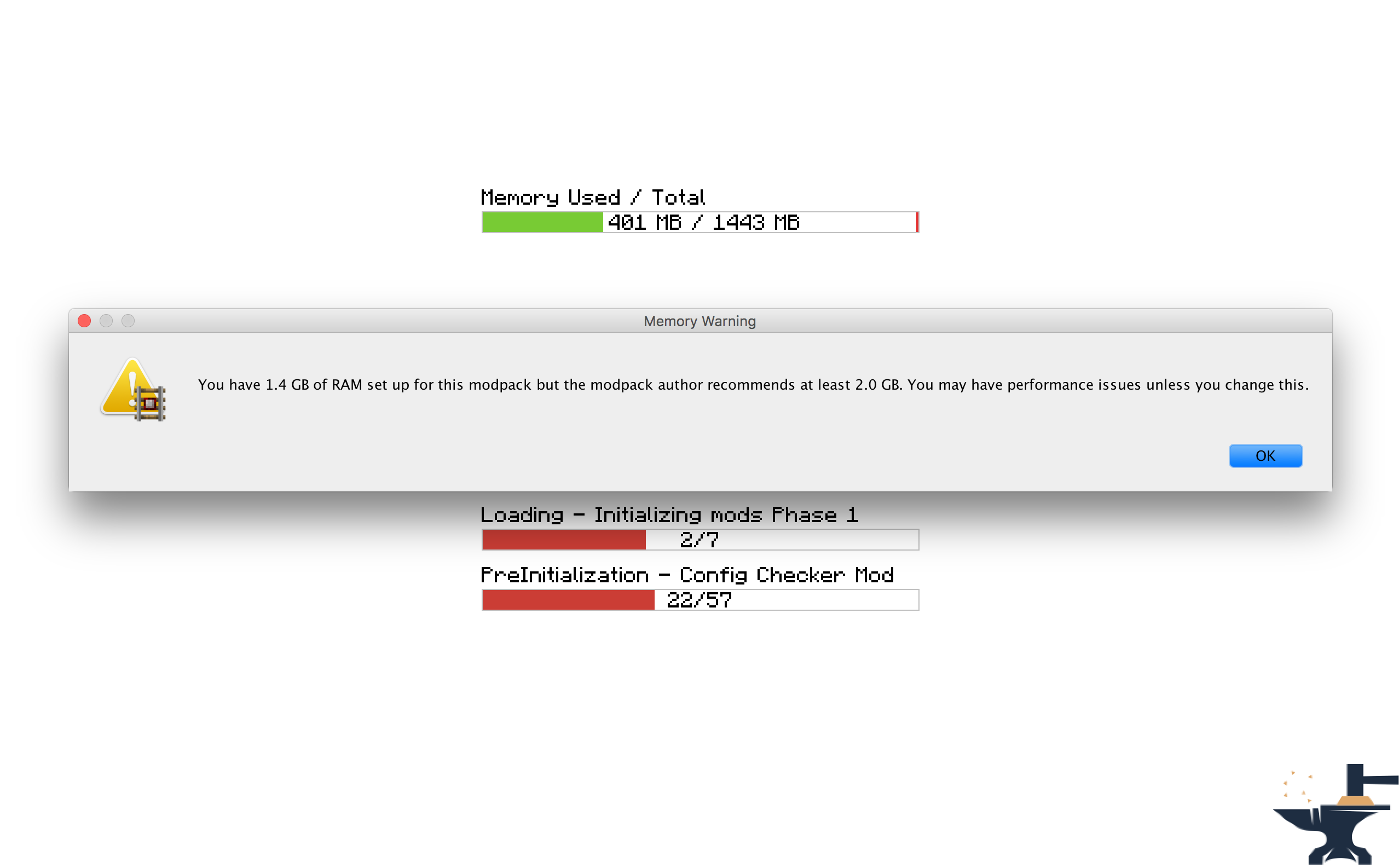
- Menetapkan jumlah RAM yang direkomendasikan agar modpack dapat berjalan. Jika persyaratan ini tidak terpenuhi, pengguna akan diberi peringatan.
- Menetapkan situs web untuk dibuka saat game diluncurkan. Berguna untuk membuka situs web modpack atau halaman dukungan.
- Menetapkan pesan khusus untuk ditampilkan saat game dimuat, misalnya untuk menampilkan kredit.
- Menetapkan pesan khusus untuk ditampilkan ketika persyaratan RAM tidak terpenuhi. Berguna untuk membuat mod sesuai dengan nuansa pack Anda.
- Kemampuan untuk mengubah apakah kotak pesan muncul di atas jendela lain.
- Menetapkan pesan sapaan khusus yang muncul di chat saat game dimuat.
Lisensi
Jangan ragu untuk menggunakan mod ini di modpack apa pun dan mempostingnya di forum lain. Pastikan saja untuk menyertakan tautan kembali ke sini. Lihat Lisensi Lengkap Di Sini
Tangkapan Layar
Cara Mengonfigurasi (Minecraft 1.13 +
Saya sangat merekomendasikan menyertakan mod ini di modpack Anda: https://www.curseforge.com/minecraft/mc-mods/configured.
Ini akan memungkinkan konfigurasi dari dalam game sehingga pekerjaan Anda jauh lebih mudah.
Langkah 1) Klik tombol 'Mods' di layar menu utama.
Langkah 2) Pilih 'Modpack Config Checker dari daftar mod di sebelah kiri.
Langkah 3) Klik tombol 'Config' di kiri bawah.
Catatan
- Jika Anda tidak yakin tentang apa yang dilakukan suatu pengaturan, mengarahkan kursor ke atasnya akan menampilkan deskripsi singkat yang seharusnya memperjelas. Namun jika Anda masih tidak yakin, bereksperimenlah!! Atau jika Anda lebih suka, kirimkan saya PM atau tinggalkan komentar di thread ini. Saya akan dengan senang hati menjelaskan mekanisme mod apa pun kepada Anda.
Konfigurasi Manual (1.13.x - 1.20.x)
Konfigurasi Manual (Terletak di folder dalam game di: Config\concheckrmd-client.toml)
Bagian ini menunjukkan cara mengonfigurasi mod secara manual tanpa GUI opsional. Buka file konfigurasi di notepad atau editor teks.
Versi berkode warna dari file konfigurasi. Ini akan menunjukkan kepada Anda nilai mana yang dapat dan tidak dapat diubah.
Kunci Warna
BIRU: Boolean (Artinya hanya dapat diubah menjadi 'true' atau 'false')
MERAH: String (Artinya dapat diubah menjadi teks apa pun. mis: 'Hello World')
Hijau: Integer (Artinya dapat diubah menjadi angka apa pun. mis: '512')
["Customisable Chat Greeting Message"] The color of the message to be displayed in chat. Allowed Values: Blue, Green, Red, Aqua, Yellow, White, Black, Grey, Purple, DarkBlue, DarkGreen, DarkRed, DarkPurple "3) Greeting Message Color" = "Yellow" The text to be displayed in chat. "2) Greeting Message Text" = "Hello there! Welcome to my modpack." Customisable message that will be displayed in chat when a world is loaded. "1) Display Chat Greeting Message?" = true
["Customisable Start Message"] Customisable message that will appear each time the game starts. This is useful for displaying credits. "1) Display message box?" = true Will the window show on top of all other windows? Recommended to keep set to True. "2) Display message box topmost?" = true The text that will be displayed in the message box. "3) Message Box Text" = "Hello Modpack Users! Made by mattr"
["Customisable First Start Message"] A message box that will be displayed when the game is started for the first time. This is useful for displaying instructions. "1) Display message box?" = true Will the window show on top of all other windows? Recommended to keep set to True. "2) Display message box topmost?" = true The text that will be displayed in the message box. "3) Message Box Text" = "Welcome. Thank you for starting my mofdpack for the first time!"
["Open A Website when the Game Starts"] Opens a webpage when the game starts. This is useful for modpack support. "1) Display Website when game starts?" = true The URL of the website that will be displayed. This can be formatted like: http://google.com, www.google.com or google.com. "2) Website URL" = "minecraft.curseforge.com/projects/config-checker"
["Amount of RAM Recommended for Game to Start"] The amount of RAM recommended for stable gameplay. Range: 128 ~ 51200 "1) Ram Recommended (IN MB)" = 12048 If the player has less than the recommended amount of RAM assigned to the modpack then a warning will be displayed when the game is started. "2) Check RAM meets recommendation?" = true The custom message to be displayed if you have set the previous setting to 'True'. Will display custom message instead of the default text. "5) Custom Message" = "You should assign more RAM to experience better performance." Will the window show on top of all other windows? I highly recommend this is left as true. "3) Display message box topmost?" = true Customise the text that appears in the warning message. Will display custom message instead of the default text. "4) Customise low RAM Warning?" = false
["Recommended RAM Chat Message"] The amount of RAM recommended for stable gameplay. Range: 128 ~ 51200 "1) Ram Recommended (IN MB)" = 51200 If the player has less than the recommended amount of RAM assigned to the modpack then a warning will be displayed in chat when a world is loaded. "2) Check RAM meets recommendation?" = true Customise the text that appears in the warning message. Will display custom message instead of the default text. "3) Customise low RAM Warning?" = true The custom message to be displayed in chat if you have set the previous setting to 'True'. Will display custom message instead of the default text. "4) Custom Message" = "You should assign more RAM to experience better performance."
["Amount of RAM Required for Game to Start"] If the player has less than the required amount of RAM assigned to the modpack then they will be alerted as the game starts and the game will close. "2) Check RAM meets requirement?" = true The amount of RAM required for the game to run. Range: 128 ~ 51200 "1) Ram Required (IN MB)" = 1024 The custom message to be displayed if you have set the previous setting to 'True'. Will display custom message instead of the default text. "5) Custom Message" = "You need more RAM. The game will close." Will the window show on top of all other windows? I highly recommend this is left as true. "3) Display message box topmost?" = true Customise the text that appears in the error message. Will display custom message instead of the default text. "4) Display custom text in messagebox?" = false
["Game Launch Time Limit"] If the game exceeds the launch timeout then a message box will be displayed and the game will close. "2) Check game meets launch timeout?" = false The custom message to be displayed if you have set the previous setting to 'True'. Will display custom message instead of the default text. "5) Custom Message" = "The game has taken too long too start to start this modpack. This is probably due to insufficient system resources. The game will now close." The maximum amount of time the game will be allowed to spend booting. (IN SECONDS) Range: 5 ~ 5400 "1) Launch Timeout (IN SECONDS)" = 30 Will the window show on top of all other windows? I highly recommend this is left as true. "3) Display message box topmost?" = true Customise the text that appears in the error message. Will display custom message instead of the default text. "4) Display custom text in error message?" = false
Cara Mengonfigurasi (Minecraft 1.11 + 1.12)
Mulai versi 1.6, mod ini sekarang dapat dikonfigurasi sepenuhnya dari dalam game. Ini berarti tidak lagi perlu mengedit file konfigurasi mana pun secara manual sehingga mod ini JAUH lebih mudah digunakan. Layar konfigurasi dapat diakses dengan mengikuti langkah-langkah berikut:
Langkah 1) Klik tombol 'Mods' di layar menu utama.
Langkah 2) Pilih 'Modpack Config Checker dari daftar mod di sebelah kiri.
Langkah 3) Klik tombol 'Config' di kiri bawah.
Catatan
- Jika Anda tidak yakin tentang apa yang dilakukan suatu pengaturan, mengarahkan kursor ke atasnya akan menampilkan deskripsi singkat yang seharusnya memperjelas. Namun jika Anda masih tidak yakin, bereksperimenlah!! Atau jika Anda lebih suka, kirimkan saya PM atau tinggalkan komentar di thread ini. Saya akan dengan senang hati menjelaskan mekanisme mod apa pun kepada Anda.
- Saya telah membuat alat migrasi yang berarti semua pengaturan Anda akan ditransfer ke versi mod yang diperbarui. Ini memastikan transfer yang mulus, sehingga tidak akan berdampak pada pengguna biasa. Jika file Config lama terdeteksi, game akan secara otomatis memberi Anda opsi untuk mengimpor pengaturan lama Anda. Saya telah menghabiskan banyak waktu untuk fitur ini, sehingga tingkat keberhasilannya sangat sangat tinggi.
- Konfigurasi dalam game hanya tersedia di 1.11.2 ke atas (Untuk saat ini). Ini karena pengaturan ini lebih kompleks pada versi forge yang lebih lama. Jika Anda menggunakan versi Minecraft yang lebih rendah, Anda harus menggunakan konfigurasi legacy, yang dijelaskan di bawah. Jika ada cukup minat, saya mungkin akan mem-porting balik ke 1.10.2 atau 1.7.10 di masa mendatang, tetapi untuk saat ini versi tersebut tidak akan diperbarui lagi.
Konfigurasi Legacy (Minecraft 1.10 dan di bawahnya) (Terletak di folder dalam game di: Config/concheckrmd.cfg)
Versi berkode warna dari file konfigurasi. Ini akan menunjukkan kepada Anda nilai mana yang dapat dan tidak dapat diubah.
Kunci Warna
BIRU: Boolean (Artinya hanya dapat diubah menjadi 'true' atau 'false')
MERAH: String (Artinya dapat diubah menjadi teks apa pun. mis: 'Hello World')
Hijau: Integer (Artinya dapat diubah menjadi angka apa pun. mis: '512')
File Konfigurasi
"custom greeting message" {
B:"1. Display custom greeting message when joining a world?"=false
Pesan yang akan ditampilkan di chat saat game dimuat. Hanya akan ditampilkan jika 'Display custom greeting message when joining a world?' sama dengan true [default: Hello there! Welcome to my modpack.]
S:"2. Custom greeting message text"=Hello there! Welcome to my modpack. }
"custom messagebox" { B:"1. Show custom messagebox when game loads?"=false B:"2. Display message box on top of all other windows?"=true
Masukkan teks popup. Hanya akan ditampilkan jika 'Show custom messagebox when game loads?' sama dengan true [default: Hello World!!]
S:"3. Custom Messagebox text"=Hello World!! }
"display webpage" { B:"1. Open web browser to URL when game loads?"=false
Masukkan URL yang akan diluncurkan. Hanya akan ditampilkan jika 'Open web browser to URL when game loads?' sama dengan true [default: http://minecraft.curseforge.com/projects/config-checker]
S:"2. URL to webpage"=minecraft.curseforge.com/projects/config-checker }
"ram recommendation" { I:"1. Ram Recommended (IN MB)"=2048 B:"2. Check RAM meets recommendation?"=true B:"3. Display message box on top of all other windows?"=true B:"4. Display custom text in message box if RAM recommendations not met?"=false
Masukkan teks khusus yang akan ditampilkan jika rekomendasi RAM tidak terpenuhi. Hanya akan ditampilkan jika 'Display custom text in message box if RAM recommendation not met?' sama dengan true [default: You should add more RAM.]
S:"5. Custom recommendation text"=You should add more RAM. B:"6. Display warning in game chat if RAM recommendation not met?"=true B:"7. Customise game chat RAM recommendation message?"=false
Masukkan teks khusus yang akan ditampilkan di chat dalam game jika rekomendasi RAM tidak terpenuhi. Hanya akan ditampilkan jika 'Customise game chat RAM recommendation message?"' sama dengan true [default: [WARNING] You should assign more RAM to this modpack.]
S:"8. Custom chat message"=[WARNING] You should assign more RAM to this modpack. }
"ram requirement" { I:"1. Ram Required (IN MB)"=1024 B:"2. Check RAM meets requirement?"=false B:"3. Display message box on top of all other windows?"=true B:"4. Display custom text in message box if RAM requirement not met?"=false
Masukkan teks khusus yang akan ditampilkan jika persyaratan RAM tidak terpenuhi. Hanya akan ditampilkan jika 'Display custom text in message box if RAM requirement not met?' sama dengan true [default: You need more RAM.]
S:"5. Custom requirement text"=You need more RAM. }
Cara memasang Modpack Configuration Checker
With Millida Launcher
Install Millida Launcher
The launcher is free: download it at millida.net/launcher and sign in with any nickname.
Click “Install” on this page
The launcher opens and installs the mod for Minecraft 1.12–1.21 on Fabric or Forge automatically.
Launch the game
A profile with it appears in the launcher: click “Play”.
Manually
Install Fabric or Forge
The loader must match the game version of the mod file, for example Minecraft 1.21. After installing it, a separate profile appears in your launcher.
Download the file for your version
In the version list above, pick the file Modpack Configuration Checker-1.21.x-v1.9.5-forge.jar (146 KB) for your game version and loader.
Put it in the mods folder
The folder is inside .minecraft (Windows: %appdata%\.minecraft\mods). If it does not exist, create it.
Launch the loader profile
Open “Mods” in the main menu: Modpack Configuration Checker should be in the list.
Minecraft 1.21 runs on Java 21: with a different Java version the game may close right after launch.
Versi
Dengan dependensi
| Minecraft | Loader | File | Tanggal | Tindakan |
|---|---|---|---|---|
| 1.20.6 | Fabric | Modpack Configuration Checker-1.20.6-v1.9.8-fabric.jar84 KB | ||
| 1.21 | Forge | Modpack Configuration Checker-1.21.x-v1.9.5-forge.jar146 KB | ||
| 1.12.1 | — | Modpack Configuration Checker-1.12.2-v1.9.5.jar154 KB | ||
| 1.14.4 | — | Modpack Configuration Checker-1.14.x-v1.7.1.jar135 KB |
FAQ
Which Minecraft versions does Modpack Configuration Checker work on?
There are files for 1.21, 1.20.6, 1.14.4, 1.12.2, 1.12.1, 1.12. The newest is 1.21.
Does Modpack Configuration Checker need other mods?
The author lists no required dependencies: the Fabric or Forge loader is enough.
Which Java does Modpack Configuration Checker need?
Minecraft 1.21 runs on Java 21. If the game closes right after launch, the usual cause is the wrong Java version in the profile settings.
Ulasan
Jadilah yang pertama menilai Modpack Configuration Checker


