
Luggage Mod untuk Minecraft 1.20.1, 1.21.1
Rekreasi OpenBlocks Luggage untuk versi modern
 NeoForge
 Forge
Forge Fabric
 Quilt
QuiltTentang mod Luggage
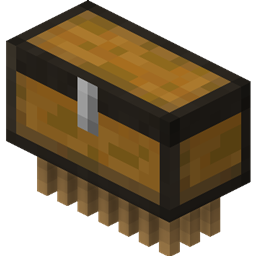
Mod sederhana untuk membuat ulang entitas Luggage dari OpenBlocks di versi MC modern.
- Sama seperti di OpenBlocks, Luggage mengikuti Anda dan mengambil item di tanah lalu menyimpannya di inventarisnya. Anda dapat membuka inventarisnya dengan klik kanan padanya.
- Shift klik kanan pada Luggage akan memungkinkan Anda mengambil entitas tersebut sebagai item, sehingga Anda dapat menyimpannya dengan mudah. Inventaris, status charged, dan namanya tersimpan di dalam item tersebut.
- Luggage bersifat abadi, jadi Anda tidak perlu khawatir kehilangan item Anda.
- Jika Luggage Anda tersambar petir dengan cara tertentu, ia akan menjadi charged dan kapasitas inventarisnya menjadi dua kali lipat. Perubahan ini tercermin pada tekstur untuk entitas maupun itemnya.
- Apakah Luggage Anda tidak lagi mengikuti Anda? Apakah Anda kehilangan jejak ke mana Luggage Anda pergi, dan ia tidak mau teleport kembali kepada Anda? Apakah ia terjebak di dalam gua yang dalam dan Anda tidak dapat dengan mudah mengambilnya? Nah, tidak perlu mencari lebih jauh selain fungsi bersiul! Cukup tekan tombol siul, (secara default terikat ke ) dan selama Luggage berada di chunk yang termuat, ia akan teleport kembali kepada Anda.
Build Forge diberi label sebagai rilis, build Fabric diberi label sebagai beta. Ini hanya agar keduanya terlihat oleh semua orang.
Silakan laporkan masalah apa pun yang Anda temukan ke issue tracker (tautannya ada di atas). Terima kasih!
Cara memasang Luggage
With Millida Launcher
Install Millida Launcher
The launcher is free: download it at millida.net/launcher and sign in with any nickname.
Click “Install” on this page
The launcher opens and installs the mod for Minecraft 1.19.2–1.21.1 on Fabric, Forge, NeoForge or Quilt automatically.
Launch the game
A profile with it appears in the launcher: click “Play”.
Manually
Install Fabric, Forge, NeoForge or Quilt
The loader must match the game version of the mod file, for example Minecraft 1.21.1. After installing it, a separate profile appears in your launcher.
Download the file for your version
In the version list above, pick the file luggage-1.21-1.6.12.jar (166 KB) for your game version and loader.
Put it in the mods folder
The folder is inside .minecraft (Windows: %appdata%\.minecraft\mods). If it does not exist, create it.
Launch the loader profile
Open “Mods” in the main menu: Luggage should be in the list.
Minecraft 1.21.1 runs on Java 21: with a different Java version the game may close right after launch.
Versi
Dengan dependensi
| Minecraft | Loader | File | Tanggal | Tindakan |
|---|---|---|---|---|
| 1.21.1 | NeoForge | Luggage 1.6.12 - NeoForge 1.21166 KB | ||
| 1.20.1 | Forge | Luggage 1.6.1 - Forge 1.20172 KB | ||
| 1.19.2 | Fabric, Quilt | Luggage 1.5.2 - Fabric296 KB |
FAQ
Which Minecraft versions does Luggage work on?
There are files for 1.21.1, 1.20.1, 1.20, 1.19.2. The newest is 1.21.1.
Is Luggage for Forge or Fabric?
There are files for Fabric: 1.19.2, for Forge: 1.20–1.20.1, for NeoForge: 1.21.1 and for Quilt: 1.19.2.
Does Luggage need other mods?
The author lists no required dependencies: the Fabric, Forge, NeoForge or Quilt loader is enough.
Which Java does Luggage need?
Minecraft 1.21.1 runs on Java 21. If the game closes right after launch, the usual cause is the wrong Java version in the profile settings.
Where can I download Luggage safely?
On this page: the file luggage-1.21-1.6.12.jar (166 KB) is stored on Millida’s server, with no link shorteners. SHA-1 checksum: 83db4b12f9c673b9a1990531d3a0d182d46301e4.
Ulasan
Jadilah yang pertama menilai Luggage


