
Long NBT Killer Mod untuk Minecraft 1.21.8
Mencegah minecraft crash saat menemui tag nbt yang dalam
 NeoForge
 Fabric
 Forge
Tentang mod Long NBT Killer
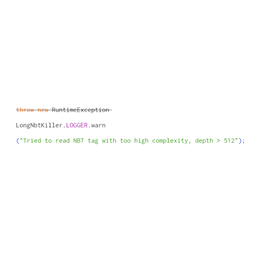
Ketika Minecraft menemukan tag nbt compound / list dengan kedalaman lebih dari 512, Minecraft akan melempar exception dan menolak memuat save.
Mod ini menggantikan mekanisme yang menjengkelkan itu dengan peringatan log yang tidak berbahaya, dan membiarkan game tetap berjalan.
Sayangnya, perilaku keliru dari mod tertentu dapat menyebabkan kedalaman NBT terus bertambah, yang akhirnya memicu StackOverflowError. Akibatnya, pengguna mungkin perlu mengidentifikasi mod spesifik yang bertanggung jawab dan mengambil tindakan yang tepat. Menurut laporan dari pengguna "ABadHaiku," masalah seperti ini cukup umum terjadi pada beberapa mod MCreator. Dia sudah menghubungi pengembang MCreator, yang sejak itu telah memperbaiki masalah ini di versi terbaru. Jika pengguna dapat menentukan sumber glitch-nya, mereka harus melaporkannya kepada pembuat mod tersebut. Selain itu, "ABadHaiku" telah menyediakan metode untuk memperbaiki file save yang terdampak di sini.
PERHATIAN:
Tag nbt compound / list dengan kedalaman lebih dari 512 itu sendiri sudah tidak normal, dan kamu dapat memeriksa save-mu melalui editor NBT setelah menerima peringatan di log;
Kamu PASTI BISA menambahkan mod ini ke modpack-mu.
Cara memasang Long NBT Killer
With Millida Launcher
Install Millida Launcher
The launcher is free: download it at millida.net/launcher and sign in with any nickname.
Click “Install” on this page
The launcher opens and installs the mod for Minecraft 1.21.3–1.21.8 on Fabric, Forge or NeoForge automatically.
Launch the game
A profile with it appears in the launcher: click “Play”.
Manually
Install Fabric, Forge or NeoForge
The loader must match the game version of the mod file, for example Minecraft 1.21.8. After installing it, a separate profile appears in your launcher.
Download the file for your version
In the version list above, pick the file LongNBTKiller-NeoForge-1.21.8-1.0.0.jar (4 KB) for your game version and loader.
Put it in the mods folder
The folder is inside .minecraft (Windows: %appdata%\.minecraft\mods). If it does not exist, create it.
Launch the loader profile
Open “Mods” in the main menu: Long NBT Killer should be in the list.
Minecraft 1.21.8 runs on Java 21: with a different Java version the game may close right after launch.
Versi
Dengan dependensi
| Minecraft | Loader | File | Tanggal | Tindakan |
|---|---|---|---|---|
| 1.21.8 | NeoForge | LongNBTKiller-NeoForge-1.21.8-1.0.0.jar4 KB | ||
| 1.21.8 | Fabric | LongNbtKiller-Fabric-1.21.8-1.0.0.jar3.6 KB | ||
| 1.21.3 | Forge | LongNBTKiller-Forge-1.21.3-1.0.0.jar5.3 KB |
FAQ
Which Minecraft versions does Long NBT Killer work on?
There are files for 1.21.8, 1.21.3. The newest is 1.21.8.
Is Long NBT Killer for Forge or Fabric?
There are files for Fabric: 1.21.8, for Forge: 1.21.3 and for NeoForge: 1.21.8.
Does Long NBT Killer need other mods?
The author lists no required dependencies: the Fabric, Forge or NeoForge loader is enough.
Which Java does Long NBT Killer need?
Minecraft 1.21.8 runs on Java 21. If the game closes right after launch, the usual cause is the wrong Java version in the profile settings.
Where can I download Long NBT Killer safely?
On this page: the file LongNBTKiller-NeoForge-1.21.8-1.0.0.jar (4 KB) is stored on Millida’s server, with no link shorteners. SHA-1 checksum: 42f6036a4d238640c5190407a0a975aef705b0bb.
Ulasan
Jadilah yang pertama menilai Long NBT Killer


