
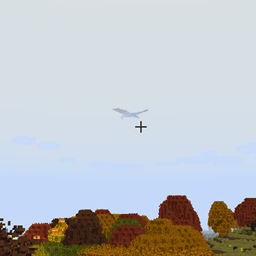
ISeeDragons Mod untuk Minecraft 1.12.2
Memperbaiki jarak render dragon di RLCraft dan versi lama Ice and Fire
- unduhan
- 1 unduhan
- dilihat
- 14 dilihat
- Diperbarui
- Diperbarui 18.10.2026
- 1.12.2
 Forge
Forge
Tentang mod ISeeDragons
ISeeDragons Ok... Naga di RLCraft memang sulit... Tapi apakah mereka harus punya perangkat penyamaran pribadi yang aktif saat pemain berada 64+ blok jauhnya?!
Mod ini memperbaiki beberapa bug besar di Ice and Fire 1.7.1 (versi lama), penggunaan dengan Ice and Fire 1.8.x dapat menyebabkan perilaku tak terduga (bug, crash, dll)! Mod ini ditujukan untuk digunakan di modpack RLCraft!
Fitur:
- Memperbaiki jarak render naga Ice and Fire (dapat dikonfigurasi, mungkin berfungsi dengan entitas modded lain)
- Memperbaiki naga Ice and Fire yang tidak bangun saat dipukul
- Memperbaiki pemain yang dapat kabur dari rahang naga dengan shift/dismount
- Memperbaiki perbaikan armor sea serpent Ice and Fire
- Memperbaiki Dragonbone Axe
- Mengurangi partikel dari naga yang menghancurkan blok untuk mencegah lag (dapat dikonfigurasi)
- Menambahkan kembali entri OreDictionary untuk item Ice and Fire (Ice and Fire masih membanjiri log, TODO: hapus juga spam log)
- Item perbaikan khusus dapat diatur untuk alat yang belum memiliki item perbaikan (dapat dikonfigurasi)
- Item dapat diberi damage ekstra khusus terhadap musuh undead (dapat dikonfigurasi)
Mod ini sebaiknya dipasang di client dan server, tetapi sebagian besar perbaikannya akan berfungsi jika hanya dipasang di server (pemasangan di client bukan syarat mutlak).
Modpack RLCraft: https://www.curseforge.com/minecraft/modpacks/rlcraft Mod Ice and Fire: https://www.curseforge.com/minecraft/mc-mods/ice-and-fire-dragons
Untuk memasang mod ini, letakkan file jar di folder mods pada folder instance Minecraft Anda. Lokasi folder instance Minecraft berbeda-beda tergantung launcher yang Anda gunakan!
Kode Sumber: https://github.com/xcube16/ISeeDragons
Cara memasang ISeeDragons
With Millida Launcher
Install Millida Launcher
The launcher is free: download it at millida.net/launcher and sign in with any nickname.
Click “Install” on this page
The launcher opens and installs the mod for Minecraft 1.12.2 on Forge automatically.
Launch the game
A profile with it appears in the launcher: click “Play”.
Manually
Install Forge
The loader must match the game version of the mod file, for example Minecraft 1.12.2. After installing it, a separate profile appears in your launcher.
Download the file for your version
In the version list above, pick the file ISeeDragons-1.2.1.jar (64 KB) for your game version.
Put it in the mods folder
The folder is inside .minecraft (Windows: %appdata%\.minecraft\mods). If it does not exist, create it.
Launch the loader profile
Open “Mods” in the main menu: ISeeDragons should be in the list.
Minecraft 1.12.2 runs on Java 8: with a different Java version the game may close right after launch.
Versi
Dengan dependensi
| Minecraft | Loader | File | Tanggal | Tindakan |
|---|---|---|---|---|
| 1.12.2 | Forge | ISeeDragons-1.2.163.7 KB 1 | ||
| 1.12.2 | Forge | ISeeDragons-0.1224.4 KB | ||
| 1.12.2 | Forge | ISeeDragons6.7 KB |
FAQ
Which Minecraft versions does ISeeDragons work on?
Only Minecraft 1.12.2: there are no files for other versions.
Is ISeeDragons for Forge or Fabric?
Only for Forge: 1.12.2. There are no files for Fabric or NeoForge: a mod for another loader will not start.
Does ISeeDragons need other mods?
The author lists no required dependencies: the Forge loader is enough.
Which Java does ISeeDragons need?
Minecraft 1.12.2 runs on Java 8. If the game closes right after launch, the usual cause is the wrong Java version in the profile settings.
Where can I download ISeeDragons safely?
On this page: the file ISeeDragons-1.2.1.jar (64 KB) is stored on Millida’s server, with no link shorteners. SHA-1 checksum: 0f8c5fee7eb2b76ab4a01adb08b63147f5a2a2fe.
Ulasan
Jadilah yang pertama menilai ISeeDragons


