
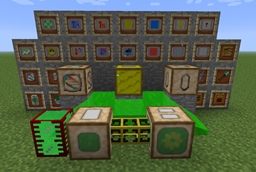
Gendustry Mod untuk Minecraft 1.12.2
Menambahkan apiari industri, manipulasi genetik tingkat lanjut, dan mutasi (addon Forestry)
Features
- Advanced powered apiary with tons of upgrades
- Genetic manipulation of bees, trees and butterflies
- Forced mutation
- Construction of new organisms from genetic templates
Requirements
- Minecraft 1.7.10
- Forge 10.13.4.x
- Forestry 4.0
- BdLib 1.9.3
Supported Mods
- Machines can be powered by either BuildCraft 4.2.0+, IC2 Experimental or Thermal Expansion 3
- Items can be charged by either IC2 Experimental or Thermal Expansion 3
- All mods that add Bees, Trees or Butterflies using the Forestry API are supported
- IC2 Uranium 235/238 can be used to produce Mutagen
- If BuildCraft is installed some alternative recipes are enabled
Configuration
I believe in the ultimate freedom of the end user, thus EVERYTHING in this mod is configurable.
You can change most settings, and all recipes by copying gendustry-tuning.cfg and gendustry-recipes.cfg from the JAR (in assets/gendustry) to your config folder and editing them.
Note that you will need to manually update them for future versions, no automated merging of configuration is possible.
Documentation of the format is a WIP, but it should mostly be understandable
Cara memasang Gendustry
With Millida Launcher
Install Millida Launcher
The launcher is free: download it at millida.net/launcher and sign in with any nickname.
Click “Install” on this page
The launcher opens and installs the mod for Minecraft 1.7.10–1.12.2 automatically.
Launch the game
A profile with it appears in the launcher: click “Play”.
Manually
Download the file for your version
In the version list above, pick the file gendustry-1.6.5.8-mc1.12.2.jar (1.8 MB) for your game version.
Put it in the mods folder
The folder is inside .minecraft (Windows: %appdata%\.minecraft\mods). If it does not exist, create it.
Launch the loader profile
Open “Mods” in the main menu: Gendustry should be in the list.
Minecraft 1.12.2 runs on Java 8: with a different Java version the game may close right after launch.
Versi
Dengan dependensi
| Minecraft | Loader | File | Tanggal | Tindakan |
|---|---|---|---|---|
| 1.12.1 | — | Gendustry 1.6.5.8 (MC 1.12.2)1.8 MB | ||
| 1.12 | — | Gendustry 1.6.5.3 (MC 1.12)1.8 MB | ||
| 1.7.10 | — | gendustry-1.6.3.132-mc1.7.10.jar1.8 MB |
FAQ
Which Minecraft versions does Gendustry work on?
There are files for 1.12.2, 1.12.1, 1.12, 1.7.10. The newest is 1.12.2.
Which Java does Gendustry need?
Minecraft 1.12.2 runs on Java 8. If the game closes right after launch, the usual cause is the wrong Java version in the profile settings.
Where can I download Gendustry safely?
On this page: the file gendustry-1.6.5.8-mc1.12.2.jar (1.8 MB) is stored on Millida’s server, with no link shorteners. SHA-1 checksum: fdb69e45f0e54c793b9e52bb49ecedc9dfce13a1.
Ulasan
Jadilah yang pertama menilai Gendustry


