

Entangled Mod untuk Minecraft 1.12.2, 26.3
Entangled memungkinkanmu untuk 'menjalin' dua blok bersama!
 NeoForge
 Fabric
 Quilt
Quilt Forge
ForgeTentang mod Entangled
Entangled gives you the materials needed to bind two blocks together, allowing you to interact with either one as if they were the same block! This will allow you to transfer items, energy, fluids or whatever you want instantly, you can have more than six sides to work with or you could just hide your messy cables, the possibilities are endless!
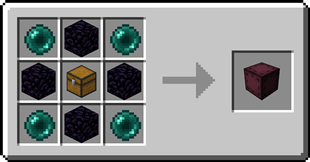
#### Entangled Block
- This block will absorb the state of another!
Recipe
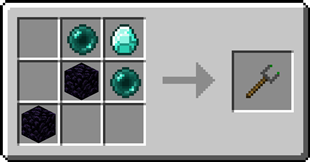
#### Entangled Binder
- Allows you to control what blocks bind together!
Recipe
Step-by-step Guide
Binding the Entangled Block
- Craft an Entangled Block and an Entangled Binder
- Place down your Entangled Block
- Right-Click on the block you want to bind with the Entangled Binder
- Right-Click on your Entangled Block with the Entangled Binder

Unbinding the Entangled Block
- Select an empty slot on your hotbar
- Start crouching
- Right-Click on the Entangled Block

Configuration
Config options
- allowDimensional: true or false, true by default
Determines whether entangled blocks can be bound between different dimensions.
- maxDistance: -1 or a number greater than 0, -1 by default
Determines the maximum distance between an entangled and its target. -1 means no limit.
- renderBlockHighlight: true or false, true by default
A client-side option to determine whether when looking at an entangled block, its targeted block is highlighted.
- rotateRenderedBlock: true or false, true by default
A client-side option to determine whether the block rendered inside an entangled block spins around.
Tags
- entangled:invalid_targets block tag
The entangled block cannot target any blocks inside the tag.
- entangled:render_blacklist block tag
Any blocks in the tag will not be rendered inside entangled blocks.
- entangled:render_blacklist block entity type tag
The entangled block won't render any block entity for which their type is in the tag.
Does the Entangled Block work interdimensionally? Yes, just select a block in a different dimension with the Entangled Binder Can I use your mod in my modpack? Yes, feel free to use my mod in your modpack
Discord
For future content, upcoming mods, and discussion, feel free to join the SuperMartijn642 discord server! [ ](https://discord.gg/QEbGyUYB2e)
Cara memasang Entangled
With Millida Launcher
Install Millida Launcher
The launcher is free: download it at millida.net/launcher and sign in with any nickname.
Click “Install” on this page
The launcher opens and installs the mod for Minecraft 1.12–26.3 on Fabric, Forge, NeoForge or Quilt automatically, together with its dependencies: SuperMartijn642's Config Lib, Fabric API, SuperMartijn642's Core Lib.
Launch the game
A profile with it appears in the launcher: click “Play”.
Manually
Install Fabric, Forge, NeoForge or Quilt
The loader must match the game version of the mod file, for example Minecraft 26.3. After installing it, a separate profile appears in your launcher.
Download the file for your version
In the version list above, pick the file entangled-1.3.21-neoforge-mc26.3.jar (158 KB) for your game version and loader.
Put it in the mods folder
The folder is inside .minecraft (Windows: %appdata%\.minecraft\mods). If it does not exist, create it. Required dependencies go there too: SuperMartijn642's Config Lib, Fabric API, SuperMartijn642's Core Lib.
Launch the loader profile
Open “Mods” in the main menu: Entangled should be in the list.
On a server
A server on Fabric, Forge, NeoForge or Quilt
The mod only works on a server with the same loader and game version, for example 26.3.
File goes into the server’s mods folder
Stop the server, put the mod file into the mods folder and start the server again.
Use the “To server” button
On Millida Hosting, the button at the top of the page uploads the file to your server and restarts it for you.
Versi
Dengan dependensi
| Minecraft | Loader | File | Tanggal | Tindakan |
|---|---|---|---|---|
| 26.3 | NeoForge | 26.3158 KB 1 | ||
| 26.3 | Fabric, Quilt | 26.3128 KB | ||
| 26.2 | NeoForge | 26.2158 KB | ||
| 1.12.2 | Forge | 1.12.2115 KB | — |
Yang dibutuhkan untuk menjalankan
- SuperMartijn642's Config Libwajib
- Fabric APIwajib
- Jade 🔍opsional
- SuperMartijn642's Core Libwajib
FAQ
Which Minecraft versions does Entangled work on?
There are files for 26.3, 26.2, 1.12.2, 1.12.1, 1.12. The newest is 26.3.
Is Entangled for Forge or Fabric?
There are files for Fabric: 26.3, for Forge: 1.12–1.12.2, for NeoForge: 26.2–26.3 and for Quilt: 26.3.
Where can I download Entangled safely?
On this page: the file entangled-1.3.21-neoforge-mc26.3.jar (158 KB) is stored on Millida’s server, with no link shorteners. SHA-1 checksum: 6c8f7c3b7e028a9afc8d8a045c1230712a410b18.
Ulasan
Jadilah yang pertama menilai Entangled


