

EMI Ores Mod untuk Minecraft 1.20.1, 1.21.1
Lihat informasi generasi ore dengan mudah dari dalam EMI.
 NeoForge
 Fabric
 Forge
ForgeEMI Ores
Lihat informasi pembuatan ore dengan mudah dari dalam EMI.
EMI Ores adalah plugin untuk penampil resep EMI yang menampilkan informasi tentang bagaimana ore terbentuk di dunia, termasuk:
- Distribusi tingkat Y
- Ukuran vein
- Jumlah vein per chunk
- Batasan bioma
Mod ini diperlukan di sisi klien dan server agar berfungsi; jika hanya ada di satu sisi, mod ini akan menonaktifkan dirinya sendiri secara diam-diam.
Karena mod ini mengumpulkan datanya dari fitur yang dikonfigurasi/ditempatkan oleh data pack, ore dari mod seharusnya tampil dengan benar tanpa konfigurasi tambahan pada sebagian besar kasus.

Tangkapan layar
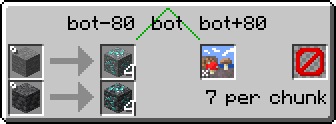
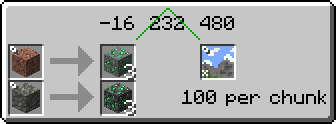
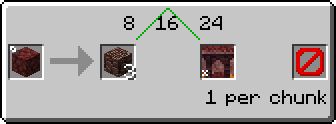
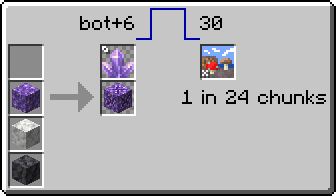
Perbandingan dengan plugin penampil resep pembuatan ore yang sudah ada
Fitur - EMI Ores - Just Enough Resources - Roughly Enough Resources
Menampilkan informasi pembuatan ore - ✅ - ✅ - ✅ Menampilkan informasi pembuatan dunia non-ore - ❌ - ❌ - ✅ Dukungan otomatis untuk ore dari mod - ✅ - ❌ - ✅ Menampilkan batasan bioma - ✅ - ✅ - ❌ Menggabungkan ore stone dan deepslate - ✅ - ✅ - ❌ Sumber data - Fitur yang ditempatkan/dikonfigurasi oleh data pack - Hard-coded - Chunk yang dipindai Dukungan penampil resep - EMI - JEI, EMI (melalui JEI) - REI Menampilkan loot table - ❌[^1] - ✅ - ✅ Menampilkan perdagangan penduduk desa - ❌[^2] - ✅ - ❌ Menampilkan enchantment yang tersedia pada item - ⭕[^3] - ✅ - ❌
Ikon bioma vanilla dilisensikan CC BY-NC-SA 3.0 oleh para kontributor Minecraft Wiki, diambil dari halaman wiki Biome.
[^1]: Lihat EMI Loot. [^2]: Lihat EMI Trades. [^3]: Fungsi dasar tersedia di EMI, lihat juga EMI Enchanting.

Cara memasang EMI Ores
With Millida Launcher
Install Millida Launcher
The launcher is free: download it at millida.net/launcher and sign in with any nickname.
Click “Install” on this page
The launcher opens and installs the mod for Minecraft 1.19.2–1.21.1 on Fabric, Forge or NeoForge automatically, together with its dependencies: Fabric API, EMI.
Launch the game
A profile with it appears in the launcher: click “Play”.
Manually
Install Fabric, Forge or NeoForge
The loader must match the game version of the mod file, for example Minecraft 1.21.1. After installing it, a separate profile appears in your launcher.
Download the file for your version
In the version list above, pick the file emi_ores-1.3+1.21.1+neoforge.jar (114 KB) for your game version and loader.
Put it in the mods folder
The folder is inside .minecraft (Windows: %appdata%\.minecraft\mods). If it does not exist, create it. Required dependencies go there too: Fabric API, EMI.
Launch the loader profile
Open “Mods” in the main menu: EMI Ores should be in the list.
On a server
A server on Fabric, Forge or NeoForge
The mod only works on a server with the same loader and game version, for example 1.21.1.
File goes into the server’s mods folder
Stop the server, put the mod file into the mods folder and start the server again.
Use the “To server” button
On Millida Hosting, the button at the top of the page uploads the file to your server and restarts it for you.
Minecraft 1.21.1 runs on Java 21: with a different Java version the game may close right after launch.
Versi
Dengan dependensi
| Minecraft | Loader | File | Tanggal | Tindakan |
|---|---|---|---|---|
| 1.21.1 | NeoForge | 1.21.1114 KB 3 | ||
| 1.21.1 | Fabric | 1.21.1112 KB 1 | ||
| 1.20.1 | Forge | 1.20.1117 KB 1 | ||
| 1.20.1 | Fabric | 1.20.1113 KB | ||
| 1.19.2 | Forge | 1.19.2118 KB 1 | ||
| 1.19.2 | Fabric | 1.19.2115 KB | ||
| 1.21.1 | NeoForge | 1.21.1109 KB | ||
| 1.21.1 | Fabric | 1.21.1107 KB |
Yang dibutuhkan untuk menjalankan
- Fabric APIwajib
- EMIwajib
Ulasan
Jadilah yang pertama menilai EMI Ores


