
Dynamic Tooltips Mod untuk Minecraft 26.1.2
Perkecil tooltip gear raksasa. Dapat diperluas!
- dilihat
- 10 dilihat
- Diperbarui
- Diperbarui 18.10.2026
- 26.1.2
 Fabric
Dynamic Tooltips
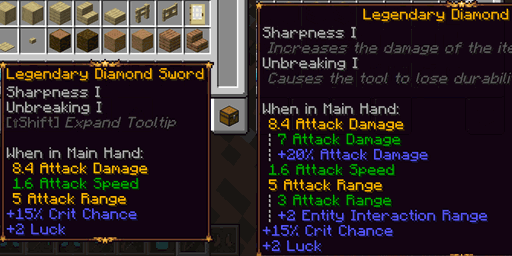
A client-side mod for Fabric (inspired by Neoforge!) revamping Minecraft's tooltips for attributes and enchantments, providing a clearer, merged view, and reducing tooltip clutter.
Features:
- Merged Attribute View: Combines attribute modifiers (e.g., +10 Attack Damage, +20% Attack Damage) into a single line reflecting the final calculated value. Easier to understand and takes up less space!
- Detailed Breakdown: Hold [Shift] to expand merged attributes and see the original base value plus all contributing modifiers individually.
- Intelligent Coloring: Modifiers are colored based on their impact (positive, negative, or neutral), respecting "sentiments" (e.g., scale is neutral gray, burning time treats lower values as better).
- Enchantment Descriptions: Displays enchantment descriptions directly below the enchantment name when holding [Shift] (or always for Enchanted Books).
- Canonical Headers: Cleans up redundant headers (e.g., "When on Body:", "When Worn:") into a single appropriate header when modifiers for multiple slots are present on an item, but only one slot is relevant.
Client-Side Only. Fabric only, no Neoforge port is planned. (Neoforge already has a very similar feature built-in!)
Compatibility:
Compatible with Legendary Tooltips. Probably compatible with other tooltip mods (but try it out!)
Includes dedicated integration for:
- Better Combat: Displays Attack Range on Better Combat weapons (if enabled in BC's config), intelligently merging in relevant Entity Interaction Range modifiers.
- Enchantment Descriptions: Dynamic Tooltips will use description keys provided by this mod, and from other mods providing the Enchantment Descriptions lang format.
- Ranged Weapon API: Always display Ranged Damage and Pull Time modifiers on RWA weapons, formatting them as "base" modifiers (green/gold when merged).
- TieredZ: Works with tooltips modified by TieredZ
Also compatible with Icon Leading Tooltip and Attribute Icons - Thanks KevzCz for adding compatibility!
Cara memasang Dynamic Tooltips
With Millida Launcher
Install Millida Launcher
The launcher is free: download it at millida.net/launcher and sign in with any nickname.
Click “Install” on this page
The launcher opens and installs the mod for Minecraft 26.1.2 on Fabric automatically.
Launch the game
A profile with it appears in the launcher: click “Play”.
Manually
Install Fabric
The loader must match the game version of the mod file, for example Minecraft 26.1.2. After installing it, a separate profile appears in your launcher.
Download the file for your version
In the version list above, pick the file dynamic-tooltips-1.0.2+26.1.2.jar (186 KB) for your game version.
Put it in the mods folder
The folder is inside .minecraft (Windows: %appdata%\.minecraft\mods). If it does not exist, create it.
Launch the loader profile
Open “Mods” in the main menu: Dynamic Tooltips should be in the list.
Versi
Dengan dependensi
| Minecraft | Loader | File | Tanggal | Tindakan |
|---|---|---|---|---|
| 26.1.2 | Fabric | Dynamic-Tooltips 1.0.2+26.1.2186 KB |
Ulasan
Jadilah yang pertama menilai Dynamic Tooltips


