

Dark Paintings Mod untuk Minecraft 1.20.1, 1.19.2
Menambahkan lukisan baru ke Minecraft
 NeoForge
 Fabric
 Forge
Forge Quilt
QuiltTentang mod Dark Paintings
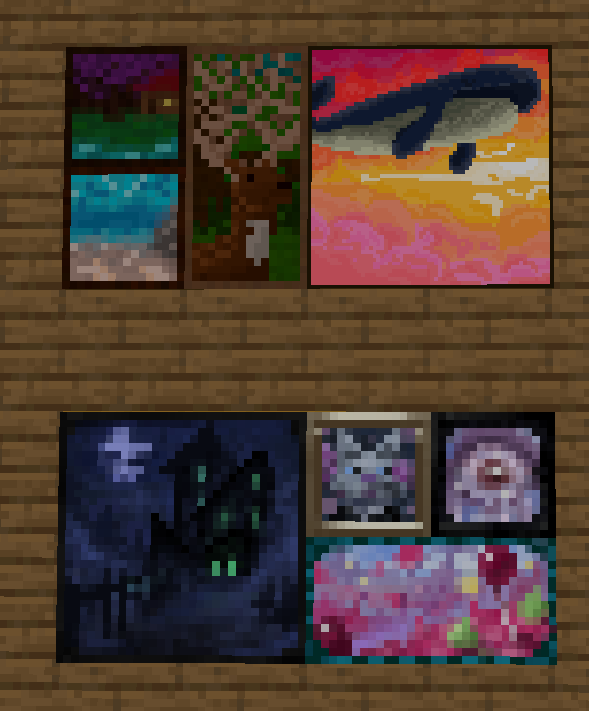
Mod ini menambahkan banyak lukisan baru ke dalam game! Lukisan-lukisan ini hadir dalam berbagai ukuran dan gaya seni. Setiap lukisan dirancang dan diilustrasikan oleh anggota komunitas kami! Lukisan-lukisan ini terintegrasi secara mulus dengan lukisan vanilla dan dapat dipasang di dunia menggunakan item lukisan biasa. Ada juga item di tab kreatif yang dapat digunakan untuk memasang desain tertentu tepat di tempat yang Anda inginkan!
Terima kasih kepada banyak seniman berbakat yang telah berkolaborasi dengan saya dalam mod ini, termasuk mmg28rtt, FuryDev, Axeonlotl, Wouter, Absolem Jackdaw, Punpudle, Superkat32, dan saya Darkhax lol.
Proyek ini disponsori oleh Nodecraft. Gunakan kode DARKHAX untuk diskon 30% pada bulan pertama layanan Anda!
Cara memasang Dark Paintings
With Millida Launcher
Install Millida Launcher
The launcher is free: download it at millida.net/launcher and sign in with any nickname.
Click “Install” on this page
The launcher opens and installs the mod for Minecraft 1.15.2–26.3 on Fabric, Forge, NeoForge or Quilt automatically.
Launch the game
A profile with it appears in the launcher: click “Play”.
Manually
Install Fabric, Forge, NeoForge or Quilt
The loader must match the game version of the mod file, for example Minecraft 26.3. After installing it, a separate profile appears in your launcher.
Download the file for your version
In the version list above, pick the file DarkPaintings-neoforge-MC26.3-26.3.0.1.jar (55 KB) for your game version and loader.
Put it in the mods folder
The folder is inside .minecraft (Windows: %appdata%\.minecraft\mods). If it does not exist, create it.
Launch the loader profile
Open “Mods” in the main menu: Dark Paintings should be in the list.
Versi
Dengan dependensi
| Minecraft | Loader | File | Tanggal | Tindakan |
|---|---|---|---|---|
| 26.3 | NeoForge | DarkPaintings-neoforge-MC26.3-26.3.0.1.jar55.3 KB 1 | ||
| 26.3 | Fabric | DarkPaintings-fabric-MC26.3-26.3.0.1.jar57.8 KB 24 | ||
| 1.20.1 | Forge, NeoForge | DarkPaintings-Forge-1.20.1-17.0.6.jar51.4 KB 6 | ||
| 1.19.2 | Forge | DarkPaintings-Forge-1.19.2-13.1.4.jar38.6 KB | ||
| 1.19.2 | Fabric, Quilt | DarkPaintings-Fabric-1.19.2-13.1.4.jar33.8 KB | ||
| 1.17 | Fabric | DarkPaintings-fabric-1.17-rc2-3.0.5.jar12.7 KB | ||
| 1.15.2 | — | DarkPaintings-1.15.2-1.0.2.jar7.1 KB | ||
| 1.15.2 | — | DarkPaintings-1.15.2-1.0.1.jar28.8 KB |
FAQ
Which Minecraft versions does Dark Paintings work on?
There are files for 26.3, 1.20.1, 1.19.2, 1.17, 1.15.2. The newest is 26.3.
Is Dark Paintings for Forge or Fabric?
There are files for Fabric: 1.17–26.3, for Forge: 1.19.2–1.20.1, for NeoForge: 1.20.1–26.3 and for Quilt: 1.19.2.
Does Dark Paintings need other mods?
The author lists no required dependencies: the Fabric, Forge, NeoForge or Quilt loader is enough.
Where can I download Dark Paintings safely?
On this page: the file DarkPaintings-neoforge-MC26.3-26.3.0.1.jar (55 KB) is stored on Millida’s server, with no link shorteners. SHA-1 checksum: 15c9f13e2fa48507f646c9f0b133940516f6350c.
Ulasan
Jadilah yang pertama menilai Dark Paintings


