

Create Propulsion: Simulated Mod untuk Minecraft 1.21.1
Port mod Create: Propulsion ke NeoForge 1.21.1 dengan dukungan Sable dan Create: Aeronautics
- unduhan
- 37 unduhan
- dilihat
- 137 dilihat
- Diperbarui
- Diperbarui 03.10.2026
- 1.21.1
 NeoForge
- Klien dan server
Create Propulsion: Simulated
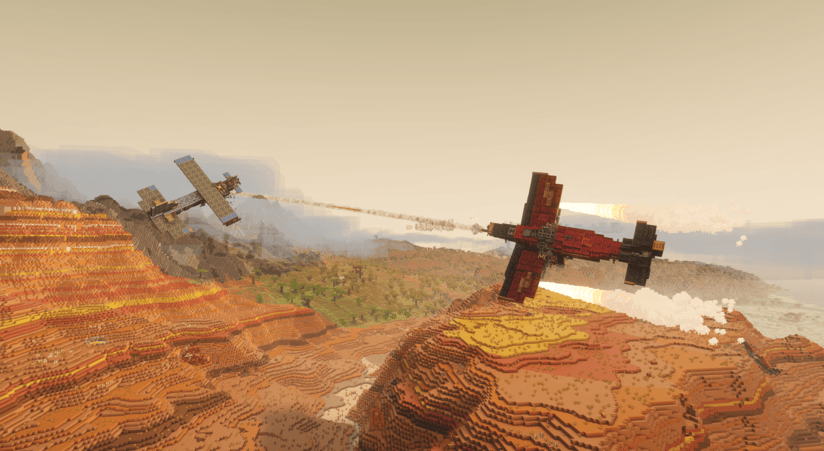
Create Propulsion: Simulated is a NeoForge addon for Minecraft 1.21.1 that brings propulsion-focused Create gameplay to the Sable + Create Aeronautics ecosystem.
It adds three thruster types:

- Thruster: standard fuel-based propulsion
- Ion Thruster: FE-powered propulsion
- Creative Thruster: configurable high-power propulsion for testing and creative builds

The mod integrates directly with Sable and Create Aeronautics contraption physics, including force-at-point behavior for proper torque and multi-thruster handling on assembled crafts.

It also includes Copycat Wings for lightweight aerodynamic building with copycat-style visual customization.
Thrusters support fuels from these mods:
- Create: The Factory Must Grow
- Create: Crafts & Additions
- Create: Diesel Generators
- Immersive Engineering
- Mekanism: Generators
- Northstar: Redux
- Stellaris
Special thanks to:
- PacificCyan - Ion Thruster model, Coral Generator model
- FoxyFox909 - Multiblock Thrusters
- DeltaSF - Original Create: Propulsion creator for 1.20.1
- Fleugle - Reworked thruster models/textures

Cara memasang Create Propulsion: Simulated
With Millida Launcher
Install Millida Launcher
The launcher is free: download it at millida.net/launcher and sign in with any nickname.
Click “Install” on this page
The launcher opens and installs the mod for Minecraft 1.21.1 on NeoForge automatically, together with its dependencies: Create, Sable, Create Aeronautics.
Launch the game
A profile with it appears in the launcher: click “Play”.
Manually
Install NeoForge
The loader must match the game version of the mod file, for example Minecraft 1.21.1. After installing it, a separate profile appears in your launcher.
Download the file for your version
In the version list above, pick the file createpropulsion-1.1.5.jar (1.6 MB) for your game version.
Put it in the mods folder
The folder is inside .minecraft (Windows: %appdata%\.minecraft\mods). If it does not exist, create it. Required dependencies go there too: Create, Sable, Create Aeronautics.
Launch the loader profile
Open “Mods” in the main menu: Create Propulsion: Simulated should be in the list.
On a server
A server on NeoForge
The mod only works on a server with the same loader and game version, for example 1.21.1.
File goes into the server’s mods folder
Stop the server, put the mod file into the mods folder and start the server again.
Use the “To server” button
On Millida Hosting, the button at the top of the page uploads the file to your server and restarts it for you.
Minecraft 1.21.1 runs on Java 21: with a different Java version the game may close right after launch.
Versi
Dengan dependensi
| Minecraft | Loader | File | Tanggal | Tindakan |
|---|---|---|---|---|
| 1.21.1 | NeoForge | 1.21.11.6 MB 37 | ||
| 1.21.1 | NeoForge | 1.21.11.1 MB | ||
| 1.21.1 | NeoForge | 1.21.1733 KB | ||
| 1.21.1 | NeoForge | 1.21.1751 KB | ||
| 1.21.1 | NeoForge | 1.21.1491 KB | ||
| 1.21.1 | NeoForge | 1.21.1485 KB | ||
| 1.21.1 | NeoForge | 1.21.1337 KB |
Yang dibutuhkan untuk menjalankan
- Createwajib
- Sablewajib
- Create Aeronauticswajib
Ulasan
Jadilah yang pertama menilai Create Propulsion: Simulated


