
Create: Netherless ((Neo)Forge) Mod untuk Minecraft 1.20.1, 1.21.1
🚫Kumpulkan dan otomatiskan sumber daya Nether tanpa perlu pernah ke Nether
 NeoForge
 Forge
Tentang mod Create: Netherless ((Neo)Forge)
Jika kamu ingin versi fabric, klik di sini
Create: Netherless adalah Addon untuk Create Mod;
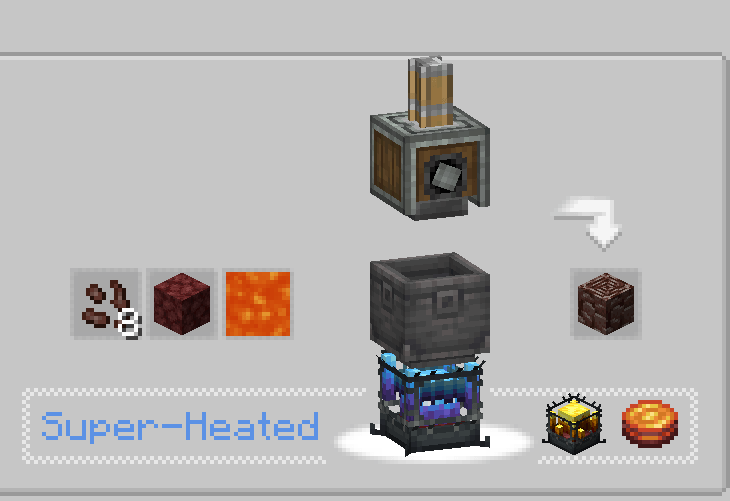
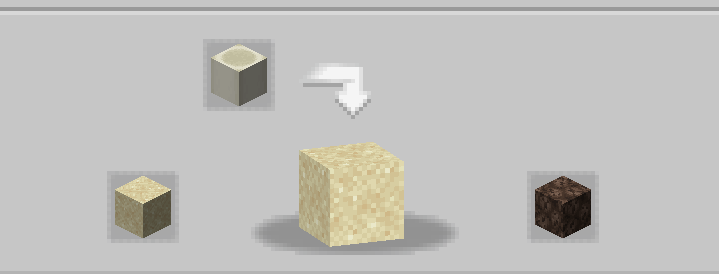
Tujuan mod ini adalah memberi pemain kemungkinan untuk membuat dan mengotomatiskan sebagian besar sumber daya Nether bahkan tanpa akses ke Nether! Ini termasuk Blaze, Netherite, Netherrack, atau apa pun yang kamu pikirkan yang terkunci di balik Nether. Jika kamu merasa ada resep yang tidak seimbang/tidak berfungsi/hilang, beri tahu saya di kolom komentar💬!
Pertanyaan yang Sering Diajukan (FAQ):
▶T: Bagaimana cara melihat resepnya? J: Kamu bisa menggunakan mod penampil resep seperti JEI atau EMI.
▶T: Apakah menghapus/menambahkan addon ini ke dunia yang sudah ada akan menyebabkan masalah? J: Kamu dapat dengan aman menghapus/menambahkan mod ini dari dunia mana pun tanpa masalah.
▶T: Apakah mod ini akan pernah hadir di fabric? J: Tentu! cukup klik di sini!
▶T: Apakah add-on ini tersedia untuk 6.0.x? J: Ya, tersedia!
▶T: Apa selanjutnya untuk mod ini? J: Add-on ini saat ini dijeda karena kami sedang mengerjakan proyek lain. Konten baru dan penyeimbangan sudah direncanakan, dengan pengenalan ectoplasm misalnya, tetapi untuk sekarang, kamu harus menunggu!
▶Ada pertanyaan lain? Kamu bisa bergabung dengan Server Discord Honeycomb Studio dan bertanya di sana!
Maaf jika saya membuat kesalahan, saya orang Prancis.. jika kamu melihat kesalahan ejaan, tolong beri tahu saya!
Mod ini TIDAK menonaktifkan nether!
Cara memasang Create: Netherless ((Neo)Forge)
With Millida Launcher
Install Millida Launcher
The launcher is free: download it at millida.net/launcher and sign in with any nickname.
Click “Install” on this page
The launcher opens and installs the mod for Minecraft 1.19.2–1.21.1 on Forge or NeoForge automatically.
Launch the game
A profile with it appears in the launcher: click “Play”.
Manually
Install Forge or NeoForge
The loader must match the game version of the mod file, for example Minecraft 1.21.1. After installing it, a separate profile appears in your launcher.
Download the file for your version
In the version list above, pick the file create_netherless-2.0.0-1.21.1.jar (30 KB) for your game version and loader.
Put it in the mods folder
The folder is inside .minecraft (Windows: %appdata%\.minecraft\mods). If it does not exist, create it.
Launch the loader profile
Open “Mods” in the main menu: Create: Netherless ((Neo)Forge) should be in the list.
Minecraft 1.21.1 runs on Java 21: with a different Java version the game may close right after launch.
Versi
Dengan dependensi
| Minecraft | Loader | File | Tanggal | Tindakan |
|---|---|---|---|---|
| 1.21.1 | NeoForge | create_netherless-2.0.0-1.21.1.jar30.2 KB 65 | ||
| 1.20.1 | Forge | create_netherless-2.0.0-1.20.1.jar30.1 KB 19 | ||
| 1.19.2 | Forge | Create: Netherless 1.19.2-1.137.6 KB 1 |
FAQ
Which Minecraft versions does Create: Netherless ((Neo)Forge) work on?
There are files for 1.21.1, 1.20.1, 1.19.2. The newest is 1.21.1.
Is Create: Netherless ((Neo)Forge) for Forge or Fabric?
There are files for Forge: 1.19.2–1.20.1 and for NeoForge: 1.21.1. There are no files for Fabric: a mod for another loader will not start.
Does Create: Netherless ((Neo)Forge) need other mods?
The author lists no required dependencies: the Forge or NeoForge loader is enough.
Which Java does Create: Netherless ((Neo)Forge) need?
Minecraft 1.21.1 runs on Java 21. If the game closes right after launch, the usual cause is the wrong Java version in the profile settings.
Where can I download Create: Netherless ((Neo)Forge) safely?
On this page: the file create_netherless-2.0.0-1.21.1.jar (30 KB) is stored on Millida’s server, with no link shorteners. SHA-1 checksum: 2d3499b77c8bcbe8c7a301750271c3d2a0b35cbe.
Ulasan
Jadilah yang pertama menilai Create: Netherless ((Neo)Forge)


