
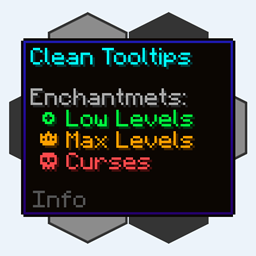
Clean Tooltips Mod untuk Minecraft 1.20.1, 1.21.10
Meningkatkan Tooltip dengan menciptakan tampilan yang bersih dan konsisten! Tooltip Daya Tahan & lainnya!
 NeoForge
 Fabric
 Forge
ForgeTentang mod Clean Tooltips
Clean Tooltips
Pernah merasa tooltip bawaan bisa dibuat lebih menarik? Kalau begitu, inilah yang kamu cari.
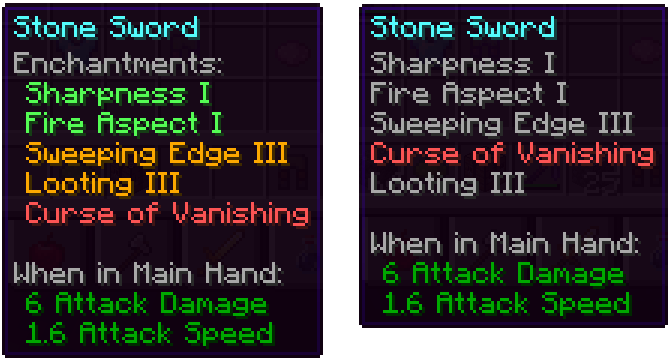
Terutama, mod ini merombak cara enchantment ditampilkan di tooltip:
- kini mereka punya subkategori "Enchantents:" sendiri
- pewarnaan untuk lebih mudah membedakan enchantment bagus (hijau) dan kutukan (merah)
- enchantment level maksimal akan ditampilkan dengan warna emas
- kutukan selalu diurutkan di bagian bawah daftar
Dengan mod terpasang: Tanpa mod terpasang (Vanila):
Selain itu, bagian lain juga ikut ditingkatkan:
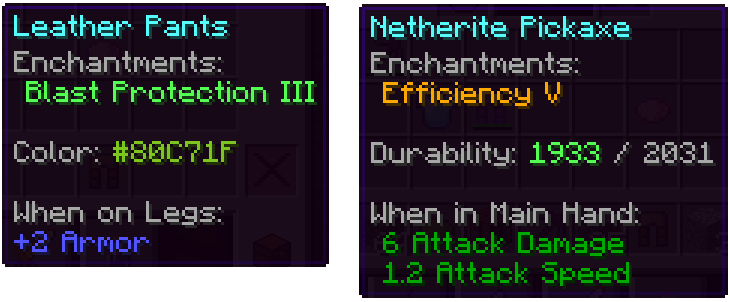
- garis warna pada item yang diwarnai kini benar-benar menampilkan warna yang digunakan
- item yang rusak menampilkan sisa daya tahannya di tooltip
Kami punya banyak ide lain tentang bagaimana tooltip bisa ditingkatkan untuk pembaruan mendatang. Selain menambahkan fitur baru, pembaruan berikutnya juga akan menambahkan banyak opsi pengaturan.
Cara memasang Clean Tooltips
With Millida Launcher
Install Millida Launcher
The launcher is free: download it at millida.net/launcher and sign in with any nickname.
Click “Install” on this page
The launcher opens and installs the mod for Minecraft 1.20.1–1.21.10 on Fabric, Forge or NeoForge automatically.
Launch the game
A profile with it appears in the launcher: click “Play”.
Manually
Install Fabric, Forge or NeoForge
The loader must match the game version of the mod file, for example Minecraft 1.21.10. After installing it, a separate profile appears in your launcher.
Download the file for your version
In the version list above, pick the file clean_tooltips-1.1-neoforge-1.21.10.jar (24 KB) for your game version and loader.
Put it in the mods folder
The folder is inside .minecraft (Windows: %appdata%\.minecraft\mods). If it does not exist, create it.
Launch the loader profile
Open “Mods” in the main menu: Clean Tooltips should be in the list.
Minecraft 1.21.10 runs on Java 21: with a different Java version the game may close right after launch.
Versi
Dengan dependensi
| Minecraft | Loader | File | Tanggal | Tindakan |
|---|---|---|---|---|
| 1.21.10 | NeoForge | clean_tooltips-1.1-neoforge-1.21.10.jar24.4 KB | ||
| 1.21.10 | Fabric | clean_tooltips-1.1-fabric-1.21.10.jar23.1 KB 3 | ||
| 1.20.1 | Forge | clean_tooltips-1.0-forge-1.20.1.jar25.8 KB 1 |
FAQ
Which Minecraft versions does Clean Tooltips work on?
There are files for 1.21.10, 1.20.1. The newest is 1.21.10.
Is Clean Tooltips for Forge or Fabric?
There are files for Fabric: 1.21.10, for Forge: 1.20.1 and for NeoForge: 1.21.10.
Does Clean Tooltips need other mods?
The author lists no required dependencies: the Fabric, Forge or NeoForge loader is enough.
Which Java does Clean Tooltips need?
Minecraft 1.21.10 runs on Java 21. If the game closes right after launch, the usual cause is the wrong Java version in the profile settings.
Where can I download Clean Tooltips safely?
On this page: the file clean_tooltips-1.1-neoforge-1.21.10.jar (24 KB) is stored on Millida’s server, with no link shorteners. SHA-1 checksum: 594541adddbc0d20e2361a8fef21b5ed960c2588.
Ulasan
Jadilah yang pertama menilai Clean Tooltips


