
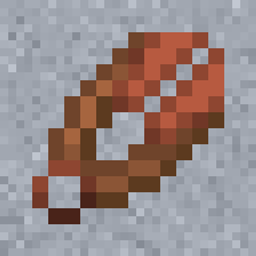
Ceramic Shears Mod untuk Minecraft 26.3
Menambahkan Ceramic Shears yang terbuat dari tanah liat. (Forge, NeoForge, Fabric, Quilt)
 Fabric
 Quilt
Quilt NeoForge
 Forge
ForgeCeramic Shears
This is a Minecraft mod which adds Ceramic Shears to the game. (Forge, NeoForge, Fabric, Quilt) So it is possible to craft shears out of clay.
Adds 3 items to the game:
- Clay Shears Part: Craftable with two clay balls.
- Ceramic Shears Part: Craftable in furnace with a Clay Shears Part.
- Ceramic Shears: Act like vanilla shears but has only 75% durability. Craftable with two Ceramic Shears Part.
The durability is configurable since mod version 1.6.0.0.
The Fabric / Quilt version needs the following mods:
- Fabric API (Github, Curseforge, Modrinth)
- Cloth Config API (Github, Curseforge, Modrinth)
- (for Minecraft 1.20.4) WSMLMB (Github, Curseforge, Modrinth)

Links
There is also a wiki where you can read all details about the mod.
Sponsors
You need a server? Save 25% on Bisect Hosting with the promo code "cech12"!
Can I use this mod in my mod pack? Yes, you are allowed to use this mod in your mod packs.
Port to another Minecraft version? Which versions are supported?
Sorry, but I do not backport any mod to an older version. Here is a list of all supported and planned versions: Minecraft mod versions of cech12
Is there a Fabric version? Yes, since 1.20.4 Fabric and Quilt are officially supported. There is no plan to backport Fabric support to earlier Minecraft versions. For earlier versions, please see the Stone Utils mod.
Where is the config file? There is a defaultconfig directory, where you can find it. If you change something there it has only an effect on new savegames. For existing savegames you need to go to the serverconfig directory of the savegame.
I found a bug or I have a good idea to enhance this mod! Very good! Open an issue at Github. You have no Github-Account? You can also contact me here in the comments or via private message.
Cara memasang Ceramic Shears
With Millida Launcher
Install Millida Launcher
The launcher is free: download it at millida.net/launcher and sign in with any nickname.
Click “Install” on this page
The launcher opens and installs the mod for Minecraft 26.3 on Fabric, Forge, NeoForge or Quilt automatically.
Launch the game
A profile with it appears in the launcher: click “Play”.
Manually
Install Fabric, Forge, NeoForge or Quilt
The loader must match the game version of the mod file, for example Minecraft 26.3. After installing it, a separate profile appears in your launcher.
Download the file for your version
In the version list above, pick the file ceramicshears-fabric-26.3-4.2.0.0.jar (37 KB) for your game version and loader.
Put it in the mods folder
The folder is inside .minecraft (Windows: %appdata%\.minecraft\mods). If it does not exist, create it.
Launch the loader profile
Open “Mods” in the main menu: Ceramic Shears should be in the list.
Versi
Dengan dependensi
| Minecraft | Loader | File | Tanggal | Tindakan |
|---|---|---|---|---|
| 26.3 | Fabric, Quilt | fabric-26.3-4.2.0.036.7 KB | ||
| 26.3 | NeoForge | neoforge-26.3-4.2.0.025.5 KB | ||
| 26.3 | Forge | forge-26.3-4.2.0.026.4 KB |
Ulasan
Jadilah yang pertama menilai Ceramic Shears


