
Basic Nether Ores [Forge/Fabric] Mod untuk Minecraft 1.21.1
Memunculkan Ore Vanilla dan Modded di Nether
 Forge
 NeoForge
 Fabric
Tentang mod Basic Nether Ores [Forge/Fabric]
BIJIH NETHER DASAR
Kompatibilitas Forge, NeoForge, & Fabric Kini Tersedia untuk 1.21
Datapack tersedia untuk kustomisasi dengan Versi Forge dan NeoForge
Lihat mod saudara kami untuk End
https://www.curseforge.com/minecraft/mc-mods/basic-end-ores
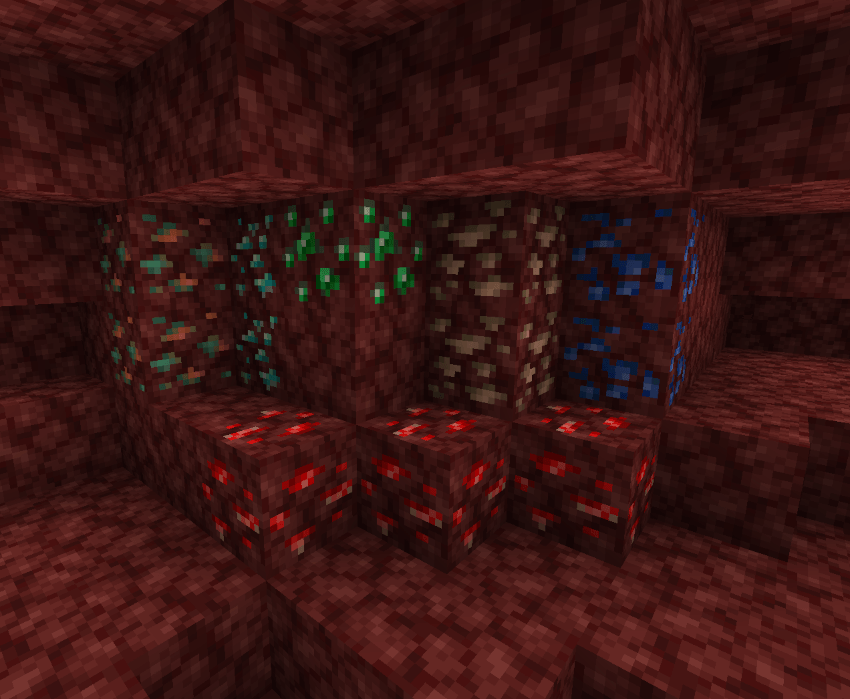
Basic Nether Ores memunculkan bijih vanilla di Nether. Sederhananya, mod ini memperluas kemampuan pemain untuk menambang bijih dan permata di Nether, memberikan kehidupan dan makna baru bagi Nether. Bijih Copper dan Tin telah ditambahkan ke mod ini untuk berfungsi di mod lain. Tingkat kemunculan Bijih Nether diatur setara atau lebih tinggi daripada versi vanilla-nya agar menambang di Nether menjadi berharga. Teksturnya tidak berlebihan sehingga pemain harus memperhatikan area sekitarnya untuk mengenali Bijih Nether.
Apa keunggulan Basic Nether Ores dibandingkan mod Bijih Nether lainnya?
- Basic Nether Ore adalah mod mandiri dan tidak bergantung pada API atau mod lain.
- Semua Bijih, Blok, dan Item diberi entri Ore Dictionary agar cocok dengan versi vanilla-nya.
- Blok Bijih dapat dilebur untuk menghasilkan satu ingot seperti bijih vanilla.
Hati-hati saat menambang dan memanen Bijih Nether. wink wink
Cara memasang Basic Nether Ores [Forge/Fabric]
With Millida Launcher
Install Millida Launcher
The launcher is free: download it at millida.net/launcher and sign in with any nickname.
Click “Install” on this page
The launcher opens and installs the mod for Minecraft 1.16.1–1.21.1 on Fabric, Forge or NeoForge automatically.
Launch the game
A profile with it appears in the launcher: click “Play”.
Manually
Install Fabric, Forge or NeoForge
The loader must match the game version of the mod file, for example Minecraft 1.21.1. After installing it, a separate profile appears in your launcher.
Download the file for your version
In the version list above, pick the file bno-forge-1.21.1-10.1.0.jar (701 KB) for your game version and loader.
Put it in the mods folder
The folder is inside .minecraft (Windows: %appdata%\.minecraft\mods). If it does not exist, create it.
Launch the loader profile
Open “Mods” in the main menu: Basic Nether Ores [Forge/Fabric] should be in the list.
Minecraft 1.21.1 runs on Java 21: with a different Java version the game may close right after launch.
Versi
Dengan dependensi
| Minecraft | Loader | File | Tanggal | Tindakan |
|---|---|---|---|---|
| 1.21.1 | Forge | BasicNetherOres-1.21.1-10.1.0 - Forge701 KB 1 | ||
| 1.21.1 | NeoForge | BasicNetherOres-1.21.1-10.1.0 - NeoForge664 KB 2 | ||
| 1.21.1 | Fabric | BasicNetherOres-1.21.1-10.1.0 - Fabric896 KB | ||
| 1.20.4 | Forge | BasicNetherOres-1.20.4-9.4.1 - Forge598 KB | ||
| 1.16.1 | — | Basic Nether Ores-1.16.1-5.1.0 - Forge331 KB | ||
| 1.16.1 | — | Basic Nether Ores-1.16.1-5.0.0 - Forge308 KB |
FAQ
Which Minecraft versions does Basic Nether Ores [Forge/Fabric] work on?
There are files for 1.21.1, 1.20.4, 1.16.1. The newest is 1.21.1.
Does Basic Nether Ores [Forge/Fabric] need other mods?
The author lists no required dependencies: the Fabric, Forge or NeoForge loader is enough.
Which Java does Basic Nether Ores [Forge/Fabric] need?
Minecraft 1.21.1 runs on Java 21. If the game closes right after launch, the usual cause is the wrong Java version in the profile settings.
Where can I download Basic Nether Ores [Forge/Fabric] safely?
On this page: the file bno-forge-1.21.1-10.1.0.jar (701 KB) is stored on Millida’s server, with no link shorteners. SHA-1 checksum: ee379e9cf582befd6a207492db18e0ad6f2a0b67.
Ulasan
Jadilah yang pertama menilai Basic Nether Ores [Forge/Fabric]


