
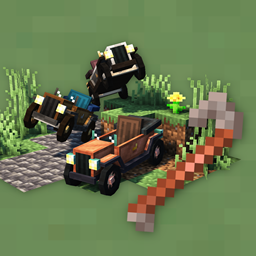
Automobility Mod untuk Minecraft 1.20.1
Mod kendaraan yang menambahkan mobil yang dapat disesuaikan dan fungsional
 Fabric
 Quilt
Quilt Forge
ForgeMod Minecraft yang menambahkan kendaraan yang dapat disesuaikan.
Automobility saat ini masih dalam tahap BETA! Mod ini belum lengkap fiturnya, dan permintaan fitur apa pun akan sangat dihargai. Diskusikan fitur di halaman GitHub Discussions mod ini, atau di Discord.
Tersedia untuk Fabric/Quilt dan Forge
- Membutuhkan Fabric API (Fabric) atau QSL (Quilt)
- Tidak ada mod tambahan yang diperlukan di Forge
- Silakan klik Files di bagian atas halaman untuk melihat semua versi untuk semua mod loader
Saat ini dipelihara untuk versi 1.20/1.20.1, versi lama sudah tidak digunakan lagi
Memulai
- Resep: Resep crafting dapat dilihat menggunakan EMI (Fabric/Quilt) atau JEI (Forge).
- Suku Cadang Mobil: Buat Auto Mechanic Table. Gunakan GUI untuk membuat frame, mesin, dan roda untuk mobil Anda. Anda dapat secara opsional membuat attachment.
- Membuat Mobil Anda: Buat Automobile Assembler, serta Crowbar. Letakkan suku cadang di assembler hingga kendaraan selesai. Gunakan crowbar untuk menghancurkan kendaraan.
- Meningkatkan Mobil Anda: Gunakan Auto Mechanic Table untuk membuat attachment, yang dapat diletakkan pada Mobil Anda untuk menambahkan fungsionalitas atau utilitas yang menarik.
- Membangun: Anda dapat menggunakan Slopes, Dash Panels, Off-Road tiles dan lainnya untuk membangun jalan, sirkuit balap, atau lintasan rintangan.
Mengemudi
- W - Mempercepat
- S - Mengerem/Mundur/Burnout
- A/D - Belok kiri/kanan
- Space - Drift
Dukungan Controller: saat menggunakan MidnightControls, Anda akan dapat mengendalikan mobil dengan kontrol default berikut:
- A - Mempercepat
- B - Mengerem/Mundur
- LStick - Belok kiri/kanan
- RTrigger - Drift
Cara memasang Automobility
With Millida Launcher
Install Millida Launcher
The launcher is free: download it at millida.net/launcher and sign in with any nickname.
Click “Install” on this page
The launcher opens and installs the mod for Minecraft 1.20–1.20.1 on Fabric, Forge or Quilt automatically.
Launch the game
A profile with it appears in the launcher: click “Play”.
Manually
Install Fabric, Forge or Quilt
The loader must match the game version of the mod file, for example Minecraft 1.20.1. After installing it, a separate profile appears in your launcher.
Download the file for your version
In the version list above, pick the file automobility-0.4.2+1.20.1-fabric.jar (1.1 MB) for your game version and loader.
Put it in the mods folder
The folder is inside .minecraft (Windows: %appdata%\.minecraft\mods). If it does not exist, create it.
Launch the loader profile
Open “Mods” in the main menu: Automobility should be in the list.
Minecraft 1.20.1 runs on Java 17: with a different Java version the game may close right after launch.
Versi
Dengan dependensi
| Minecraft | Loader | File | Tanggal | Tindakan |
|---|---|---|---|---|
| 1.20.1 | Fabric, Quilt | [Fabric] Automobility Beta 0.4.2 for 1.20.11.1 MB 7 | ||
| 1.20.1 | Forge | [Forge] Automobility Beta 0.4.2 for 1.20.11 MB 17 |
FAQ
Which Minecraft versions does Automobility work on?
There are files for 1.20.1, 1.20. The newest is 1.20.1.
Does Automobility need other mods?
The author lists no required dependencies: the Fabric, Forge or Quilt loader is enough.
Which Java does Automobility need?
Minecraft 1.20.1 runs on Java 17. If the game closes right after launch, the usual cause is the wrong Java version in the profile settings.
Where can I download Automobility safely?
On this page: the file automobility-0.4.2+1.20.1-fabric.jar (1.1 MB) is stored on Millida’s server, with no link shorteners. SHA-1 checksum: c820b82890d0192ccf1e8bc05d1ff081bc5954b7.
Ulasan
Jadilah yang pertama menilai Automobility


