
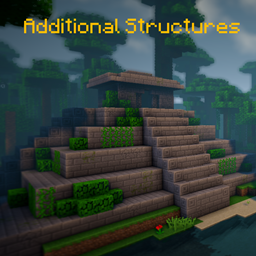
Additional Structures Mod untuk Minecraft 1.20.1, 1.12.2
Menambahkan > 250 struktur baru yang terintegrasi sempurna ke duniamu!
 NeoForge
 Forge
Forge📖 Deskripsi
Mod ini menambahkan sekitar 250 struktur kecil dan menengah baru ke dalam game untuk memperluas dunia Anda!
- mendukung mod generasi bioma, seperti Terralith, Traverse, Biomes O' Plenty, Biome Bundle, dan lainnya!
- integrasi Mystcraft (MC 1.12)
- dengan opsi konfigurasi untuk mengubah nilai spawn setiap jenis struktur! (MC 1.12)
- berfungsi dengan perintah /locate
- dengan pemeriksa pembaruan
- struktur berbeda dihasilkan di bioma vanilla dan modded di overworld dan the end!
- Datapack Konfigurasi
Ingin memodifikasi atau mengubah beberapa nilai struktur pada 1.18+? Berikut cara melakukannya!
Di sini Anda dapat menemukan semua struktur dari versi saat ini!
Apakah Anda menggunakan Fabric atau Quilt? Maka gunakan versi ini!
📷 Presentasi
🗃️ Dependensi
Wajib:
- Magma Core [≥ MC 1.21.5]
- Menyediakan kode dan fitur dasar seperti pemeriksa pembaruan
- CurseForge | Modrinth
Didukung:
- Mystcraft [MC 1.12]
- Simbol fitur struktur AS ditambahkan
- CurseForge | Modrinth
- Antique Atlas [≥ MC 1.21]
- Penanda peta untuk beberapa struktur pada peta
- CurseForge | Modrinth
Cara memasang Additional Structures
With Millida Launcher
Install Millida Launcher
The launcher is free: download it at millida.net/launcher and sign in with any nickname.
Click “Install” on this page
The launcher opens and installs the mod for Minecraft 1.12–1.21.10 on Forge or NeoForge automatically.
Launch the game
A profile with it appears in the launcher: click “Play”.
Manually
Install Forge or NeoForge
The loader must match the game version of the mod file, for example Minecraft 1.21.10. After installing it, a separate profile appears in your launcher.
Download the file for your version
In the version list above, pick the file AdditionalStructures-1.21.10-(v.8.1.1-NEO).jar (1.5 MB) for your game version and loader.
Put it in the mods folder
The folder is inside .minecraft (Windows: %appdata%\.minecraft\mods). If it does not exist, create it.
Launch the loader profile
Open “Mods” in the main menu: Additional Structures should be in the list.
Minecraft 1.21.10 runs on Java 21: with a different Java version the game may close right after launch.
Versi
Dengan dependensi
| Minecraft | Loader | File | Tanggal | Tindakan |
|---|---|---|---|---|
| 1.21.9 | NeoForge | AdditionalStructures v.8.1.1-NEO1.5 MB 1 | ||
| 1.20.2 | Forge | Additional Structures v.4.2.21.5 MB 24 | ||
| 1.12.1 | — | Additional Structures v.2.2.2782 KB 5 |
FAQ
Which Minecraft versions does Additional Structures work on?
There are files for 1.12–1.21.10, 12 versions in total. The newest is 1.21.10.
Is Additional Structures for Forge or Fabric?
There are files for Forge: 1.20–1.20.6 and for NeoForge: 1.21.9–1.21.10. There are no files for Fabric: a mod for another loader will not start.
Does Additional Structures need other mods?
The author lists no required dependencies: the Forge or NeoForge loader is enough.
Which Java does Additional Structures need?
Minecraft 1.21.10 runs on Java 21. If the game closes right after launch, the usual cause is the wrong Java version in the profile settings.
Where can I download Additional Structures safely?
On this page: the file AdditionalStructures-1.21.10-(v.8.1.1-NEO).jar (1.5 MB) is stored on Millida’s server, with no link shorteners. SHA-1 checksum: 05bfd35a858149e7e18e7eecd841f14dee9e504b.
Ulasan
Jadilah yang pertama menilai Additional Structures


