
Presentation [View Resource Packs] Peta untuk Minecraft 1.19.2
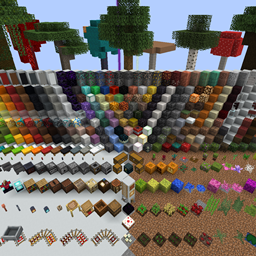
Peta showcase untuk mempresentasikan resource pack.
Tentang map Presentation [View Resource Packs]
PRESENTATION: Hey there, hope you enjoy what I've created! This map's purpose is for quickly testing & taking pictures of resource packs. You may use this map to add into your own worlds as long as credit is given, by providing my name and a link to either my profile or this project. I'll try to keep this updated as requested & for every Minecraft update. If you have any requests, please contact me. All feedback is welcome and greatly appreciated. If you like what you see, please leave a follow, like, or comment and let me know what you like the most.
Featured in "RestWorld" by BlueMeanial.
Current Features: ♦ The main presentation that gives a general preview of a texture pack.
Legal: You are free to; Share - copy and redistribute the material in any medium or format Adapt - remix, transform, and build upon the material The licensor cannot revoke these freedoms as long as you follow the license terms. Under the following terms; Attribution - You must give appropriate credit, provide a link to the license, and indicate if changes were made. You may do so in any reasonable manner, but not in any way that suggests the licensor endorses you or your use. NonCommercial - You may not use the material for commercial purposes. No additional restrictions - You may not apply legal terms or technological measures that legally restrict others from doing anything the license permits.
Cara memasang Presentation [View Resource Packs]
With Millida Launcher
Install Millida Launcher
The launcher is free: download it at millida.net/launcher and sign in with any nickname.
Click “Install” on this page
The launcher opens and installs the map for Minecraft 1.19.2 automatically.
Launch the game
A profile with it appears in the launcher: click “Play”.
Manually
Download the map archive
Pick the file Presentation_1.19.2.zip (4.7 MB).
Unpack it into the saves folder
The world folder (with level.dat inside) must sit directly in .minecraft/saves.
Open the world
“Singleplayer”: the map will be in your world list.
On a server
Replace the world folder
Stop the server and put the map folder in place of world (or set its name in level-name).
Use the “To server” button
On Millida Hosting, the button at the top of the page uploads the file to your server and restarts it for you.
Versi
Dengan dependensi
| Minecraft | Loader | File | Tanggal | Tindakan |
|---|---|---|---|---|
| 1.19.2 | — | Presentation_1.19.2.zip4.7 MB |
FAQ
Which Minecraft versions does Presentation [View Resource Packs] work on?
Only Minecraft 1.19.2: there are no files for other versions.
Where can I download Presentation [View Resource Packs] safely?
On this page: the file Presentation_1.19.2.zip (4.7 MB) is stored on Millida’s server, with no link shorteners. SHA-1 checksum: d754d486e2782d0ef182c660b425ee3ed736f2e4.
Ulasan
Jadilah yang pertama menilai Presentation [View Resource Packs]



