
Cube Block Peta untuk Minecraft 1.12.2, 1.14.4
A skyblock survival 3D-Art Map
Tentang map Cube Block
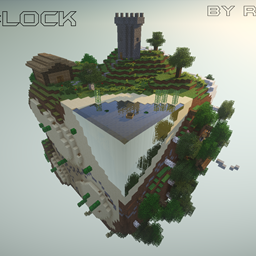
My new Skyblock Survival map, Cube Block, only consits of a minecraft cube. Every side of the block has an own biom and is crossed by caves, dungeons and canyons.
PMC: http://www.planetminecraft.com/project/cube-block---wip----deutschenglish/ Cube Block x3: http://www.planetminecraft.com/project/cube-block-x3/
Awesome Renders
by GoCreative:
by Splekh:
Image Removed: http://www.mediafire.com/convkey/8188/7asdaceha43ict7zg.jpg
Image Removed: http://www.mediafire.com/convkey/7ef3/vcdda5euowr9g8pzg.jpg
Star Cube coordinates spoiler
X = 18* Y = 2*2 Z = 3
Videos
Important - Cube Block Gravity Edition!
To play the Cube Blocks "Gravity Edition", the StarMine / AntiGravity Mod installation is needed. Download:http://popularmmos.com/starminer
Cube Block - Gravity Edition Trailer:
Features:
- 4 different biome
- Caves
- Custom villager shops
- Custom landscape
- Custom mobs
- Empty map
- Hidden chests
- Easter eggs
- Canyons
- Structures
- Dungeon
- Mine shaft
- Custom items
- Nether Cube
- Star Cube
- End Cube
- and more...
Achievements:
- Build a cobblestone generator
- Build an infinite water source
- Find a dungeon
- Build a cornfield
- A trade with the villagers
- Go to the Nether
- Go to the end
- Build a monster trap
- Build a Functioning Redstone circuit
- Find a Diamond
- Find a Smaragt
- Build a Nether portal
- Collect a pearl of Ender
- Farme obsidian
- Find a Nether Fortress
- Get through the Ender fountain
- Holding Farm Animal
- Find lava
- Build a Golem
- Use an anvil
- Use a brew stand
- Find a Disc
- Grab the final egg
- Craft a Cake
- Build a house
- Find a sponge
- Find a "Mystery Scroll"
- Angle a fish
- Find an mine
- Find the Star Cube
- Find an Easter Egg
- Go to all four biomes
- Tame an ocelot
- Tame a Wolf
- Find a Pumpkin
- Find a melon
- Find and kill Herobrine
- Find a way out of the Nether Cube
- Find the secret chest in the end
- Find 3 Dungeons
- All without cheating: b
- Play with a friend: b
- Find a hay bale
- Tame and Ride a Horse
- Trade with 3 different villagers
- Crafte or find a diamond sword
- Collect 10 Smaragte
- Collect 5 Diamonds
- Collect 15 Redstone
- Collect 20 flowers
Cara memasang Cube Block
With Millida Launcher
Install Millida Launcher
The launcher is free: download it at millida.net/launcher and sign in with any nickname.
Click “Install” on this page
The launcher opens and installs the map for Minecraft 1.10–1.14.4 automatically.
Launch the game
A profile with it appears in the launcher: click “Play”.
Manually
Download the map archive
Pick the file Cube Block v.5.4 by XxRexRaptorxX.zip (25 MB).
Unpack it into the saves folder
The world folder (with level.dat inside) must sit directly in .minecraft/saves.
Open the world
“Singleplayer”: the map will be in your world list.
On a server
Replace the world folder
Stop the server and put the map folder in place of world (or set its name in level-name).
Use the “To server” button
On Millida Hosting, the button at the top of the page uploads the file to your server and restarts it for you.
Versi
Dengan dependensi
| Minecraft | Loader | File | Tanggal | Tindakan |
|---|---|---|---|---|
| 1.13.1 | — | Cube Block v.5.424.8 MB 5 |
FAQ
Which Minecraft versions does Cube Block work on?
There are files for 1.10–1.14.4, 17 versions in total. The newest is 1.14.4.
Where can I download Cube Block safely?
On this page: the file Cube Block v.5.4 by XxRexRaptorxX.zip (25 MB) is stored on Millida’s server, with no link shorteners. SHA-1 checksum: 1b943c7217b6d1457fd1734b8201177ffc0b4dc0.
Ulasan
Jadilah yang pertama menilai Cube Block



