

Sapling Tweaks Paket data untuk Minecraft 1.20.1, 1.21.1
Menambahkan kemampuan untuk membuat dan menyilangkan bibit pohon
- dilihat
- 33 dilihat
- Diperbarui
- Diperbarui 03.09.2026
- 1.13 — 26.2
 Paket data
- Klien dan server
Sapling Tweaks Datapack
Elevate your Minecraft arboreal adventures with Sapling Tweaks, a datapack designed to revolutionize your sapling interactions. Bid farewell to waiting for drops – now you can easily enhance your sapling experiences.

Crafts
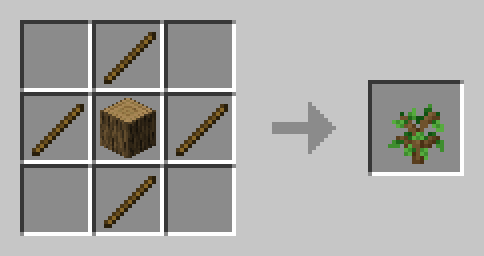
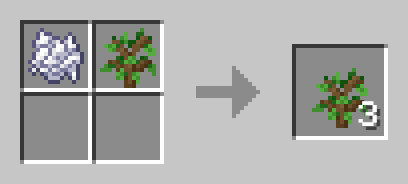
- Works with all saplings
- See gallery for more

How to Use:
- Download the Sapling Tweaks Datapack.
- Place the downloaded file into the "datapacks" folder in your Minecraft world save.
- Dive into the enhanced world of sapling customization!
Transform Your Grove:
Immerse yourself in a world where sapling customization is at your fingertips. Sapling Tweaks empowers you to personalize your tree-filled landscape effortlessly, whether you're a seasoned planter or a casual adventurer. Cultivate, and let your green paradise flourish!

Cara memasang Sapling Tweaks
With Millida Launcher
Install Millida Launcher
The launcher is free: download it at millida.net/launcher and sign in with any nickname.
Click “Install” on this page
The launcher opens and installs the data pack for Minecraft 1.13–26.2 automatically.
Launch the game
A profile with it appears in the launcher: click “Play”.
Manually
Download the archive
Pick the file Sapling Tweaks.zip (20 KB) for your game version.
New world: “Data Packs”
When creating a world, click “Data Packs”, drag the archive into the window, then move it to “Selected”.
Existing world: the datapacks folder
Put the archive into saves/<world>/datapacks and type /reload in game.
On a server
Archive goes into the server world’s datapacks
The world/datapacks folder on the server; players do not need to install anything.
Reload the data
Type /reload in the server console or restart the server.
Use the “To server” button
On Millida Hosting, the button at the top of the page uploads the file to your server and restarts it for you.
Versi
Dengan dependensi
| Minecraft | Loader | File | Tanggal | Tindakan |
|---|---|---|---|---|
| 26.2 | Paket data | 26.220 KB | ||
| 26.1 | Paket data | 26.120 KB | ||
| 1.21.11 | Paket data | 1.21.1120 KB | ||
| 1.21 | Paket data | 1.2119.3 KB | ||
| 1.20.1 | Paket data | 1.20.119.4 KB | ||
| 1.19.2 | Paket data | 1.19.219.4 KB | ||
| 1.17.1 | Paket data | 1.17.119.4 KB | ||
| 1.15.2 | Paket data | 1.15.219.4 KB |
Ulasan
Jadilah yang pertama menilai Sapling Tweaks


