

Minecraft 1.4.6 के लिए UberForest प्लगइन
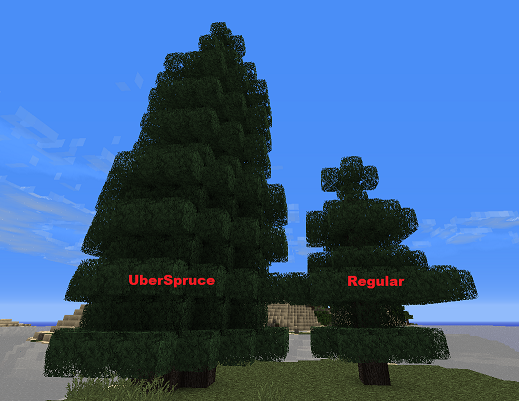
Spruce trees may grow sometimes to be very large!
General
A highly configurable forest plugin. Forests spread naturally at a configurable rate based purely on sapling growth! Spruce and Birch saplings can also grow very large variants similar to oak and jungle trees (and they look good too)! Overcrowding algorithms allow you to configure how dense or sparse forests can grow. You can even configure a world with massive dense forests that players need to work at to keep them from spreading too thick.
Maintenance free reforestation on well used larger Minecraft servers is now a possibility!

Time Lapse Video
See UberForest in action! This was using very agressive growth settings with no overcrowding protection enabled ;) The forest at ground level was so thick you'd need shears to get anywhere in it! UberForest time-lapse video
YouTube Reviews
- ServerMiner gives a concise and to the point summary of UberForest ServerMiner Review
- Andrew and James from UltiByte review UberForest! Utilitbyte Review
- The Russians review UberForest (I think?) Uncraftables Review
Uber Trees
- Spruce Trees up to 24 blocks tall
- Birch Trees up to 16 blocks tall
- Checks if the conditions are good for growing an Uber tree (similar to the normal Minecraft tree checking algorithm)
- Trees will not destroy any non-nature blocks
- Trees requiring a larger base will sometimes create "roots" one block down if needed
- No user interaction required! Works with or without bonemeal!
- Users can still farm trees! Torches placed within 2 blocks of a sapling will prevent it from growing Uber, yet still allow it to grow normally :)
Forest Growth
- Forests plant themselves, once a sapling grows into a tree, a new sapling (configurable) of that tree type is placed nearby on an appropriate tile.
- No user interaction required! Works with or without bonemeal!
- Players can easily manage UberForest growth by smacking away any saplings. No saplings = no spreading as the saplings only spawn when other saplings grow :)
- Adjust the rate of growth in specific biomes. Keep your plains plain!
- Overcrowding protection allows forests to grow "spaced" out or jam packed with trees and saplings. It's up to you! See the detailed configuration section for more details: here
- Use combinations of fence, cobble, smooth brick, torches, glowstone, crops and logs to stop spreading. These blocks will also work when placed 1 under the surface. Saplings will not spawn within whatever distance overcrowding radius is for these blocks. Complete List
Detailed Configuration Notes
You can view more detailed information on config.yml settings here.
Tips
- If you are running as separate tree chopping plugin you may want to test if the uber trees chop properly in it. If not then you can just disable the uber trees in the config and just leave sapling spreading enabled :)
- Remember ForestSpreadSaplings and UberForestSpreadSaplings are additive!
- Regenerate your config if you're upgrading from prior to 1.0 to see all the options available.
Future Improvements
- Implement a better way of players managing growth near their land.
- Mycelium/UberMushroom Growth!
- Sharks with Lasers (one day!)
UberForest कैसे इंस्टॉल करें
A server on Paper or Spigot
The plugin runs on the server core for Minecraft 1.4.6; players do not need to install anything.
File goes into the plugins folder
Download the file UberForest.jar (36 KB) and put it into the server’s plugins folder.
Restart the server
On startup the plugin creates its own settings folder in plugins.
Use the “To server” button
On Millida Hosting, the button at the top of the page uploads the file to your server and restarts it for you.
Minecraft 1.4.6 runs on Java 8: with a different Java version the game may close right after launch.
वर्ज़न
डिपेंडेंसी के साथ
| Minecraft | लोडर | फ़ाइल | तारीख़ | क्रियाएँ |
|---|---|---|---|---|
| 1.4.6 | — | UberForest 2.2.136.2 KB | ||
| — | — | UberForest 1.0.430 KB | ||
| — | — | UberForest 0.1.020 KB |
FAQ
Which Minecraft versions does UberForest work on?
Only Minecraft 1.4.6: there are no files for other versions.
Do players need to install UberForest?
No, the plugin goes only on the server, into the plugins folder: players do not need to download anything.
Which Java does UberForest need?
Minecraft 1.4.6 runs on Java 8. If the game closes right after launch, the usual cause is the wrong Java version in the profile settings.
Where can I download UberForest safely?
On this page: the file UberForest.jar (36 KB) is stored on Millida’s server, with no link shorteners. SHA-1 checksum: 6e3ddc346063721b81480bcf09f34aeb6f9a1022.
रिव्यू
UberForest को सबसे पहले रेट करें


