
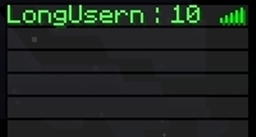
TabHealth - Shows the health in the playerlist
Quote:
TabHealth doesn't need to be updated with every release of Bukkit. It still works 100%.
Overview
If you are pressing TAB you will see the players health there. 3 different colors.
Install
- Download the Plugin
- Copy it to your /plugins/ directory
- Start your Server and press TAB. That's it.
Default Config
- Colors = true (Enables (true) or disables (false) the colors in the list)
How to use
- Just press TAB to open the playerlist. You'll see everyone's health.
- If the playername + the health is longer than 16 characters, it will be shortened.
Little FAQ
Q: Where can i find help? A: Just open a Ticket. Don't post errors in comments. And please leave informations about the error or what's happening.
Changelog
v1.1
- Added config file and the entry "Colors" which toggles the colors on/off
v1.0
- Releasing the Plugin
TabHealth कैसे इंस्टॉल करें
A server on Paper or Spigot
The plugin runs on the server core for Minecraft 1.2.5; players do not need to install anything.
File goes into the plugins folder
Download the file TabHealth.jar (3 KB) and put it into the server’s plugins folder.
Restart the server
On startup the plugin creates its own settings folder in plugins.
Use the “To server” button
On Millida Hosting, the button at the top of the page uploads the file to your server and restarts it for you.
Minecraft 1.2.5 runs on Java 8: with a different Java version the game may close right after launch.
वर्ज़न
डिपेंडेंसी के साथ
| Minecraft | लोडर | फ़ाइल | तारीख़ | क्रियाएँ |
|---|---|---|---|---|
| 1.2.5 | — | v1.13 KB |
FAQ
Which Minecraft versions does TabHealth work on?
Only Minecraft 1.2.5: there are no files for other versions.
Which Java does TabHealth need?
Minecraft 1.2.5 runs on Java 8. If the game closes right after launch, the usual cause is the wrong Java version in the profile settings.
Where can I download TabHealth safely?
On this page: the file TabHealth.jar (3 KB) is stored on Millida’s server, with no link shorteners. SHA-1 checksum: a7d5b34d723bb294095e84e2125eb5f5703fffa8.
रिव्यू
TabHealth को सबसे पहले रेट करें


