
Minecraft के लिए SpoutClock प्लगइन
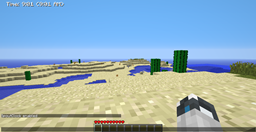
SpoutClock - समय प्रदर्शित करने वाला Plugin
SpoutClock प्लगिन के बारे में
SpoutClock - The Time Display Plugin: Version: v1.0.0 Author: Waterpicker Description: Displays the in-world time in real-time
Features:
- It displays the in-world time in realtime
- Depends on Spout and lib24time
- toggle for time display /spoutclock
- Has three time displays(AM/PM, 24 hours, Time of day)
- Permission node for it "spoutclock.enable"
Todo:
- Move the clock to the other side of the screen.
- Color change ability
Source Code - not available yet.
Changelog:
-Version 1.0.0
- SpoutClock is released -Version 1.5
- implemented lib25time
- added configuration file
- fixed toggle log off issue
- added three options for time display..
-Version 1.5_1
- fixed bug caused by a change in how bukkit makes configuration files
-Version 1.7
- added the ability to make display only available while holding a clock
SpoutClock कैसे इंस्टॉल करें
A server on Paper or Spigot
The plugin runs on the server core; players do not need to install anything.
File goes into the plugins folder
Download the file SpoutClock.jar (9 KB) and put it into the server’s plugins folder.
Restart the server
On startup the plugin creates its own settings folder in plugins.
Use the “To server” button
On Millida Hosting, the button at the top of the page uploads the file to your server and restarts it for you.
वर्ज़न
डिपेंडेंसी के साथ
| Minecraft | लोडर | फ़ाइल | तारीख़ | क्रियाएँ |
|---|---|---|---|---|
| — | — | v 1.78.7 KB |
FAQ
Do players need to install SpoutClock?
No, the plugin goes only on the server, into the plugins folder: players do not need to download anything.
Where can I download SpoutClock safely?
On this page: the file SpoutClock.jar (9 KB) is stored on Millida’s server, with no link shorteners. SHA-1 checksum: 84fad5eb10ce7eb4c47f8461de106c3ed1b5974f.
रिव्यू
SpoutClock को सबसे पहले रेट करें



