
Particle Trail
- Welcome to the particle trail plugin from TheCedi. It's an amazing plugin for you, following each step you make. After a while the trail disappears.
- The particle trail is a following particle effect and is spawning every tick.
- The plugin includes 15 unique effects
- Its also working with Arrows
Commands
- /trail
- permission: 'trail.menu'
- description: open a particle trail menu
- /trailreload
- permission: 'trail.reload'
- description: reload the particle trail config
Menu
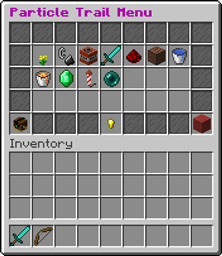
- click on one Item/Block and you get the trail
- click the red wool to select no trail particle
Permissions
- 'trail.*' all particle trail permissions
- you need the permission: 'trail.reload' to reload the particle trail config
- you need the permission: 'trail.*' to select the random particle trail
- you need the permission: 'trail.menu' to open the trail menu
- you need the permission : 'trail.crit' to select the particle trail 'crit'
- you need the permission : 'trail.dust' to select the particle trail 'dust'
- you need the permission : 'trail.explosion' to select the particle trail 'explosion'
- you need the permission : ''trail.flames' to select the particle trail 'flames'
- you need the permission : ''trail.heart' to select the particle trail 'heart'
- you need the permission : 'trail.lava' to select the particle trail 'lava'
- you need the permission : 'trail.note' to select the particle trail '
- you need the permission : 'trail.water' to select the particle trail 'water'
- you need the permission : 'trail.emerald' to select the particle trail 'emerald'
- you need the permission : 'trail.firework' to select the particle trail 'Firework'
- you need the permission : 'trail.portal' to select the particle trail 'Portal'
- you need the permission : 'trail.colorspell' to select the particle trail 'colorspell'
- you need the permission : 'trail.magicspell' to select the particle trail 'magicspell'
- you need the permission : 'trail.colordust' to select the particle trail 'colordust'
- you need the permission : 'trail.magiccrit' to select the particle trail 'magiccrit'
Config
- [%permisson%] is the permisson name
- [%player%] is the player name
- [%particle%] is the particle name
- You can write with Colors if you use the & symbol.
Support
- If you want to support me please write in the comments:
- What do you want to see in the next update?
- Or bugs that you found
Particle Trail कैसे इंस्टॉल करें
A server on Paper or Spigot
The plugin runs on the server core for Minecraft 1.10; players do not need to install anything.
File goes into the plugins folder
Download the file particle_trail_3.9.jar (21 KB) and put it into the server’s plugins folder.
Restart the server
On startup the plugin creates its own settings folder in plugins.
Use the “To server” button
On Millida Hosting, the button at the top of the page uploads the file to your server and restarts it for you.
Minecraft 1.10 runs on Java 8: with a different Java version the game may close right after launch.
वर्ज़न
डिपेंडेंसी के साथ
| Minecraft | लोडर | फ़ाइल | तारीख़ | क्रियाएँ |
|---|---|---|---|---|
| 1.10 | — | Particle Trail 3.921.3 KB |
रिव्यू
Particle Trail को सबसे पहले रेट करें
कमेंट 0
टिप्पणी करने के लिए साइन इन करेंसाइन इन करें


