

Minecraft के लिए Admin Channel प्लगइन
एक सरल, उपयोग में आसान चैट प्लगइन जो स्टाफ को उनके सर्वर की निगरानी में मदद करता है!
Simple, Customisable , Convenient
Description
AdminChannel creates a separate administration channel within the server. Allowing server staff to communicate with other staff; in an easy to see the channel. Removing the hassle of privately message other staff; which no other staff can see. Removing the hassle of getting them all on Teamspeak, Skype, etc.
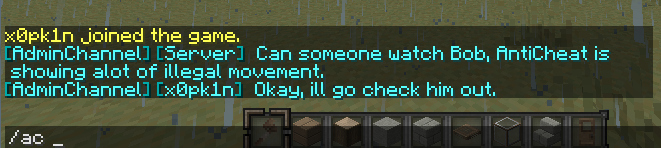
Installation
Simply drag and drop into your plugins folder and you're good to go!

Commands
To broadcast this single message to the channel This can be used from the console. /ac <message> Toggles if your normal chat broadcasts in the channel instead of global chat: /actoggle
Permissions
We use Vault for handling permissions. [ http://dev.bukkit.org/bukkit-plugins/vault/ ] If Vault is not found, we use OP as default.
To send messages to the channel. AdminChannel.Send To recieve/view messages from the channel. AdminChannel.Recieve Gives you every permission. [Only attended for Administrators.]. AdminChannel.Admin
Configuration Explanation
Check her for a detailed config.yml description http://dev.bukkit.org/bukkit-mods/adminchatboxxy/pages/configuration-explanation/ The minecraft colour codes http://www.minecraftwiki.net/wiki/Formatting_codes
To Add
- Allow non PermissionsEx support.
- Add other permission plugin support.
- Add /actoggle.
- Add help channel.
- Add Admin offices.
- Add Vault support.
- Add more chat customisation.
- Add Chat Manager support.
- Streamline code.
Change Log
- [1.83] Improved logging.
- [1.83 Removed McStats.
- [1.83 Updated update library.
- [1.80] Logging of chat is now possible through the console and to a .txt file.
- [1.71] Minor bug fixes.
- [1.70] Fixed Linux config.yml bug.
- [1.70] Other bug fixes.
- [1.41] Possible blank config.yml bug fix.
- [1.41] Imporant exploit fix!
- [1.40] Made config.yml more easy to understand.
- [1.40] Added Vault support for permissions.
- [1.40] Made Vault dependent.
- [1.40] More chat like format to the channel.
- [1.40] Added prefix and suffix support from chat managers hooked into Vault.
- [1.31] Made the config.yml more understandable.
- [1.31] Tidied up the code.
- [1.31] Added some security measures.
- [1.31] Added more configuration, so you can make it your own!
- [1.23] Added colour and prefix configuration support.
- [1.23] Added GroupManager support.
- [1.23] Added bPermission support.
- [1.11] Added /actoggle.
- [1.11] Added in update checker,. Logs to the console if there is an update.
- [1.11] Added in MCStats.
- [1.02] Not having Pex doesn't cause an error anymore.
- [1.02] If Pex isn't found then the plugin goes OP only.
Known Issues
Reporting An Issue
When reporting an issue through the ticketing system please include:
- Java version
- Bukkit version
- Other plugings running
- Error log
Notices
- When UPDATING to a newer version, PLEASE delete the config.txt! Otherwise errors will occur!
- We use Mcstats, to opt out; see the 'PluginMetrics' folder inside your plugins folder.
- We have an automatic update check, it can be turned of easily within the config.
- This plugin is complied in Java 7, I personally will not be supporting Java 1.6. Without a reason to do so.
Admin Channel कैसे इंस्टॉल करें
A server on Paper or Spigot
The plugin runs on the server core; players do not need to install anything.
File goes into the plugins folder
Download the file AdminChannel.jar (22 KB) and put it into the server’s plugins folder.
Restart the server
On startup the plugin creates its own settings folder in plugins.
Use the “To server” button
On Millida Hosting, the button at the top of the page uploads the file to your server and restarts it for you.
वर्ज़न
डिपेंडेंसी के साथ
| Minecraft | लोडर | फ़ाइल | तारीख़ | क्रियाएँ |
|---|---|---|---|---|
| — | — | AdminChannel v1.8322 KB |
FAQ
Where can I download Admin Channel safely?
On this page: the file AdminChannel.jar (22 KB) is stored on Millida’s server, with no link shorteners. SHA-1 checksum: 737e8f377d6d2846c449344b414b6ef367675095.
रिव्यू
Admin Channel को सबसे पहले रेट करें


